> ## Documentation Index
> Fetch the complete documentation index at: https://docs.openreward.ai/llms.txt
> Use this file to discover all available pages before exploring further.
# Where Environment Data Lives
> Understanding the difference between server-side data and sandbox-mounted data
## Overview
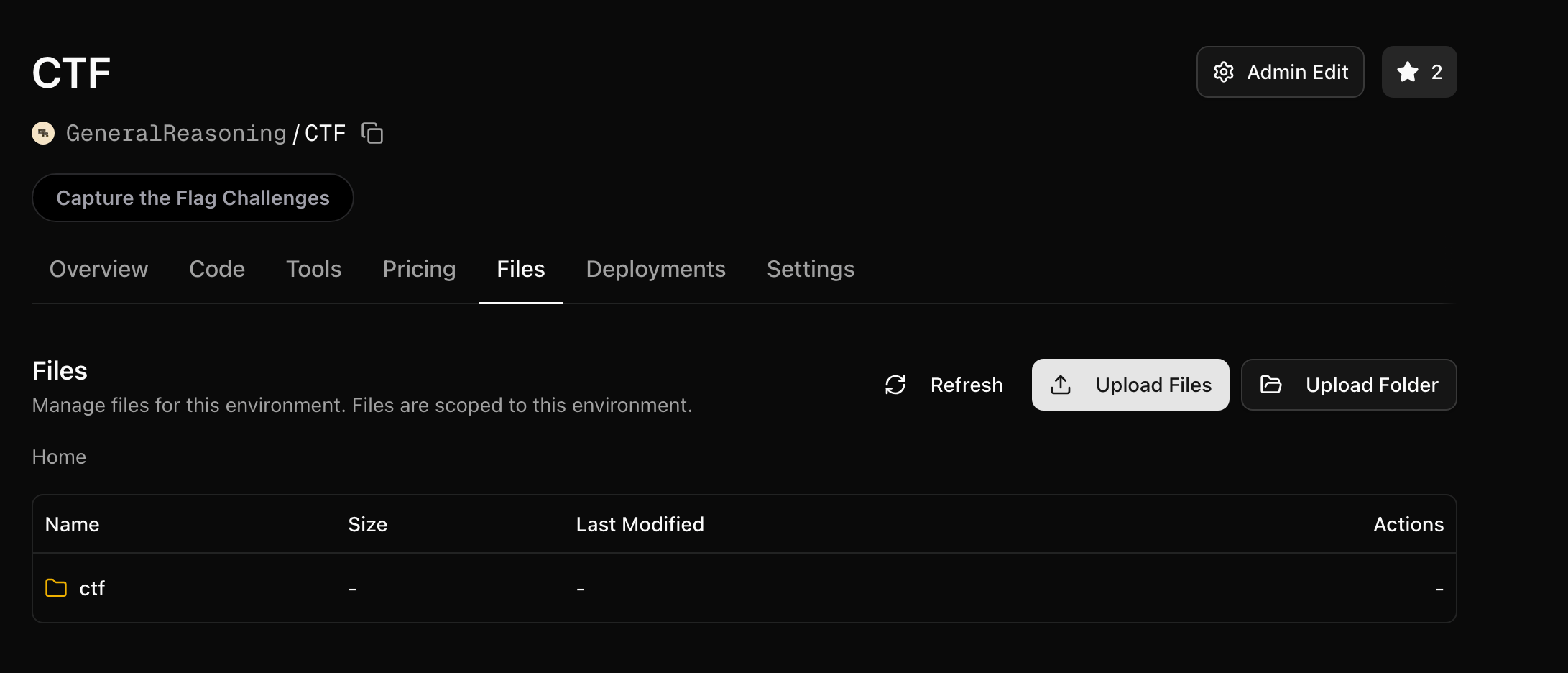
You can upload files to any environment via the **Files** tab in the web UI, or using the [`orwd` CLI](/environments/using-the-cli#uploading-files):
 ```bash theme={null}
# Upload from the command line
orwd upload my-org/my-env ./data/
```
These files are stored at `/orwd_data/` on the environment server. Your environment server code always has full access to everything in `/orwd_data/`.
Sandboxes, on the other hand, **only see what you explicitly mount**. This separation is critical: it lets your server hold ground truth data (answers, test cases, rubrics) that the agent in the sandbox never sees.
## Two Purposes for Your Files
Your uploaded files serve two distinct roles:
| | Environment Server | Sandbox (Agent) |
| ------------ | ------------------------------------------------ | ---------------------------------------------- |
| **Access** | Full access to all of `/orwd_data/` | Only sees what you mount via `bucket_config` |
| **Purpose** | Ground truth, answers, test data, rubrics | Input data the agent needs to work with |
| **Examples** | `answers.json`, `test_cases.csv`, `rubrics.json` | `transactions.csv`, `input.txt`, `dataset.csv` |
## Server-Side Data
The environment server always has access to everything in `/orwd_data/`. This is where you store data that only your server should see — ground truth answers, expected outputs, rubrics, and evaluation data.
```python theme={null}
import json
from pathlib import Path
# The server reads ground truth directly from /orwd_data/
with open("/orwd_data/answers.json") as f:
answers = json.load(f)
# Use ground truth in your reward function
def compute_reward(self, agent_answer: str) -> float:
expected = answers[self.task_id]
return 1.0 if agent_answer == expected else 0.0
```
The agent never has access to these files — they exist only on the server.
### Local vs Production Paths
`/orwd_data/` only exists when your environment is deployed to OpenReward. When developing locally, your files live alongside your code. Use a simple check to handle both cases:
```python theme={null}
import os
from pathlib import Path
if os.path.exists("/orwd_data"):
DATA_PATH = Path("/orwd_data")
else:
DATA_PATH = Path(__file__).parent # local development — files next to your code
# Now use DATA_PATH everywhere
with open(DATA_PATH / "answers.json") as f:
answers = json.load(f)
```
This way you can test locally with the same data files in your project directory, and everything switches to `/orwd_data/` automatically when deployed.
## Sandbox Data
To give the agent access to files, you mount a directory from `/orwd_data/` into the sandbox using `SandboxBucketConfig`. The key parameter is `only_dir`, which restricts the mount to a specific subdirectory.
```python theme={null}
from openreward import SandboxSettings, SandboxBucketConfig
self.sandbox_settings = SandboxSettings(
environment="YourUsername/MyEnv",
image="python:3.11-slim",
machine_size="0.5:1",
bucket_config=SandboxBucketConfig(
mount_path="/workspace", # Where files appear in the sandbox
read_only=True, # Agent can't modify the files
only_dir="agent", # Mount ONLY the agent/ subdirectory
)
)
```
With this configuration, the sandbox at `/workspace` will contain only the files from `/orwd_data/agent/` — nothing else.
## Organising Your Files
If you mount the entire bucket without using `only_dir`, the agent can see **all** of your files — including ground truth answers, test cases, and rubrics. Try to avoid this!
Structure your uploaded files with separate directories for server data and agent data:
```
/orwd_data/
├── ground_truth/ ← Server only (never mounted)
│ ├── answers.json
│ ├── rubrics.json
│ └── test_cases.csv
└── agent/ ← Mounted to sandbox
├── transactions.csv
└── instructions.txt
```
Then mount only the `agent/` directory:
```python theme={null}
bucket_config=SandboxBucketConfig(
mount_path="/workspace",
read_only=True,
only_dir="agent", # Only this subdirectory is visible to the agent
)
```
Use `only_dir` to mount a specific subdirectory rather than the entire bucket. This ensures a clear boundary between what the server knows and what the agent sees.
## Full Example
Here is a complete environment that keeps ground truth on the server and mounts only input data to the sandbox:
**File structure in `/orwd_data/`:**
```
/orwd_data/
├── answers.json ← ground truth (server only)
└── agent/ ← mounted to sandbox
└── transactions.csv
```
**Environment code:**
```python theme={null}
import json
import os
from typing import List
from pathlib import Path
from openreward import AsyncOpenReward, SandboxBucketConfig, SandboxSettings
from openreward.environments import Environment, JSONObject, TextBlock, ToolOutput, tool
from pydantic import BaseModel
# Production vs local data path
if os.path.exists("/orwd_data"):
DATA_PATH = Path("/orwd_data")
else:
DATA_PATH = Path(__file__).parent
class BashParams(BaseModel, extra="forbid"):
command: str
class SubmitAnswerParams(BaseModel, extra="forbid"):
answer: str
class MyEnvironment(Environment):
def __init__(self, task_spec: JSONObject, secrets: dict[str, str] = {}) -> None:
super().__init__(task_spec, secrets=secrets)
# Server reads ground truth — agent never sees this
with open(DATA_PATH / "answers.json") as f:
all_answers = json.load(f)
self.expected_answer = all_answers[self.task_id]
# Sandbox mounts ONLY the agent/ directory
self.sandbox_settings = SandboxSettings(
environment="YourUsername/MyEnv",
image="python:3.11-slim",
machine_size="0.5:1",
bucket_config=SandboxBucketConfig(
mount_path="/workspace",
read_only=True,
only_dir="agent", # Only agent/ is visible
),
)
or_client = AsyncOpenReward(api_key=secrets.get("api_key", ""))
self.sandbox = or_client.sandbox(self.sandbox_settings)
async def setup(self) -> None:
await self.sandbox.start()
async def get_prompt(self) -> List[TextBlock]:
return [TextBlock(
text=f"Task {self.task_id}: Analyze the data in /workspace and submit your answer."
)]
@tool
async def bash(self, params: BashParams) -> ToolOutput:
"""Run a bash command in the sandbox"""
output, exit_code = await self.sandbox.run(params.command)
return ToolOutput(blocks=[TextBlock(text=output)])
@tool
async def submit_answer(self, params: SubmitAnswerParams) -> ToolOutput:
"""Submit your final answer"""
is_correct = params.answer.strip() == str(self.expected_answer).strip()
return ToolOutput(
blocks=[TextBlock(text="Correct!" if is_correct else "Incorrect.")],
reward=1.0 if is_correct else 0.0,
finished=True,
)
async def teardown(self) -> None:
await self.sandbox.stop()
```
## Common Mistake: Mounting Everything
**Do not do this** if your bucket contains ground truth data.
```python theme={null}
# DANGEROUS: mounts ALL of /orwd_data/ to the sandbox
bucket_config=SandboxBucketConfig(
mount_path="/workspace",
read_only=True,
# no only_dir — the agent sees everything!
)
```
With this configuration the agent can read your answers, rubrics, and test cases directly. Always use `only_dir` to restrict access to a specific subdirectory.
## Next Steps
Full reference for SandboxBucketConfig parameters
End-to-end tutorial for building an environment with sandboxes
```bash theme={null}
# Upload from the command line
orwd upload my-org/my-env ./data/
```
These files are stored at `/orwd_data/` on the environment server. Your environment server code always has full access to everything in `/orwd_data/`.
Sandboxes, on the other hand, **only see what you explicitly mount**. This separation is critical: it lets your server hold ground truth data (answers, test cases, rubrics) that the agent in the sandbox never sees.
## Two Purposes for Your Files
Your uploaded files serve two distinct roles:
| | Environment Server | Sandbox (Agent) |
| ------------ | ------------------------------------------------ | ---------------------------------------------- |
| **Access** | Full access to all of `/orwd_data/` | Only sees what you mount via `bucket_config` |
| **Purpose** | Ground truth, answers, test data, rubrics | Input data the agent needs to work with |
| **Examples** | `answers.json`, `test_cases.csv`, `rubrics.json` | `transactions.csv`, `input.txt`, `dataset.csv` |
## Server-Side Data
The environment server always has access to everything in `/orwd_data/`. This is where you store data that only your server should see — ground truth answers, expected outputs, rubrics, and evaluation data.
```python theme={null}
import json
from pathlib import Path
# The server reads ground truth directly from /orwd_data/
with open("/orwd_data/answers.json") as f:
answers = json.load(f)
# Use ground truth in your reward function
def compute_reward(self, agent_answer: str) -> float:
expected = answers[self.task_id]
return 1.0 if agent_answer == expected else 0.0
```
The agent never has access to these files — they exist only on the server.
### Local vs Production Paths
`/orwd_data/` only exists when your environment is deployed to OpenReward. When developing locally, your files live alongside your code. Use a simple check to handle both cases:
```python theme={null}
import os
from pathlib import Path
if os.path.exists("/orwd_data"):
DATA_PATH = Path("/orwd_data")
else:
DATA_PATH = Path(__file__).parent # local development — files next to your code
# Now use DATA_PATH everywhere
with open(DATA_PATH / "answers.json") as f:
answers = json.load(f)
```
This way you can test locally with the same data files in your project directory, and everything switches to `/orwd_data/` automatically when deployed.
## Sandbox Data
To give the agent access to files, you mount a directory from `/orwd_data/` into the sandbox using `SandboxBucketConfig`. The key parameter is `only_dir`, which restricts the mount to a specific subdirectory.
```python theme={null}
from openreward import SandboxSettings, SandboxBucketConfig
self.sandbox_settings = SandboxSettings(
environment="YourUsername/MyEnv",
image="python:3.11-slim",
machine_size="0.5:1",
bucket_config=SandboxBucketConfig(
mount_path="/workspace", # Where files appear in the sandbox
read_only=True, # Agent can't modify the files
only_dir="agent", # Mount ONLY the agent/ subdirectory
)
)
```
With this configuration, the sandbox at `/workspace` will contain only the files from `/orwd_data/agent/` — nothing else.
## Organising Your Files
If you mount the entire bucket without using `only_dir`, the agent can see **all** of your files — including ground truth answers, test cases, and rubrics. Try to avoid this!
Structure your uploaded files with separate directories for server data and agent data:
```
/orwd_data/
├── ground_truth/ ← Server only (never mounted)
│ ├── answers.json
│ ├── rubrics.json
│ └── test_cases.csv
└── agent/ ← Mounted to sandbox
├── transactions.csv
└── instructions.txt
```
Then mount only the `agent/` directory:
```python theme={null}
bucket_config=SandboxBucketConfig(
mount_path="/workspace",
read_only=True,
only_dir="agent", # Only this subdirectory is visible to the agent
)
```
Use `only_dir` to mount a specific subdirectory rather than the entire bucket. This ensures a clear boundary between what the server knows and what the agent sees.
## Full Example
Here is a complete environment that keeps ground truth on the server and mounts only input data to the sandbox:
**File structure in `/orwd_data/`:**
```
/orwd_data/
├── answers.json ← ground truth (server only)
└── agent/ ← mounted to sandbox
└── transactions.csv
```
**Environment code:**
```python theme={null}
import json
import os
from typing import List
from pathlib import Path
from openreward import AsyncOpenReward, SandboxBucketConfig, SandboxSettings
from openreward.environments import Environment, JSONObject, TextBlock, ToolOutput, tool
from pydantic import BaseModel
# Production vs local data path
if os.path.exists("/orwd_data"):
DATA_PATH = Path("/orwd_data")
else:
DATA_PATH = Path(__file__).parent
class BashParams(BaseModel, extra="forbid"):
command: str
class SubmitAnswerParams(BaseModel, extra="forbid"):
answer: str
class MyEnvironment(Environment):
def __init__(self, task_spec: JSONObject, secrets: dict[str, str] = {}) -> None:
super().__init__(task_spec, secrets=secrets)
# Server reads ground truth — agent never sees this
with open(DATA_PATH / "answers.json") as f:
all_answers = json.load(f)
self.expected_answer = all_answers[self.task_id]
# Sandbox mounts ONLY the agent/ directory
self.sandbox_settings = SandboxSettings(
environment="YourUsername/MyEnv",
image="python:3.11-slim",
machine_size="0.5:1",
bucket_config=SandboxBucketConfig(
mount_path="/workspace",
read_only=True,
only_dir="agent", # Only agent/ is visible
),
)
or_client = AsyncOpenReward(api_key=secrets.get("api_key", ""))
self.sandbox = or_client.sandbox(self.sandbox_settings)
async def setup(self) -> None:
await self.sandbox.start()
async def get_prompt(self) -> List[TextBlock]:
return [TextBlock(
text=f"Task {self.task_id}: Analyze the data in /workspace and submit your answer."
)]
@tool
async def bash(self, params: BashParams) -> ToolOutput:
"""Run a bash command in the sandbox"""
output, exit_code = await self.sandbox.run(params.command)
return ToolOutput(blocks=[TextBlock(text=output)])
@tool
async def submit_answer(self, params: SubmitAnswerParams) -> ToolOutput:
"""Submit your final answer"""
is_correct = params.answer.strip() == str(self.expected_answer).strip()
return ToolOutput(
blocks=[TextBlock(text="Correct!" if is_correct else "Incorrect.")],
reward=1.0 if is_correct else 0.0,
finished=True,
)
async def teardown(self) -> None:
await self.sandbox.stop()
```
## Common Mistake: Mounting Everything
**Do not do this** if your bucket contains ground truth data.
```python theme={null}
# DANGEROUS: mounts ALL of /orwd_data/ to the sandbox
bucket_config=SandboxBucketConfig(
mount_path="/workspace",
read_only=True,
# no only_dir — the agent sees everything!
)
```
With this configuration the agent can read your answers, rubrics, and test cases directly. Always use `only_dir` to restrict access to a specific subdirectory.
## Next Steps
Full reference for SandboxBucketConfig parameters
End-to-end tutorial for building an environment with sandboxes