> ## Documentation Index
> Fetch the complete documentation index at: https://docs.openreward.ai/llms.txt
> Use this file to discover all available pages before exploring further.
# Your First Environment
> Make and deploy your first ORS environment
## Goals
* Make a mathematics environment using the OpenReward library.
* Deploy the environment to OpenReward.
* Sample from the environment using a model of your choice.
## Prerequisites
* An OpenReward [account](https://openreward.ai/)
* An OpenReward [API key](https://openreward.ai/keys)
* An API key and SDK for your model provider of choice (e.g. OpenAI, Anthropic, Google, OpenRouter)
## Setup
Environments in OpenReward are written using [ORS](https://openrewardstandard.io).
ORS is implemented in the [OpenReward Python library](https://www.github.com/OpenReward/openreward-python), and we will use it for this tutorial.
You can install the library using pip or uv:
```bash theme={null}
pip install openreward
```
## Background: GSM8K
[GSM8K](https://arxiv.org/abs/2110.14168) is a classic language model dataset for math word problems released by OpenAI in 2021. Problems are at the grade school
level and answers are integers. An example problem and answer from this dataset is shown below:
> Dean's mother gave him \$28 to go to the toy store. Dean bought 6 toy cars and 5 teddy bears. Each toy car cost \$2 and each teddy bear cost \$1. His mother then feels generous and decides to give him an extra \$10. How much money does Dean have left?
> **Answer**: 21
We will learn how to build an ORS environment server for GSM8K in this tutorial.
## Understanding ORS servers
To begin we'll initialise our GSM8K project with a `basic` template and investigate how ORS servers work.
Initialise a project using the OpenReward cli:
```bash theme={null}
orwd init gsm8k --template basic
cd gsm8k && ls
```
The template contains `server.py`, `Dockerfile`, `requirements.txt` and `README.md` with a template [environment card](/environments/environment-cards).
If you look inside `server.py`, you can see a `BasicEnvironment` is defined.
To run this ORS server, install the requirements and run `server.py`:
```bash theme={null}
pip install -r requirements.txt
python server.py
```
```txt theme={null}
INFO: Started server process [92466]
INFO: Waiting for application startup.
INFO: Application startup complete.
INFO: Uvicorn running on http://0.0.0.0:8080 (Press CTRL+C to quit)
```
This environment is now running on port `8080`. We will leave this running.
Now let's see how we can interact with the `BasicEnvironment`. In a different terminal, write the following file to `test_environment.py`:
```python theme={null}
from openreward import OpenReward
or_client = OpenReward()
environment = or_client.environments.get(name="basicenvironment", base_url="http://localhost:8080")
```
Because the environment class is named `BasicEnvironment`, we will pass in the name `basicenvironment`. We've
also passed in localhost `base_url` since we are running locally.
This is the same API that we use to get production environments on OpenReward. The difference is that we have not passed in a namespace (e.g. `OpenAI/SimpleQA`) and we are pointing to a local `base_url`.
Now let's test interacting with this ORS server.
Environments have splits, which are lists of tasks for different purposes such as training and evaluation. Each split is represented as a `Split` object with a `name` and a `type`. The `type` can be one of `"train"`, `"validation"`, or `"test"`, and is used to help index your environment on OpenReward so users can see whether they should use your environment for training, validation, or testing.
To see the available splits on the `test_environment.py`, add the following to `test_environment.py` and run:
```python theme={null}
print(environment.list_splits())
```
```bash theme={null}
python test_environments.py
```
```
['train', 'test']
```
So there are two splits available in this environment.
Next, let's view the tasks that are available for the `train` split.
```python theme={null}
print(environment.list_tasks("train"))
```
```bash theme={null}
python test_environments.py
```
```
[Task(server_name='basicenvironment', environment_name='basicenvironment', task_spec={'id': 'train-0', 'problem': 'What is 2+2?', 'solution': 4}, namespace=None)]
```
We can see that there is a single task. Here the `Task` object specifies the task specification, which is one of the primitives of [ORS](https://openrewardstandard.io).
You can also fetch a subset of tasks by index using `get_task_range`, which follows Python range conventions (inclusive start, exclusive stop, with support for negative indices). Task ordering is guaranteed to be consistent across calls:
```python theme={null}
# Get the first 10 tasks
tasks = environment.get_task_range("train", start=0, stop=10)
# Get the last 5 tasks
tasks = environment.get_task_range("train", start=-5)
```
Next, let us see the available tools in the environment. In ORS, actions are tools, and executing tools is the only way to interact with the environment.
```python theme={null}
print(environment.list_tools())
```
```bash theme={null}
python test_environments.py
```
```
[ToolSpec(name='answer', description='The answer tool can be used to submit your final answer. Note that this finishes the episode.', input_schema={'description': 'Each tool takes in arguments, and these are specified using types.\n\nExamples:\n- An answer tool might have an answer argument\n- A bash tool might have a command argument ', 'properties': {'answer': {'title': 'Answer', 'type': 'string'}}, 'required': ['answer'], 'title': 'AnswerParams', 'type': 'object'})]
```
There is a single tool called `answer`. Note this tool specification is the same as a tool specification in MCP, allowing compatibility with existing model function calling capabilities.
Now let's test calling the `answer` tool. Write the following script `test_tool.py`:
```python theme={null}
environment = or_client.environments.get(name="basicenvironment", base_url="http://localhost:8080")
tasks = environment.list_tasks(split="train")
example_task = tasks[0]
with environment.session(task=example_task) as session:
prompt = session.get_prompt()
tool_result = session.call_tool("answer", {"answer": "4"})
print(prompt)
print(tool_result)
```
```python theme={null}
[TextBlock(text='What is 2+2?', detail=None, type='text')]
ToolOutput(blocks=[TextBlock(text='Correct!', detail=None, type='text')], metadata=None, reward=1.0, finished=True)
```
As we can see, `prompt` contains a `TextBlock` with the prompt text for this task.
After calling the tool on the session with `call_tool` - with the tool name `answer` and tool arguments `{"answer": "4"}` - we obtain a `ToolOutput`.
The `ToolOutput` also contains a list of blocks, in this case a TextBlock showing us some text for the agent (`Correct!`). We also obtain a `reward` of `1.0`, as well as an `finished` state of `True`, denoting that the episode has finished.
This shows us the basics of how we can interface with an ORS environment server. In the next section we will build a GSM8K environment.
## Building the GSM8K environment
First we'll download the two `parquet` files from the GSM8K [HuggingFace repository](https://huggingface.co/datasets/openai/gsm8k/tree/main/main) and put them in the root of our project:
```
test-00000-of-00001.parquet
train-00000-of-00001.parquet
```
A single row of data from the train set looks as follows:
```
{'question': 'Natalia sold clips to 48 of her friends in April, and then she sold half as many clips in May. How many clips did Natalia sell altogether in April and May?', 'answer': 'Natalia sold 48/2 = <<48/2=24>>24 clips in May.\nNatalia sold 48+24 = <<48+24=72>>72 clips altogether in April and May.\n#### 72', 'id': '0'}
```
Next we'll write a new server file. This will involve:
* Loading the tasks from the `parquet` files
* Verifying the answer is correct - we'll use the [MathVerify](https://github.com/huggingface/Math-Verify) library for this.
```python theme={null}
from math_verify import parse, verify
import pandas as pd
from pydantic import BaseModel
from openreward.environments import Environment, JSONObject, Server, Split, TextBlock, ToolOutput, tool
class GSM8KTaskSpec(BaseModel):
id: str
question: str
answer: str
class AnswerParams(BaseModel):
answer: str
train_tasks = pd.read_parquet("train-00000-of-00001.parquet").to_dict(orient="records")
test_tasks = pd.read_parquet("test-00000-of-00001.parquet").to_dict(orient="records")
for i, task in enumerate(train_tasks):
task['id'] = str(i)
for i, task in enumerate(test_tasks):
task['id'] = str(i)
class GSM8K(Environment):
"""
A GSM8K environment
"""
def __init__(self, task_spec: JSONObject = {}, secrets: dict[str, str] = {}):
super().__init__(task_spec)
self.config = GSM8KTaskSpec.model_validate(task_spec)
@classmethod
def list_tasks(cls, split: str) -> list[JSONObject]:
if split == "train":
return train_tasks
elif split == "test":
return test_tasks
raise ValueError(f"Unknown split: {split}")
@classmethod
def list_splits(cls):
return [Split(name="train", type="train"), Split(name="test", type="test")]
def get_prompt(self) -> str:
return [TextBlock(type="text", text=self.config.question)]
@tool
def answer(self, params: AnswerParams) -> ToolOutput:
"""
The answer tool can be used to submit your final answer. Note that this finishes the episode.
"""
gold = parse(self.config.answer, parsing_timeout=None)
answer = parse(params.answer, parsing_timeout=None)
is_correct = verify(gold, answer, timeout_seconds=None)
if is_correct:
agent_message = "Correct!"
reward = 1.0
else:
agent_message = "Wrong!"
reward = 0.0
return ToolOutput(
blocks=[TextBlock(type="text", text=agent_message)],
reward=reward,
finished=True
)
if __name__ == "__main__":
Server([GSM8K]).run()
```
**Task ordering must be deterministic.** Your `list_tasks` implementation (and any overrides of `get_task` or `get_task_range`) must always return tasks in the same order. Clients rely on stable indexing to fetch tasks by index, partition work across workers, and reproduce results. Avoid non-deterministic data structures like sets or unordered database queries — use ordered lists or sort your data before returning it.
Install the `math-verify` requirement, along with pandas and fastparquet for parsing:
```bash theme={null}
pip install math-verify pandas fastparquet
```
Now we can test this environment. First run the server as before:
```bash theme={null}
python server.py
```
Now choose a model provider of your choice and sample from the environment:
Make sure you have an API key for [OpenAI](https://platform.openai.com/api-keys), and set the environment variable:
```bash theme={null}
export OPENREWARD_API_KEY='your-openreward-api-key-here'
export OPENAI_API_KEY='your-openai-api-key-here'
```
Save this as `sample_agent.py`:
```python theme={null}
from openai import OpenAI
from openreward import OpenReward
import json
or_client = OpenReward()
oai_client = OpenAI()
MODEL_NAME = "gpt-5.4"
environment = or_client.environments.get(name="gsm8k", base_url="http://localhost:8080")
tasks = environment.list_tasks(split="train")
tools = environment.list_tools(format="openai")
example_task = tasks[0]
with environment.session(task=example_task) as session:
prompt = session.get_prompt()
input_list = [{"role": "user", "content": prompt[0].text}]
finished = False
print(input_list)
while not finished:
response = oai_client.responses.create(
model=MODEL_NAME,
tools=tools,
input=input_list
)
print(response.output)
input_list += response.output
for item in response.output:
if item.type == "function_call":
tool_result = session.call_tool(item.name, json.loads(str(item.arguments)))
reward = tool_result.reward
finished = tool_result.finished
input_list.append({
"type": "function_call_output",
"call_id": item.call_id,
"output": tool_result.blocks[0].text
})
print(input_list[-1])
if tool_result.finished:
finished = True
break
```
```bash theme={null}
python sample_agent.py
```
Example output:
```bash theme={null}
[{'role': 'user', 'content': 'Natalia sold clips to 48 of her friends in April, and then she sold half as many clips in May. How many clips did Natalia sell altogether in April and May?'}]
[ResponseReasoningItem(id='rs_000dde94c785f76800693413cbb66c81928b57cca2b5488c2d', summary=[], type='reasoning', content=None, encrypted_content=None, status=None), ResponseOutputMessage(id='msg_000dde94c785f76800693413ce541881928b37ef5a6ec49cf9', content=[ResponseOutputText(annotations=[], text='72', type='output_text', logprobs=[])], role='assistant', status='completed', type='message')]
[ResponseFunctionToolCall(arguments='{"answer":"72"}', call_id='call_Eaw188yiAYpNCgQXduR1x0lR', name='answer', type='function_call', id='fc_000dde94c785f76800693413cf1be08192995f531548dffa4d', status='completed')]
{'type': 'function_call_output', 'call_id': 'call_Eaw188yiAYpNCgQXduR1x0lR', 'output': 'Correct!'}
```
Make sure you have API key for [Anthropic](https://platform.claude.com/settings/keys), and set the environment variable:
```bash theme={null}
export OPENREWARD_API_KEY='your-openreward-api-key-here'
export ANTHROPIC_API_KEY='your-anthropic-api-key-here'
```
Save this as `sample_agent.py`:
```python theme={null}
import anthropic
from openreward import OpenReward
import json
or_client = OpenReward()
ant_client = anthropic.Anthropic()
MODEL_NAME = "claude-sonnet-4-6"
environment = or_client.environments.get(name="gsm8k", base_url="http://localhost:8080")
tasks = environment.list_tasks(split="train")
tools = environment.list_tools(format="anthropic")
example_task = tasks[0]
with environment.session(task=example_task) as session:
prompt = session.get_prompt()
messages = [{"role": "user", "content": prompt[0].text}]
finished = False
print(messages)
while not finished:
message = ant_client.messages.create(
model=MODEL_NAME,
max_tokens=4096,
tools=tools,
messages=messages
)
messages.append({
"role": "assistant",
"content": message.content,
})
print(messages[-1])
if message.stop_reason == "tool_use":
tool_uses = [b for b in message.content if getattr(b, "type", None) == "tool_use"]
if not tool_uses:
raise RuntimeError("stop_reason was tool_use but no tool_use blocks found")
tool_result_blocks = []
finished = False
for tu in tool_uses:
tool_name = tu.name
tool_input = tu.input
try:
tr = session.call_tool(tool_name, tool_input)
# Convert OpenReward blocks -> string safely
text_parts = []
for b in getattr(tr, "blocks", []) or []:
t = getattr(b, "text", None)
if t is not None:
text_parts.append(t)
else:
text_parts.append(str(b))
tool_text = "".join(text_parts)
tool_result_blocks.append({
"type": "tool_result",
"tool_use_id": tu.id,
"content": tool_text,
})
# Track termination if the env says we're done
if getattr(tr, "finished", False):
finished = True
except Exception as e:
tool_result_blocks.append({
"type": "tool_result",
"tool_use_id": tu.id,
"content": f"Tool execution failed: {type(e).__name__}: {e}",
"is_error": True,
})
messages.append({
"role": "user",
"content": tool_result_blocks
})
print(messages[-1])
continue
```
```bash theme={null}
python sample_agent.py
```
Example output:
```bash theme={null}
[{'role': 'user', 'content': 'Natalia sold clips to 48 of her friends in April, and then she sold half as many clips in May. How many clips did Natalia sell altogether in April and May?'}]
Message(id='msg_01DJorrT3UPhnPhdN19ugsyT', content=[TextBlock(citations=None, text='I need to find the total number of clips Natalia sold in April and May.\n\nGiven information:\n- In April, Natalia sold clips to 48 friends\n- In May, she sold half as many clips as in April\n\nLet me calculate:\n- April: 48 clips\n- May: 48 ÷ 2 = 24 clips\n- Total: 48 + 24 = 72 clips', type='text'), ToolUseBlock(id='toolu_01HEJromRn1bMcU8HM5jQZDF', input={'answer': '72'}, name='answer', type='tool_use')], model='claude-sonnet-4-6-20250929', role='assistant', stop_reason='tool_use', stop_sequence=None, type='message', usage=Usage(cache_creation=CacheCreation(ephemeral_1h_input_tokens=0, ephemeral_5m_input_tokens=0), cache_creation_input_tokens=0, cache_read_input_tokens=0, input_tokens=608, output_tokens=151, server_tool_use=None, service_tier='standard'))
{'role': 'user', 'content': [{'type': 'tool_result', 'tool_use_id': 'toolu_01HEJromRn1bMcU8HM5jQZDF', 'content': 'Correct!'}]}
```
Make sure you have an API key for [Gemini](https://aistudio.google.com/app/apikey) and set it as an environment variable:
```bash theme={null}
export OPENREWARD_API_KEY='your-openreward-api-key-here'
export GEMINI_API_KEY='your-gemini-api-key-here'
```
Save this as `sample_agent.py`:
```python theme={null}
from google import genai
from google.genai import types
from openreward import OpenReward
import json
or_client = OpenReward()
gem_client = genai.Client()
MODEL_NAME = "gemini-2.5-flash"
environment = or_client.environments.get(name="gsm8k", base_url="http://localhost:8080")
tasks = environment.list_tasks(split="train")
tools = environment.list_tools(format="google")
genai_tools = [types.Tool(function_declarations=tools)]
genai_config = types.GenerateContentConfig(tools=genai_tools)
example_task = tasks[0]
with environment.session(task=example_task) as session:
prompt = session.get_prompt()
contents = [
types.Content(
role="user", parts=[types.Part(text=prompt[0].text)]
)
]
finished = False
print(contents)
while not finished:
response = gem_client.models.generate_content(
model=MODEL_NAME,
config=genai_config,
contents=contents
)
print(response.candidates[0].content)
contents.append(response.candidates[0].content) # Append the content from the model's response.
for part in response.candidates[0].content.parts:
if part.function_call:
tool_call = part.function_call
tool_result = session.call_tool(tool_call.name, tool_call.args)
reward = tool_result.reward
finished = tool_result.finished
function_response_part = types.Part.from_function_response(
name=tool_call.name,
response={"result": tool_result.blocks[0].text},
)
contents.append(types.Content(role="user", parts=[function_response_part])) # Append the function response
print(contents[-1])
if tool_result.finished:
finished = True
break
```
```bash theme={null}
python sample_agent.py
```
Example output:
```bash theme={null}
[Content(
parts=[
Part(
text='Natalia sold clips to 48 of her friends in April, and then she sold half as many clips in May. How many clips did Natalia sell altogether in April and May?'
),
],
role='user'
)]
parts=[Part(
function_call=FunctionCall(
args={
'answer': 'Natalia sold 72 clips altogether in April and May.'
},
name='answer'
),
thought_signature=b'\n\xe3\x02\x01r\xc8\xda|#w\x85/\x9e\xd1\xe7mK\xc1\xdd\xf6X\xeayY\x12<\x0fQ\x1608\xedKg\x07\xe3tV\xd0\xe3\xaf\xc6=\xc0.x\x15\x85\xeb\xec+\x84\xad\xf0\x02\xb6\xf8\x88iX\x94\xf8\xcb8g\xf9m\x02\xcd`\xb1\x8fm\x1e\x10\x1a\x14]2\x81H\x7f-\xb6E6\xd8\xf3\xa6kUw\xb7\xc3kr\x14...'
)] role='model'
parts=[Part(
function_response=FunctionResponse(
name='answer',
response={
'result': 'Correct!'
}
)
)] role='user'
```
Make sure you have an API key for [OpenRouter](https://openrouter.ai/keys) and set it as an environment variables:
```bash theme={null}
export OPENREWARD_API_KEY='your-openreward-api-key-here'
export OPENROUTER_API_KEY='your-openrouter-api-key-here'
```
Save this as `sample_agent.py`:
```python theme={null}
from openai import OpenAI
from openreward import OpenReward
import json
import os
or_client = OpenReward()
oai_client = OpenAI(
base_url="https://openrouter.ai/api/v1",
api_key=os.environ.get("OPENROUTER_API_KEY")
)
MODEL_NAME = "deepseek/deepseek-v3.2"
environment = or_client.environments.get(name="gsm8k", base_url="http://localhost:8080")
tasks = environment.list_tasks(split="train")
tools = environment.list_tools(format="openrouter")
example_task = tasks[0]
with environment.session(task=example_task) as session:
prompt = session.get_prompt()
input_list = [{"role": "user", "content": prompt[0].text}]
finished = False
print(input_list)
while not finished:
response = oai_client.chat.completions.create(
model=MODEL_NAME,
tools=tools,
messages=input_list
)
input_list.append({
"role": "assistant",
"content": response.choices[0].message.content,
"tool_calls": response.choices[0].message.tool_calls
})
print(input_list[-1])
tool_calls = response.choices[0].message.tool_calls
if not tool_calls:
break
for tool_call in response.choices[0].message.tool_calls:
tool_name = tool_call.function.name
tool_args = json.loads(tool_call.function.arguments)
tool_result = session.call_tool(tool_name, tool_args)
reward = tool_result.reward
finished = tool_result.finished
input_list.append({
"role": "tool",
"tool_call_id": tool_call.id,
"content": json.dumps({
"result": tool_result.blocks[0].text
})
})
print(input_list[-1])
if tool_result.finished:
finished = True
break
```
```bash theme={null}
python sample_agent.py
```
Example output:
```bash theme={null}
[{'role': 'user', 'content': 'Natalia sold clips to 48 of her friends in April, and then she sold half as many clips in May. How many clips did Natalia sell altogether in April and May?'}]
ChatCompletion(id='gen-1765024924-6BK4o9Oiefjb7Fe7J7eW', choices=[Choice(finish_reason='tool_calls', index=0, logprobs=None, message=ChatCompletionMessage(content="Let's break this down step by step.\n\n1. In April: Natalia sold clips to **48 friends**. This means she sold **48 clips** (assuming one clip per friend).\n2. In May: She sold **half as many clips** as in April.\n - Half of 48 is \\( 48 \\div 2 = 24 \\).\n3. Altogether in April and May:\n \\[\n 48 + 24 = 72\n \\]\n\nSo Natalia sold **72 clips** altogether in April and May.\n\n", refusal=None, role='assistant', annotations=None, audio=None, function_call=None, tool_calls=[ChatCompletionMessageFunctionToolCall(id='019af3af119248e0f1cd239559746033', function=Function(arguments='{"answer": "72"}', name='answer'), type='function', index=0)], reasoning=None), native_finish_reason='tool_calls')], created=1765024924, model='deepseek/deepseek-v3.2', object='chat.completion', service_tier=None, system_fingerprint='', usage=CompletionUsage(completion_tokens=153, prompt_tokens=333, total_tokens=486, completion_tokens_details=CompletionTokensDetails(accepted_prediction_tokens=None, audio_tokens=None, reasoning_tokens=0, rejected_prediction_tokens=None, image_tokens=0), prompt_tokens_details=PromptTokensDetails(audio_tokens=0, cached_tokens=0, video_tokens=0), cost=0.00015417, is_byok=False, cost_details={'upstream_inference_cost': None, 'upstream_inference_prompt_cost': 8.991e-05, 'upstream_inference_completions_cost': 6.426e-05}), provider='SiliconFlow')
{'role': 'tool', 'tool_call_id': '019af3af119248e0f1cd239559746033', 'content': 'Correct!'}
```
Nice one! We have a working ORS environment.
Now we'll see how we can host the environment on OpenReward. The benefits of using OpenReward are:
* **Infrastructure**: you do not have to set up infrastructure and compute to host the environment yourself. We take care of this and you are only charged based on your actual usage of the environment.
* **Discovery**: your environment can be discovered and used by other users of the platform, helping drive adoption and attention to your work.
We'll see how to host our environment on OpenReward next.
## Host on OpenReward
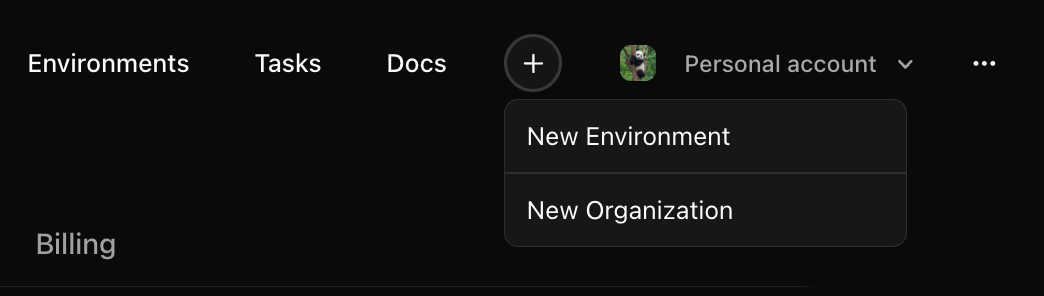
Log into [OpenReward](https://openreward.ai), press the plus icon in the navbar and press **New Environment**:
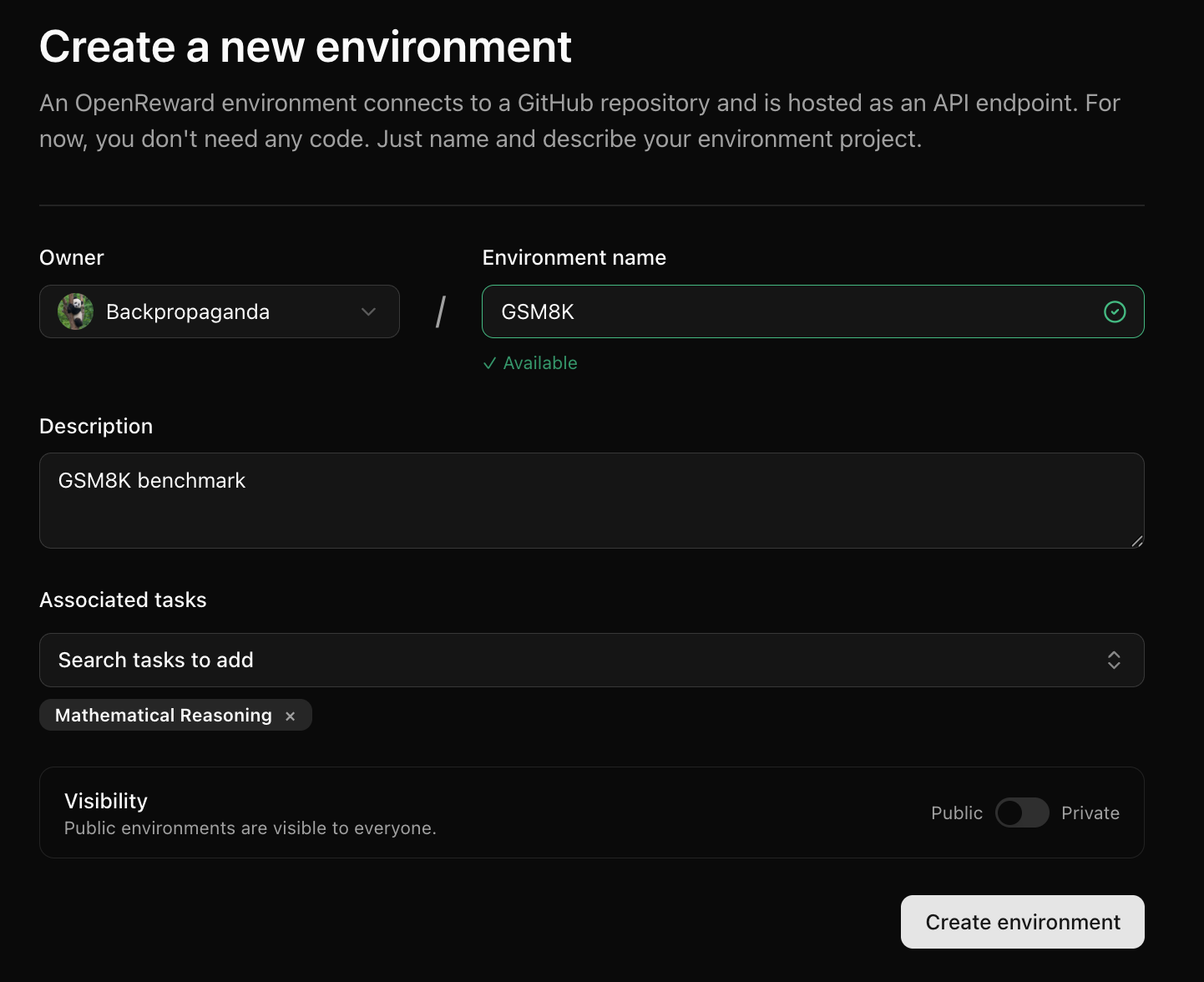
 Next, fill in information about the environment and press **Create Environment**:
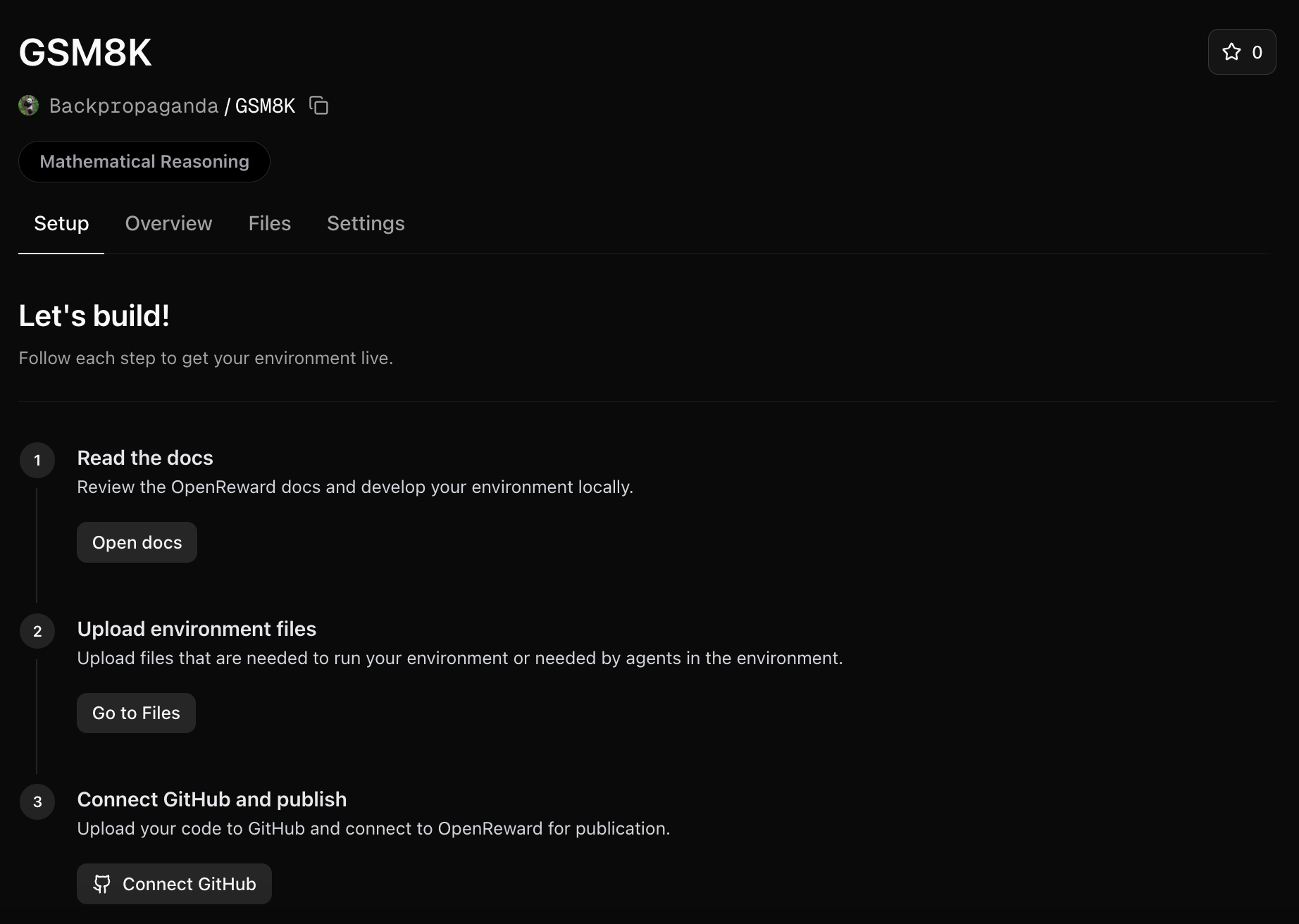
 You will be redirected to your new environment and will see setup instructions:
 ### Upload environment files
We will need a way to use the train and test parquet files in our environment. We'll upload these to the environment files:
Click on the **Files** tab and upload each file:
### Upload environment files
We will need a way to use the train and test parquet files in our environment. We'll upload these to the environment files:
Click on the **Files** tab and upload each file:
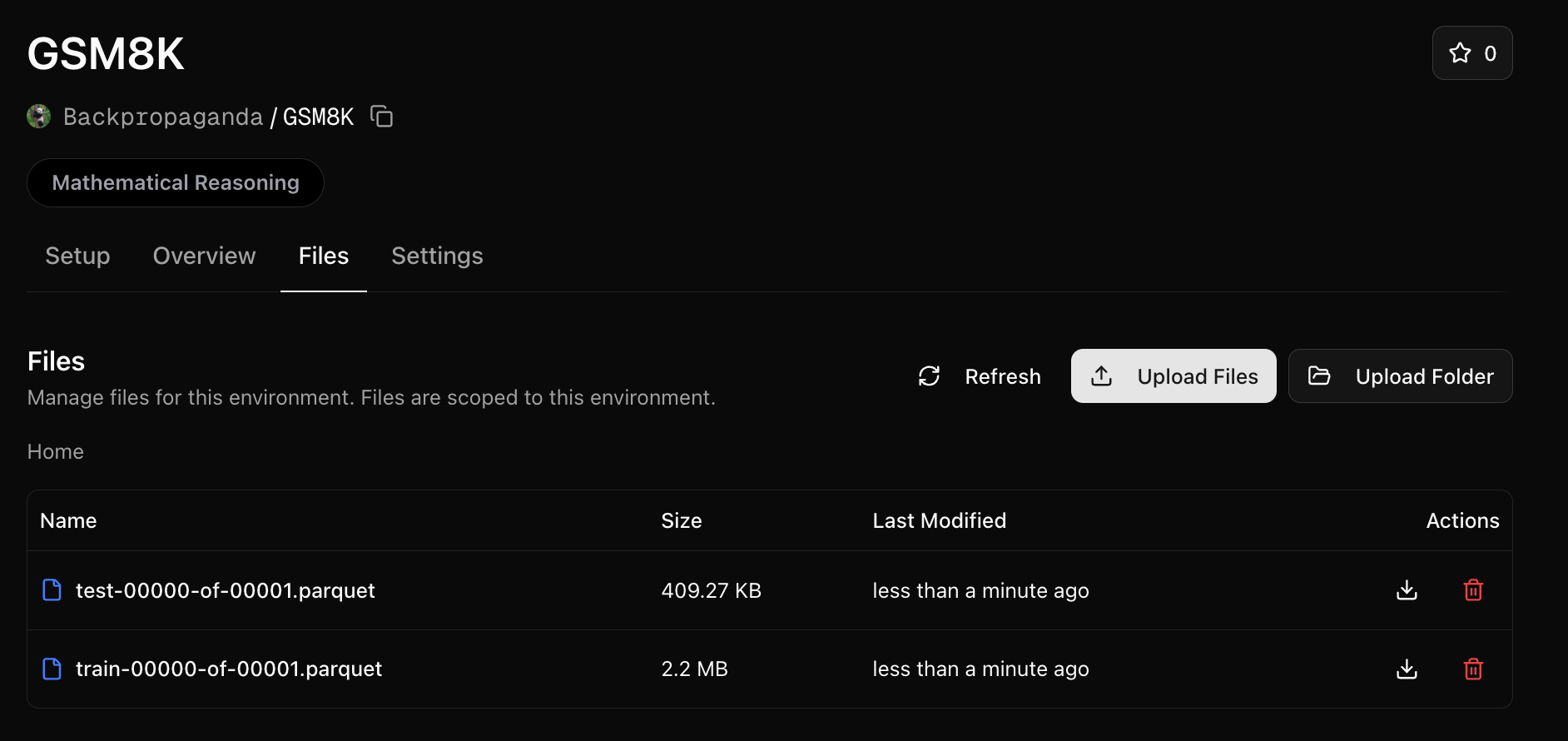 Files are mounted to the environment server at the `/orwd_data` directory.
We'll need to reference this folder in our `server.py`. Make the following change:
```python theme={null}
train_tasks = pd.read_parquet("/orwd_data/train-00000-of-00001.parquet").to_dict(orient="records")
test_tasks = pd.read_parquet("/orwd_data/test-00000-of-00001.parquet").to_dict(orient="records")
```
Note: you may want to set an environment variable instead of hardcoding like above so you can continue to test
locally (without the `/orwd_data` prefix).
### Write the Dockerfile and requirements
We'll need a `Dockerfile` in our repository:
```txt theme={null}
FROM python:3.11-slim
RUN apt update && apt upgrade -y && apt install -y \
curl
WORKDIR /app
# Copy requirements and install dependencies
COPY requirements.txt .
RUN pip install --no-cache-dir -r requirements.txt
# Copy application code
COPY server.py .
# Expose port
EXPOSE 8000
# Start the server
CMD ["python", "server.py"]
```
We'll need to update `requirements.txt`:
```txt theme={null}
fastapi>=0.115.12
openreward
pandas
pyarrow
uvicorn>=0.34.3
math-verify[antlr4_13_2]
```
### Push to GitHub and connect
Next, [push your environment code to a GitHub repository](https://github.com/new).
Once your GitHub repository is ready, go to your OpenReward environment and connect the repository:
Files are mounted to the environment server at the `/orwd_data` directory.
We'll need to reference this folder in our `server.py`. Make the following change:
```python theme={null}
train_tasks = pd.read_parquet("/orwd_data/train-00000-of-00001.parquet").to_dict(orient="records")
test_tasks = pd.read_parquet("/orwd_data/test-00000-of-00001.parquet").to_dict(orient="records")
```
Note: you may want to set an environment variable instead of hardcoding like above so you can continue to test
locally (without the `/orwd_data` prefix).
### Write the Dockerfile and requirements
We'll need a `Dockerfile` in our repository:
```txt theme={null}
FROM python:3.11-slim
RUN apt update && apt upgrade -y && apt install -y \
curl
WORKDIR /app
# Copy requirements and install dependencies
COPY requirements.txt .
RUN pip install --no-cache-dir -r requirements.txt
# Copy application code
COPY server.py .
# Expose port
EXPOSE 8000
# Start the server
CMD ["python", "server.py"]
```
We'll need to update `requirements.txt`:
```txt theme={null}
fastapi>=0.115.12
openreward
pandas
pyarrow
uvicorn>=0.34.3
math-verify[antlr4_13_2]
```
### Push to GitHub and connect
Next, [push your environment code to a GitHub repository](https://github.com/new).
Once your GitHub repository is ready, go to your OpenReward environment and connect the repository:
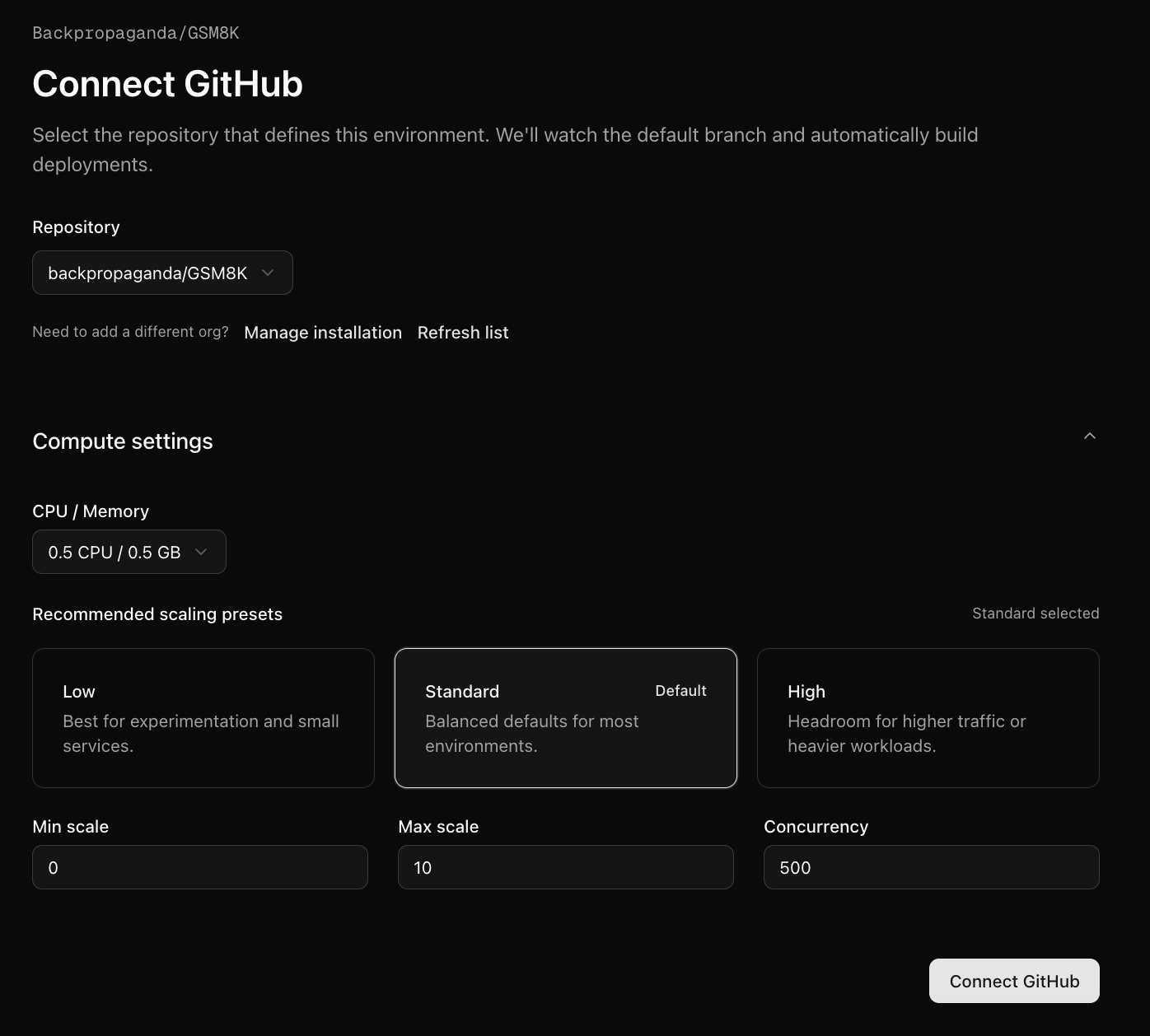 You will be given a choice for how much compute you would like to allocate for it. We'll use a low compute configuration since this is a simple environment.
Press Connect GitHub and your first build will begin.
To check the progress of the build, click the Deployments tab:
You will be given a choice for how much compute you would like to allocate for it. We'll use a low compute configuration since this is a simple environment.
Press Connect GitHub and your first build will begin.
To check the progress of the build, click the Deployments tab:
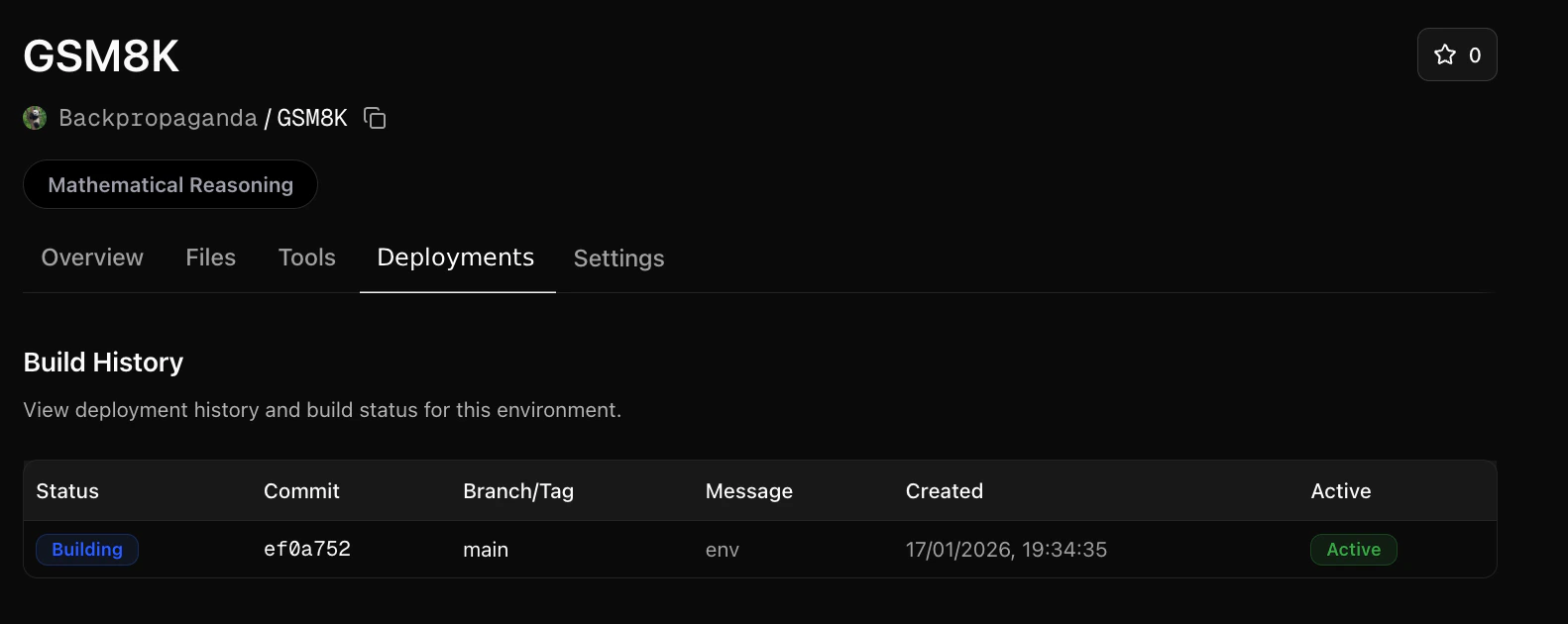 You can click on the latest build row to see logs:
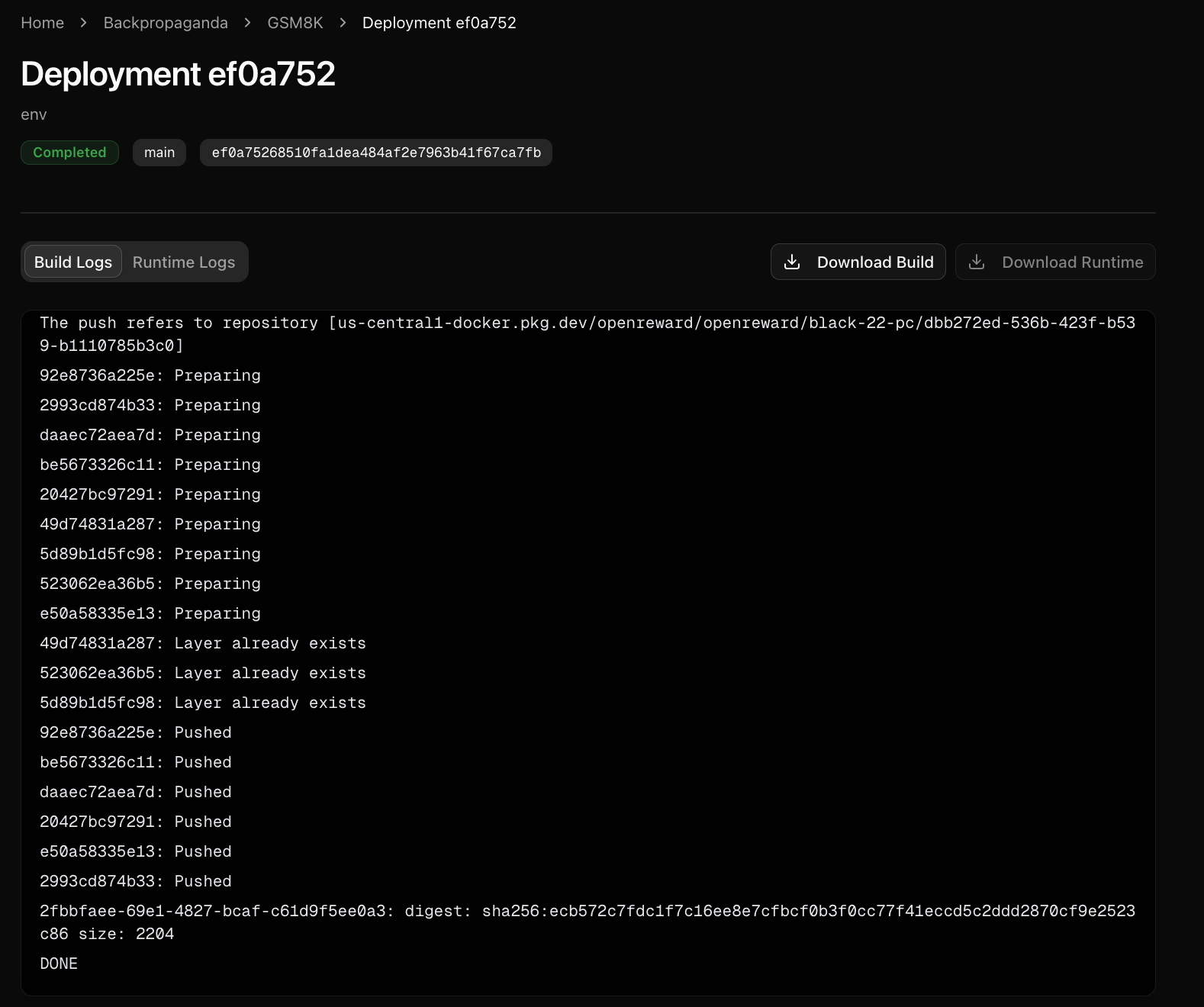 The build logs show the progress of building the environment. The runtime logs show any calls to the environment server, and can be useful for diagnosing errors.
### Sample from your environment
Now your environment is hosted on OpenReward, we can sample from it:
Make sure you have API keys for [OpenReward](https://openreward.ai/keys) and [OpenAI](https://platform.openai.com/api-keys), and set these as environment variables:
```bash theme={null}
export OPENAI_API_KEY='your-openai-api-key-here'
export OPENREWARD_API_KEY='your-openreward-api-key-here'
```
Save this as `quickstart.py`:
```python theme={null}
from openai import OpenAI
from openreward import OpenReward
import json
or_client = OpenReward()
oai_client = OpenAI()
MODEL_NAME = "gpt-5.4"
environment = or_client.environments.get(name="yourusername/gsm8k")
tasks = environment.list_tasks(split="train")
tools = environment.list_tools(format="openai")
example_task = tasks[0]
with environment.session(task=example_task) as session:
prompt = session.get_prompt()
input_list = [{"role": "user", "content": prompt[0].text}]
finished = False
print(input_list)
while not finished:
response = oai_client.responses.create(
model=MODEL_NAME,
tools=tools,
input=input_list
)
print(response.output)
input_list += response.output
for item in response.output:
if item.type == "function_call":
tool_result = session.call_tool(item.name, json.loads(str(item.arguments)))
reward = tool_result.reward
finished = tool_result.finished
input_list.append({
"type": "function_call_output",
"call_id": item.call_id,
"output": tool_result.blocks[0].text
})
print(input_list[-1])
if tool_result.finished:
finished = True
break
```
```bash theme={null}
python quickstart.py
```
Example output:
```bash theme={null}
[{'role': 'user', 'content': 'Natalia sold clips to 48 of her friends in April, and then she sold half as many clips in May. How many clips did Natalia sell altogether in April and May?'}]
[ResponseReasoningItem(id='rs_000dde94c785f76800693413cbb66c81928b57cca2b5488c2d', summary=[], type='reasoning', content=None, encrypted_content=None, status=None), ResponseOutputMessage(id='msg_000dde94c785f76800693413ce541881928b37ef5a6ec49cf9', content=[ResponseOutputText(annotations=[], text='72', type='output_text', logprobs=[])], role='assistant', status='completed', type='message')]
[ResponseFunctionToolCall(arguments='{"answer":"72"}', call_id='call_Eaw188yiAYpNCgQXduR1x0lR', name='answer', type='function_call', id='fc_000dde94c785f76800693413cf1be08192995f531548dffa4d', status='completed')]
{'type': 'function_call_output', 'call_id': 'call_Eaw188yiAYpNCgQXduR1x0lR', 'output': 'Correct!'}
```
Make sure you have API keys for [OpenReward](https://openreward.ai/keys) and [Anthropic](https://platform.claude.com/settings/keys), and set these as environment variables:
```bash theme={null}
export ANTHROPIC_API_KEY='your-anthropic-api-key-here'
export OPENREWARD_API_KEY='your-openreward-api-key-here'
```
Save this as `quickstart.py`:
```python theme={null}
import anthropic
from openreward import OpenReward
import json
or_client = OpenReward()
ant_client = anthropic.Anthropic()
MODEL_NAME = "claude-sonnet-4-6"
environment = or_client.environments.get(name="yourusername/gsm8k")
tasks = environment.list_tasks(split="train")
tools = environment.list_tools(format="anthropic")
example_task = tasks[0]
with environment.session(task=example_task) as session:
prompt = session.get_prompt()
messages = [{"role": "user", "content": prompt[0].text}]
finished = False
print(messages)
while not finished:
response = ant_client.messages.create(
model=MODEL_NAME,
max_tokens=4096,
tools=tools,
messages=messages
)
print(response)
messages.append({"role": "assistant", "content": response.content})
if response.stop_reason == "tool_use":
tool_use = next(block for block in response.content if block.type == "tool_use")
tool_name = tool_use.name
tool_input = tool_use.input
tool_result = session.call_tool(tool_name, tool_input)
reward = tool_result.reward
finished = tool_result.finished
messages.append({
"role": "user",
"content": [
{
"type": "tool_result",
"tool_use_id": tool_use.id,
"content": tool_result.blocks[0].text
}
]
})
print(messages[-1])
if tool_result.finished:
finished = True
break
```
```bash theme={null}
python quickstart.py
```
Example output:
```bash theme={null}
[{'role': 'user', 'content': 'Natalia sold clips to 48 of her friends in April, and then she sold half as many clips in May. How many clips did Natalia sell altogether in April and May?'}]
Message(id='msg_01DJorrT3UPhnPhdN19ugsyT', content=[TextBlock(citations=None, text='I need to find the total number of clips Natalia sold in April and May.\n\nGiven information:\n- In April, Natalia sold clips to 48 friends\n- In May, she sold half as many clips as in April\n\nLet me calculate:\n- April: 48 clips\n- May: 48 ÷ 2 = 24 clips\n- Total: 48 + 24 = 72 clips', type='text'), ToolUseBlock(id='toolu_01HEJromRn1bMcU8HM5jQZDF', input={'answer': '72'}, name='answer', type='tool_use')], model='claude-sonnet-4-6-20250929', role='assistant', stop_reason='tool_use', stop_sequence=None, type='message', usage=Usage(cache_creation=CacheCreation(ephemeral_1h_input_tokens=0, ephemeral_5m_input_tokens=0), cache_creation_input_tokens=0, cache_read_input_tokens=0, input_tokens=608, output_tokens=151, server_tool_use=None, service_tier='standard'))
{'role': 'user', 'content': [{'type': 'tool_result', 'tool_use_id': 'toolu_01HEJromRn1bMcU8HM5jQZDF', 'content': 'Correct!'}]}
```
Make sure you have API keys for [OpenReward](https://openreward.ai/keys) and [Gemini](https://aistudio.google.com/app/apikey), and set these as environment variables:
```bash theme={null}
export GEMINI_API_KEY='your-gemini-api-key-here'
export OPENREWARD_API_KEY='your-openreward-api-key-here'
```
Save this as `quickstart.py`:
```python theme={null}
from google import genai
from google.genai import types
from openreward import OpenReward
import json
or_client = OpenReward()
gem_client = genai.Client()
MODEL_NAME = "gemini-2.5-flash"
environment = or_client.environments.get(name="yourusername/gsm8k")
tasks = environment.list_tasks(split="train")
tools = environment.list_tools(format="google")
genai_tools = [types.Tool(function_declarations=tools)]
genai_config = types.GenerateContentConfig(tools=genai_tools)
example_task = tasks[0]
with environment.session(task=example_task) as session:
prompt = session.get_prompt()
contents = [
types.Content(
role="user", parts=[types.Part(text=prompt[0].text)]
)
]
finished = False
print(contents)
while not finished:
response = gem_client.models.generate_content(
model=MODEL_NAME,
config=genai_config,
contents=contents
)
print(response.candidates[0].content)
contents.append(response.candidates[0].content) # Append the content from the model's response.
for part in response.candidates[0].content.parts:
if part.function_call:
tool_call = part.function_call
tool_result = session.call_tool(tool_call.name, tool_call.args)
reward = tool_result.reward
finished = tool_result.finished
function_response_part = types.Part.from_function_response(
name=tool_call.name,
response={"result": tool_result.blocks[0].text},
)
contents.append(types.Content(role="user", parts=[function_response_part])) # Append the function response
print(contents[-1])
if tool_result.finished:
finished = True
break
```
```bash theme={null}
python quickstart.py
```
Example output:
```bash theme={null}
[Content(
parts=[
Part(
text='Natalia sold clips to 48 of her friends in April, and then she sold half as many clips in May. How many clips did Natalia sell altogether in April and May?'
),
],
role='user'
)]
parts=[Part(
function_call=FunctionCall(
args={
'answer': 'Natalia sold 72 clips altogether in April and May.'
},
name='answer'
),
thought_signature=b'\n\xe3\x02\x01r\xc8\xda|#w\x85/\x9e\xd1\xe7mK\xc1\xdd\xf6X\xeayY\x12<\x0fQ\x1608\xedKg\x07\xe3tV\xd0\xe3\xaf\xc6=\xc0.x\x15\x85\xeb\xec+\x84\xad\xf0\x02\xb6\xf8\x88iX\x94\xf8\xcb8g\xf9m\x02\xcd`\xb1\x8fm\x1e\x10\x1a\x14]2\x81H\x7f-\xb6E6\xd8\xf3\xa6kUw\xb7\xc3kr\x14...'
)] role='model'
parts=[Part(
function_response=FunctionResponse(
name='answer',
response={
'result': 'Correct!'
}
)
)] role='user'
```
Make sure you have API keys for [OpenReward](https://openreward.ai/keys) and [OpenRouter](https://openrouter.ai/keys), and set these as environment variables:
```bash theme={null}
export OPENREWARD_API_KEY='your-openreward-api-key-here'
```
Save this as `quickstart.py`:
```python theme={null}
from openai import OpenAI
from openreward import OpenReward
import json
import os
or_client = OpenReward()
oai_client = OpenAI(
base_url="https://openrouter.ai/api/v1",
api_key=os.environ.get("OPENROUTER_API_KEY")
)
MODEL_NAME = "deepseek/deepseek-v3.2"
environment = or_client.environments.get(name="yourusername/gsm8k")
tasks = environment.list_tasks(split="train")
tools = environment.list_tools(format="openrouter")
example_task = tasks[0]
with environment.session(task=example_task) as session:
prompt = session.get_prompt()
input_list = [{"role": "user", "content": prompt[0].text}]
finished = False
print(input_list)
while not finished:
response = oai_client.chat.completions.create(
model=MODEL_NAME,
tools=tools,
messages=input_list
)
input_list.append({
"role": "assistant",
"content": response.choices[0].message.content,
"tool_calls": response.choices[0].message.tool_calls
})
print(input_list[-1])
tool_calls = response.choices[0].message.tool_calls
if not tool_calls:
break
for tool_call in response.choices[0].message.tool_calls:
tool_name = tool_call.function.name
tool_args = json.loads(tool_call.function.arguments)
tool_result = session.call_tool(tool_name, tool_args)
reward = tool_result.reward
finished = tool_result.finished
input_list.append({
"role": "tool",
"tool_call_id": tool_call.id,
"content": json.dumps({
"result": tool_result.blocks[0].text
})
})
print(input_list[-1])
if tool_result.finished:
finished = True
break
```
```bash theme={null}
python quickstart.py
```
Example output:
```bash theme={null}
[{'role': 'user', 'content': 'Natalia sold clips to 48 of her friends in April, and then she sold half as many clips in May. How many clips did Natalia sell altogether in April and May?'}]
ChatCompletion(id='gen-1765024924-6BK4o9Oiefjb7Fe7J7eW', choices=[Choice(finish_reason='tool_calls', index=0, logprobs=None, message=ChatCompletionMessage(content="Let's break this down step by step.\n\n1. In April: Natalia sold clips to **48 friends**. This means she sold **48 clips** (assuming one clip per friend).\n2. In May: She sold **half as many clips** as in April.\n - Half of 48 is \\( 48 \\div 2 = 24 \\).\n3. Altogether in April and May:\n \\[\n 48 + 24 = 72\n \\]\n\nSo Natalia sold **72 clips** altogether in April and May.\n\n", refusal=None, role='assistant', annotations=None, audio=None, function_call=None, tool_calls=[ChatCompletionMessageFunctionToolCall(id='019af3af119248e0f1cd239559746033', function=Function(arguments='{"answer": "72"}', name='answer'), type='function', index=0)], reasoning=None), native_finish_reason='tool_calls')], created=1765024924, model='deepseek/deepseek-v3.2', object='chat.completion', service_tier=None, system_fingerprint='', usage=CompletionUsage(completion_tokens=153, prompt_tokens=333, total_tokens=486, completion_tokens_details=CompletionTokensDetails(accepted_prediction_tokens=None, audio_tokens=None, reasoning_tokens=0, rejected_prediction_tokens=None, image_tokens=0), prompt_tokens_details=PromptTokensDetails(audio_tokens=0, cached_tokens=0, video_tokens=0), cost=0.00015417, is_byok=False, cost_details={'upstream_inference_cost': None, 'upstream_inference_prompt_cost': 8.991e-05, 'upstream_inference_completions_cost': 6.426e-05}), provider='SiliconFlow')
{'role': 'tool', 'tool_call_id': '019af3af119248e0f1cd239559746033', 'content': 'Correct!'}
```
If you are running with another provider, or using custom models, then here are the main principles to keep in mind.
Make sure you have API keys for [OpenReward](https://openreward.ai/keys) and [OpenRouter](https://openrouter.ai/keys), and set these as environment variables:
```bash theme={null}
export OPENROUTER_API_KEY='your-openrouter-api-key-here'
export OPENREWARD_API_KEY='your-openreward-api-key-here'
```
You'll need to use the OpenReward client to access the environment and its main information
```python theme={null}
from openreward import OpenReward
or_client = OpenReward()
environment = or_client.environments.get(name="yourusername/gsm8k")
tasks = environment.list_tasks(split="train")
tools = environment.list_tools(format="openai")
example_task = tasks[0]
```
```python theme={null}
async with environment.session(task=example_task) as session:
```
Using a context manager, we can start a session with the environment. This defines a scope in which
you can use the agent to call tools and get tool results.
Above we have selected the first task to sample from, which is a particular problem in the CTF environment.
You can get the prompt for the task as follows:
```python theme={null}
prompt = await session.get_prompt()
```
You will also need to pass in the `tools` into the context window of your model, usually somewhere in the system prompt.
An agent will usually keep interacting with an environment until it hits a termination state associated with the environment, or
some other imposed limit (e.g. maximum number of terms).
In a simple sequential agent model, this could be a while loop like:
```python theme={null}
while not finished:
```
where `finished` is a boolean.
In agentic environments, actions are treated as tool calls. That means you need to have a way to parse tool calls from your model's generations.
The key thing to note is that for OpenReward environment, a tool call requires specifying a name (`str`) and some arguments (`dict`).
To call a tool you will call:
```python theme={null}
tool_result = await session.call_tool(tool_name, tool_arguments)
```
This means that you will need to parse out the `tool_name` and `tool_arguments` from your model's generation and then parse this information into the
`call_tool` method.
If you have executed an available tool correctly, you will receive a `ToolOutput` output. This contains attributes for:
* `reward` : an (optional) `float` denoting reward. For example, submitting a correct math solution through a `submit_solution` tool might give a reward of `1.0`.
* `finished` : a `bool` specifying whether the episode is finished or not. For example, some tools may end the episode (if for example an agent submits a final answer through `submit_solution` in a math task).
* `data` : a `dict` with output of the executing of the tool. For example, the stdout of executing a `bash` tool. This information should be passed to the agent as feedback.
For our agent loop, some example control flow we might want after receiving a `ToolOutput` is:
* Recording `reward` for use in a policy gradient algorithm such as GRPO or PPO
* Breaking out of the core agent loop if `finished=True`
* Adding `data` to the context window as feedback and continuing with the next model generation
## Next Steps
Build a more advanced environment that uses Computers
Learn how to run evals with OpenReward.
Learn how to use OpenReward for reinforcement learning
The build logs show the progress of building the environment. The runtime logs show any calls to the environment server, and can be useful for diagnosing errors.
### Sample from your environment
Now your environment is hosted on OpenReward, we can sample from it:
Make sure you have API keys for [OpenReward](https://openreward.ai/keys) and [OpenAI](https://platform.openai.com/api-keys), and set these as environment variables:
```bash theme={null}
export OPENAI_API_KEY='your-openai-api-key-here'
export OPENREWARD_API_KEY='your-openreward-api-key-here'
```
Save this as `quickstart.py`:
```python theme={null}
from openai import OpenAI
from openreward import OpenReward
import json
or_client = OpenReward()
oai_client = OpenAI()
MODEL_NAME = "gpt-5.4"
environment = or_client.environments.get(name="yourusername/gsm8k")
tasks = environment.list_tasks(split="train")
tools = environment.list_tools(format="openai")
example_task = tasks[0]
with environment.session(task=example_task) as session:
prompt = session.get_prompt()
input_list = [{"role": "user", "content": prompt[0].text}]
finished = False
print(input_list)
while not finished:
response = oai_client.responses.create(
model=MODEL_NAME,
tools=tools,
input=input_list
)
print(response.output)
input_list += response.output
for item in response.output:
if item.type == "function_call":
tool_result = session.call_tool(item.name, json.loads(str(item.arguments)))
reward = tool_result.reward
finished = tool_result.finished
input_list.append({
"type": "function_call_output",
"call_id": item.call_id,
"output": tool_result.blocks[0].text
})
print(input_list[-1])
if tool_result.finished:
finished = True
break
```
```bash theme={null}
python quickstart.py
```
Example output:
```bash theme={null}
[{'role': 'user', 'content': 'Natalia sold clips to 48 of her friends in April, and then she sold half as many clips in May. How many clips did Natalia sell altogether in April and May?'}]
[ResponseReasoningItem(id='rs_000dde94c785f76800693413cbb66c81928b57cca2b5488c2d', summary=[], type='reasoning', content=None, encrypted_content=None, status=None), ResponseOutputMessage(id='msg_000dde94c785f76800693413ce541881928b37ef5a6ec49cf9', content=[ResponseOutputText(annotations=[], text='72', type='output_text', logprobs=[])], role='assistant', status='completed', type='message')]
[ResponseFunctionToolCall(arguments='{"answer":"72"}', call_id='call_Eaw188yiAYpNCgQXduR1x0lR', name='answer', type='function_call', id='fc_000dde94c785f76800693413cf1be08192995f531548dffa4d', status='completed')]
{'type': 'function_call_output', 'call_id': 'call_Eaw188yiAYpNCgQXduR1x0lR', 'output': 'Correct!'}
```
Make sure you have API keys for [OpenReward](https://openreward.ai/keys) and [Anthropic](https://platform.claude.com/settings/keys), and set these as environment variables:
```bash theme={null}
export ANTHROPIC_API_KEY='your-anthropic-api-key-here'
export OPENREWARD_API_KEY='your-openreward-api-key-here'
```
Save this as `quickstart.py`:
```python theme={null}
import anthropic
from openreward import OpenReward
import json
or_client = OpenReward()
ant_client = anthropic.Anthropic()
MODEL_NAME = "claude-sonnet-4-6"
environment = or_client.environments.get(name="yourusername/gsm8k")
tasks = environment.list_tasks(split="train")
tools = environment.list_tools(format="anthropic")
example_task = tasks[0]
with environment.session(task=example_task) as session:
prompt = session.get_prompt()
messages = [{"role": "user", "content": prompt[0].text}]
finished = False
print(messages)
while not finished:
response = ant_client.messages.create(
model=MODEL_NAME,
max_tokens=4096,
tools=tools,
messages=messages
)
print(response)
messages.append({"role": "assistant", "content": response.content})
if response.stop_reason == "tool_use":
tool_use = next(block for block in response.content if block.type == "tool_use")
tool_name = tool_use.name
tool_input = tool_use.input
tool_result = session.call_tool(tool_name, tool_input)
reward = tool_result.reward
finished = tool_result.finished
messages.append({
"role": "user",
"content": [
{
"type": "tool_result",
"tool_use_id": tool_use.id,
"content": tool_result.blocks[0].text
}
]
})
print(messages[-1])
if tool_result.finished:
finished = True
break
```
```bash theme={null}
python quickstart.py
```
Example output:
```bash theme={null}
[{'role': 'user', 'content': 'Natalia sold clips to 48 of her friends in April, and then she sold half as many clips in May. How many clips did Natalia sell altogether in April and May?'}]
Message(id='msg_01DJorrT3UPhnPhdN19ugsyT', content=[TextBlock(citations=None, text='I need to find the total number of clips Natalia sold in April and May.\n\nGiven information:\n- In April, Natalia sold clips to 48 friends\n- In May, she sold half as many clips as in April\n\nLet me calculate:\n- April: 48 clips\n- May: 48 ÷ 2 = 24 clips\n- Total: 48 + 24 = 72 clips', type='text'), ToolUseBlock(id='toolu_01HEJromRn1bMcU8HM5jQZDF', input={'answer': '72'}, name='answer', type='tool_use')], model='claude-sonnet-4-6-20250929', role='assistant', stop_reason='tool_use', stop_sequence=None, type='message', usage=Usage(cache_creation=CacheCreation(ephemeral_1h_input_tokens=0, ephemeral_5m_input_tokens=0), cache_creation_input_tokens=0, cache_read_input_tokens=0, input_tokens=608, output_tokens=151, server_tool_use=None, service_tier='standard'))
{'role': 'user', 'content': [{'type': 'tool_result', 'tool_use_id': 'toolu_01HEJromRn1bMcU8HM5jQZDF', 'content': 'Correct!'}]}
```
Make sure you have API keys for [OpenReward](https://openreward.ai/keys) and [Gemini](https://aistudio.google.com/app/apikey), and set these as environment variables:
```bash theme={null}
export GEMINI_API_KEY='your-gemini-api-key-here'
export OPENREWARD_API_KEY='your-openreward-api-key-here'
```
Save this as `quickstart.py`:
```python theme={null}
from google import genai
from google.genai import types
from openreward import OpenReward
import json
or_client = OpenReward()
gem_client = genai.Client()
MODEL_NAME = "gemini-2.5-flash"
environment = or_client.environments.get(name="yourusername/gsm8k")
tasks = environment.list_tasks(split="train")
tools = environment.list_tools(format="google")
genai_tools = [types.Tool(function_declarations=tools)]
genai_config = types.GenerateContentConfig(tools=genai_tools)
example_task = tasks[0]
with environment.session(task=example_task) as session:
prompt = session.get_prompt()
contents = [
types.Content(
role="user", parts=[types.Part(text=prompt[0].text)]
)
]
finished = False
print(contents)
while not finished:
response = gem_client.models.generate_content(
model=MODEL_NAME,
config=genai_config,
contents=contents
)
print(response.candidates[0].content)
contents.append(response.candidates[0].content) # Append the content from the model's response.
for part in response.candidates[0].content.parts:
if part.function_call:
tool_call = part.function_call
tool_result = session.call_tool(tool_call.name, tool_call.args)
reward = tool_result.reward
finished = tool_result.finished
function_response_part = types.Part.from_function_response(
name=tool_call.name,
response={"result": tool_result.blocks[0].text},
)
contents.append(types.Content(role="user", parts=[function_response_part])) # Append the function response
print(contents[-1])
if tool_result.finished:
finished = True
break
```
```bash theme={null}
python quickstart.py
```
Example output:
```bash theme={null}
[Content(
parts=[
Part(
text='Natalia sold clips to 48 of her friends in April, and then she sold half as many clips in May. How many clips did Natalia sell altogether in April and May?'
),
],
role='user'
)]
parts=[Part(
function_call=FunctionCall(
args={
'answer': 'Natalia sold 72 clips altogether in April and May.'
},
name='answer'
),
thought_signature=b'\n\xe3\x02\x01r\xc8\xda|#w\x85/\x9e\xd1\xe7mK\xc1\xdd\xf6X\xeayY\x12<\x0fQ\x1608\xedKg\x07\xe3tV\xd0\xe3\xaf\xc6=\xc0.x\x15\x85\xeb\xec+\x84\xad\xf0\x02\xb6\xf8\x88iX\x94\xf8\xcb8g\xf9m\x02\xcd`\xb1\x8fm\x1e\x10\x1a\x14]2\x81H\x7f-\xb6E6\xd8\xf3\xa6kUw\xb7\xc3kr\x14...'
)] role='model'
parts=[Part(
function_response=FunctionResponse(
name='answer',
response={
'result': 'Correct!'
}
)
)] role='user'
```
Make sure you have API keys for [OpenReward](https://openreward.ai/keys) and [OpenRouter](https://openrouter.ai/keys), and set these as environment variables:
```bash theme={null}
export OPENREWARD_API_KEY='your-openreward-api-key-here'
```
Save this as `quickstart.py`:
```python theme={null}
from openai import OpenAI
from openreward import OpenReward
import json
import os
or_client = OpenReward()
oai_client = OpenAI(
base_url="https://openrouter.ai/api/v1",
api_key=os.environ.get("OPENROUTER_API_KEY")
)
MODEL_NAME = "deepseek/deepseek-v3.2"
environment = or_client.environments.get(name="yourusername/gsm8k")
tasks = environment.list_tasks(split="train")
tools = environment.list_tools(format="openrouter")
example_task = tasks[0]
with environment.session(task=example_task) as session:
prompt = session.get_prompt()
input_list = [{"role": "user", "content": prompt[0].text}]
finished = False
print(input_list)
while not finished:
response = oai_client.chat.completions.create(
model=MODEL_NAME,
tools=tools,
messages=input_list
)
input_list.append({
"role": "assistant",
"content": response.choices[0].message.content,
"tool_calls": response.choices[0].message.tool_calls
})
print(input_list[-1])
tool_calls = response.choices[0].message.tool_calls
if not tool_calls:
break
for tool_call in response.choices[0].message.tool_calls:
tool_name = tool_call.function.name
tool_args = json.loads(tool_call.function.arguments)
tool_result = session.call_tool(tool_name, tool_args)
reward = tool_result.reward
finished = tool_result.finished
input_list.append({
"role": "tool",
"tool_call_id": tool_call.id,
"content": json.dumps({
"result": tool_result.blocks[0].text
})
})
print(input_list[-1])
if tool_result.finished:
finished = True
break
```
```bash theme={null}
python quickstart.py
```
Example output:
```bash theme={null}
[{'role': 'user', 'content': 'Natalia sold clips to 48 of her friends in April, and then she sold half as many clips in May. How many clips did Natalia sell altogether in April and May?'}]
ChatCompletion(id='gen-1765024924-6BK4o9Oiefjb7Fe7J7eW', choices=[Choice(finish_reason='tool_calls', index=0, logprobs=None, message=ChatCompletionMessage(content="Let's break this down step by step.\n\n1. In April: Natalia sold clips to **48 friends**. This means she sold **48 clips** (assuming one clip per friend).\n2. In May: She sold **half as many clips** as in April.\n - Half of 48 is \\( 48 \\div 2 = 24 \\).\n3. Altogether in April and May:\n \\[\n 48 + 24 = 72\n \\]\n\nSo Natalia sold **72 clips** altogether in April and May.\n\n", refusal=None, role='assistant', annotations=None, audio=None, function_call=None, tool_calls=[ChatCompletionMessageFunctionToolCall(id='019af3af119248e0f1cd239559746033', function=Function(arguments='{"answer": "72"}', name='answer'), type='function', index=0)], reasoning=None), native_finish_reason='tool_calls')], created=1765024924, model='deepseek/deepseek-v3.2', object='chat.completion', service_tier=None, system_fingerprint='', usage=CompletionUsage(completion_tokens=153, prompt_tokens=333, total_tokens=486, completion_tokens_details=CompletionTokensDetails(accepted_prediction_tokens=None, audio_tokens=None, reasoning_tokens=0, rejected_prediction_tokens=None, image_tokens=0), prompt_tokens_details=PromptTokensDetails(audio_tokens=0, cached_tokens=0, video_tokens=0), cost=0.00015417, is_byok=False, cost_details={'upstream_inference_cost': None, 'upstream_inference_prompt_cost': 8.991e-05, 'upstream_inference_completions_cost': 6.426e-05}), provider='SiliconFlow')
{'role': 'tool', 'tool_call_id': '019af3af119248e0f1cd239559746033', 'content': 'Correct!'}
```
If you are running with another provider, or using custom models, then here are the main principles to keep in mind.
Make sure you have API keys for [OpenReward](https://openreward.ai/keys) and [OpenRouter](https://openrouter.ai/keys), and set these as environment variables:
```bash theme={null}
export OPENROUTER_API_KEY='your-openrouter-api-key-here'
export OPENREWARD_API_KEY='your-openreward-api-key-here'
```
You'll need to use the OpenReward client to access the environment and its main information
```python theme={null}
from openreward import OpenReward
or_client = OpenReward()
environment = or_client.environments.get(name="yourusername/gsm8k")
tasks = environment.list_tasks(split="train")
tools = environment.list_tools(format="openai")
example_task = tasks[0]
```
```python theme={null}
async with environment.session(task=example_task) as session:
```
Using a context manager, we can start a session with the environment. This defines a scope in which
you can use the agent to call tools and get tool results.
Above we have selected the first task to sample from, which is a particular problem in the CTF environment.
You can get the prompt for the task as follows:
```python theme={null}
prompt = await session.get_prompt()
```
You will also need to pass in the `tools` into the context window of your model, usually somewhere in the system prompt.
An agent will usually keep interacting with an environment until it hits a termination state associated with the environment, or
some other imposed limit (e.g. maximum number of terms).
In a simple sequential agent model, this could be a while loop like:
```python theme={null}
while not finished:
```
where `finished` is a boolean.
In agentic environments, actions are treated as tool calls. That means you need to have a way to parse tool calls from your model's generations.
The key thing to note is that for OpenReward environment, a tool call requires specifying a name (`str`) and some arguments (`dict`).
To call a tool you will call:
```python theme={null}
tool_result = await session.call_tool(tool_name, tool_arguments)
```
This means that you will need to parse out the `tool_name` and `tool_arguments` from your model's generation and then parse this information into the
`call_tool` method.
If you have executed an available tool correctly, you will receive a `ToolOutput` output. This contains attributes for:
* `reward` : an (optional) `float` denoting reward. For example, submitting a correct math solution through a `submit_solution` tool might give a reward of `1.0`.
* `finished` : a `bool` specifying whether the episode is finished or not. For example, some tools may end the episode (if for example an agent submits a final answer through `submit_solution` in a math task).
* `data` : a `dict` with output of the executing of the tool. For example, the stdout of executing a `bash` tool. This information should be passed to the agent as feedback.
For our agent loop, some example control flow we might want after receiving a `ToolOutput` is:
* Recording `reward` for use in a policy gradient algorithm such as GRPO or PPO
* Breaking out of the core agent loop if `finished=True`
* Adding `data` to the context window as feedback and continuing with the next model generation
## Next Steps
Build a more advanced environment that uses Computers
Learn how to run evals with OpenReward.
Learn how to use OpenReward for reinforcement learning