> ## Documentation Index
> Fetch the complete documentation index at: https://docs.openreward.ai/llms.txt
> Use this file to discover all available pages before exploring further.
# Using E2B Sandboxes
> Make and deploy an ORS environment with E2B Sandboxes
 ## Goals
* Make a mathematics code execution environment using OpenReward and E2B.
* Deploy the environment to OpenReward.
* Sample from the environment using a model of your choice.
## Prerequisites
* You have completed the [Your First Environment](../environments/your-first-environment) tutorial
* An OpenReward [account](https://openreward.ai/)
* An OpenReward [API key](https://openreward.ai/keys)
* An E2B [API key](https://e2b.dev/dashboard/)
* An API key and SDK for your model provider of choice (e.g. OpenAI, Anthropic, Google, OpenRouter)
## Setup
Environments in OpenReward are written using [ORS](https://openrewardstandard.io).
ORS is implemented in the [OpenReward Python library](https://www.github.com/OpenReward/openreward-python), and we will use it for this tutorial.
You can install the library using pip or uv:
```bash theme={null}
pip install openreward
```
You should also install the `e2b` Python SDK:
```bash theme={null}
pip install e2b
```
\## Introduction
[ORS](https://openrewardstandard.io) environments can be configured to work with any sandbox provider. In this tutorial we will show how to initialise an E2B sandbox within an ORS environment. We'll setup a simple mathematics environment and give an agent access to a sandbox for executing code. By the end of this tutorial, you will understand how to use E2B as an integration for making environments with ORS and OpenReward.
## Getting Started
In the [Your First Environment](../environments/your-first-environment) tutorial, we built a mathematics environment using the [GSM8K](https://arxiv.org/abs/2110.14168) dataset.
We will use a similar dataset here, but this time we will give an agent an access to an E2B sandbox for code execution.
First, let's initialise our environment `gsm8ksandbox`:
```bash theme={null}
orwd init gsm8ksandbox --template basic
cd gsm8k && ls
```
Next we'll download the two `parquet` files from the GSM8K [HuggingFace repository](https://huggingface.co/datasets/openai/gsm8k/tree/main/main) and put them in the root of our project:
```
test-00000-of-00001.parquet
train-00000-of-00001.parquet
```
A single row of data from the train set looks as follows:
```
{'question': 'Natalia sold clips to 48 of her friends in April, and then she sold half as many clips in May. How many clips did Natalia sell altogether in April and May?', 'answer': 'Natalia sold 48/2 = <<48/2=24>>24 clips in May.\nNatalia sold 48+24 = <<48+24=72>>72 clips altogether in April and May.\n#### 72', 'id': '0'}
```
Next we'll write a new server file. This will involve:
* Loading the tasks from the `parquet` files
* Verifying the answer is correct - we'll use the [MathVerify](https://github.com/huggingface/Math-Verify) library for this.
```python theme={null}
from math_verify import parse, verify
import pandas as pd
from pydantic import BaseModel
from typing import Optional
from e2b import AsyncSandbox
from openreward.environments import Environment, JSONObject, Server, Split, TextBlock, ToolOutput, tool
class GSM8KTaskSpec(BaseModel):
id: str
question: str
answer: str
class AnswerParams(BaseModel):
answer: str
train_tasks = pd.read_parquet("train-00000-of-00001.parquet").to_dict(orient="records")
test_tasks = pd.read_parquet("test-00000-of-00001.parquet").to_dict(orient="records")
for i, task in enumerate(train_tasks):
task['id'] = str(i)
for i, task in enumerate(test_tasks):
task['id'] = str(i)
class GSM8KSandbox(Environment):
"""
A GSM8K sandbox environment
"""
def __init__(self, task_spec: JSONObject = {}, secrets: dict[str, str] = {}):
super().__init__(task_spec)
self.config = GSM8KTaskSpec.model_validate(task_spec)
@classmethod
def list_tasks(cls, split: str) -> list[JSONObject]:
if split == "train":
return train_tasks
elif split == "test":
return test_tasks
raise ValueError(f"Unknown split: {split}")
@classmethod
def list_splits(cls):
return [Split(name="train", type="train"), Split(name="test", type="test")]
def get_prompt(self) -> str:
return [TextBlock(type="text", text=self.config.question)]
@tool
def answer(self, params: AnswerParams) -> ToolOutput:
"""
The answer tool can be used to submit your final answer. Note that this finishes the episode.
"""
gold = parse(self.config.answer)
answer = parse(params.answer)
is_correct = verify(gold, answer)
if is_correct:
agent_message = "Correct!"
reward = 1.0
else:
agent_message = "Wrong!"
reward = 0.0
return ToolOutput(
blocks=[TextBlock(type="text", text=agent_message)],
reward=reward,
finished=True
)
if __name__ == "__main__":
Server([GSM8KSandbox]).run()
```
Install the `math-verify` requirement:
```bash theme={null}
pip install math-verify
```
Now we are going to modify our environment by including an E2B sandbox. First, we'll adjust our `__init__`:
```python theme={null}
def __init__(self, task_spec: JSONObject = {}, secrets: dict[str, str] = {}):
super().__init__(task_spec)
self.config = GSM8KTaskSpec.model_validate(task_spec)
self.api_key = secrets.get("e2b_api_key")
if not self.api_key:
raise ValueError("E2B API key must be provided via secrets parameter")
self.sandbox = None
```
Next, we'll add a `setup` and `teardown` method:
```python theme={null}
async def setup(self) -> None:
self.sandbox = await AsyncSandbox.create(
api_key=self.api_key,
timeout=60 * 60, # 1 hour
)
async def teardown(self) -> None:
if self.sandbox is not None:
await self.sandbox.kill()
```
These methods ensure that when a session begins, we create a sandbox, and when a session ends, we kill it.
Lastly, we can add a tool that relies on code execution. We'll add a `bash` tool. First we'll add the Pydantic model:
```python theme={null}
class BashParams(BaseModel, extra="forbid"):
command: str
timeout: Optional[float] = 30.0
```
and then we'll add the `bash` tool to the class:
```python theme={null}
@tool
async def bash(self, params: BashParams) -> ToolOutput:
"""Execute bash commands using the computer instance."""
try:
result = await self.sandbox.commands.run(params.command.strip(), timeout=params.timeout)
result_dict = {
"stdout": getattr(result, "stdout", ""),
"stderr": getattr(result, "stderr", ""),
"exit_code": getattr(result, "exit_code", None),
"error": getattr(result, "error", None),
}
# What the model sees as tool text output
text_out = result_dict["stdout"] or result_dict["stderr"] or str(result_dict)
return ToolOutput(
blocks=[TextBlock(type="text", text=text_out)],
metadata={"output": result_dict}, # JSON-safe now
reward=0.0,
finished=False,
)
except Exception as e:
return ToolOutput(
metadata={"error": str(e)},
blocks=[TextBlock(text=f"Error executing command: {str(e)}")],
finished=False
)
```
Now we can test this environment. First run the server as before:
```bash theme={null}
python server.py
```
Now choose a model provider of your choice and sample from the environment:
Make sure you have an API key for [OpenAI](https://platform.openai.com/api-keys), and set the environment variable:
```bash theme={null}
export OPENAI_API_KEY='your-openai-api-key-here'
export E2B_API_KEY='your-e2b-api-key-here'
```
Save this as `sample_agent.py`:
```python theme={null}
from openai import OpenAI
from openreward import OpenReward
import os
import json
or_client = OpenReward()
oai_client = OpenAI()
MODEL_NAME = "gpt-5.4"
environment = or_client.environments.get(name="gsm8ksandbox", base_url="http://localhost:8080")
tasks = environment.list_tasks(split="train")
tools = environment.list_tools(format="openai")
example_task = tasks[0]
with environment.session(task=example_task, secrets={"e2b_api_key": os.getenv("E2B_API_KEY")}) as session:
prompt = session.get_prompt()
input_list = [{"role": "user", "content": prompt[0].text}]
finished = False
print(input_list)
while not finished:
response = oai_client.responses.create(
model=MODEL_NAME,
tools=tools,
input=input_list
)
print(response.output)
input_list += response.output
for item in response.output:
if item.type == "function_call":
tool_result = session.call_tool(item.name, json.loads(str(item.arguments)))
reward = tool_result.reward
finished = tool_result.finished
input_list.append({
"type": "function_call_output",
"call_id": item.call_id,
"output": json.dumps({
"result": tool_result.blocks[0].text
})
})
print(input_list[-1])
if tool_result.finished:
finished = True
break
```
```bash theme={null}
python sample_agent.py
```
Example output:
```bash theme={null}
[{'role': 'user', 'content': 'Natalia sold clips to 48 of her friends in April, and then she sold half as many clips in May. How many clips did Natalia sell altogether in April and May?\n\nUse the bash tool to execute commands.'}]
[ResponseFunctionToolCall(arguments='{"command":"python3 - << \'PY\'\\napril=48\\nmay=april/2\\nprint(april+may)\\nPY","timeout":100000}', call_id='call_TTS3bI1XFo0Gl88If18JZZ6l', name='bash', type='function_call', id='fc_04efdcdc3efb56c300699ada2d1fac81908551b7ab626fffd2', status='completed')]
{'type': 'function_call_output', 'call_id': 'call_TTS3bI1XFo0Gl88If18JZZ6l', 'output': '{"result": "72.0\\n"}'}
[ResponseOutputMessage(id='msg_04efdcdc3efb56c300699ada2f46d48190a6234d05fdc92310', content=[ResponseOutputText(annotations=[], text='Natalia sold 48 clips in April. In May she sold half of that: \\(48 \\div 2 = 24\\).\n\nAltogether, she sold \\(48 + 24 = 72\\) clips in April and May.', type='output_text', logprobs=[])], role='assistant', status='completed', type='message')]
[ResponseFunctionToolCall(arguments='{"answer":"Natalia sold 48 clips in April. In May she sold half of that: 48 ÷ 2 = 24. Altogether, she sold 48 + 24 = 72 clips."}', call_id='call_QPFUtfAviwYsozYSKadq78gZ', name='answer', type='function_call', id='fc_04efdcdc3efb56c300699ada30ddfc81909c7bd18e1398f223', status='completed')]
{'type': 'function_call_output', 'call_id': 'call_QPFUtfAviwYsozYSKadq78gZ', 'output': '{"result": "Correct!"}'}
```
Make sure you have API key for [Anthropic](https://platform.claude.com/settings/keys), and set the environment variable:
```bash theme={null}
export ANTHROPIC_API_KEY='your-anthropic-api-key-here'
export E2B_API_KEY='your-e2b-api-key-here'
```
Save this as `sample_agent.py`:
```python theme={null}
import anthropic
from openreward import OpenReward
import json
import os
or_client = OpenReward()
ant_client = anthropic.Anthropic()
MODEL_NAME = "claude-sonnet-4-6"
environment = or_client.environments.get(name="gsm8ksandbox", base_url="http://localhost:8080")
tasks = environment.list_tasks(split="train")
tools = environment.list_tools(format="anthropic")
example_task = tasks[0]
with environment.session(task=example_task, secrets={"e2b_api_key": os.getenv("E2B_API_KEY")}) as session:
prompt = session.get_prompt()
messages = [{"role": "user", "content": prompt[0].text}]
finished = False
print(messages)
while not finished:
message = ant_client.messages.create(
model=MODEL_NAME,
max_tokens=4096,
tools=tools,
messages=messages
)
messages.append({
"role": "assistant",
"content": message.content,
})
print(messages[-1])
if message.stop_reason == "tool_use":
tool_uses = [b for b in message.content if getattr(b, "type", None) == "tool_use"]
if not tool_uses:
raise RuntimeError("stop_reason was tool_use but no tool_use blocks found")
tool_result_blocks = []
finished = False
for tu in tool_uses:
tool_name = tu.name
tool_input = tu.input
try:
tr = session.call_tool(tool_name, tool_input)
# Convert OpenReward blocks -> string safely
text_parts = []
for b in getattr(tr, "blocks", []) or []:
t = getattr(b, "text", None)
if t is not None:
text_parts.append(t)
else:
text_parts.append(str(b))
tool_text = "".join(text_parts)
tool_result_blocks.append({
"type": "tool_result",
"tool_use_id": tu.id,
"content": tool_text,
})
# Track termination if the env says we're done
if getattr(tr, "finished", False):
finished = True
except Exception as e:
tool_result_blocks.append({
"type": "tool_result",
"tool_use_id": tu.id,
"content": f"Tool execution failed: {type(e).__name__}: {e}",
"is_error": True,
})
messages.append({
"role": "user",
"content": tool_result_blocks
})
print(messages[-1])
continue
```
```bash theme={null}
python sample_agent.py
```
Example output:
```bash theme={null}
[{'role': 'user', 'content': 'Natalia sold clips to 48 of her friends in April, and then she sold half as many clips in May. How many clips did Natalia sell altogether in April and May?\n\nUse the bash tool to execute commands.'}]
{'role': 'assistant', 'content': [TextBlock(text="I'll help you solve this math problem using the bash tool to calculate the answer.", type='text'), ToolUseBlock(id='toolu_01XbashToolExample123', input={'command': 'python3 - << \'PY\'\napril=48\nmay=april/2\nprint(april+may)\nPY', 'timeout': 100000}, name='bash', type='tool_use')]}
{'role': 'user', 'content': [{'type': 'tool_result', 'tool_use_id': 'toolu_01XbashToolExample123', 'content': '72.0\n'}]}
{'role': 'assistant', 'content': [TextBlock(text='Natalia sold 48 clips in April. In May she sold half of that: 48 ÷ 2 = 24.\n\nAltogether, she sold 48 + 24 = 72 clips in April and May.', type='text'), ToolUseBlock(id='toolu_01HEJromRn1bMcU8HM5jQZDF', input={'answer': 'Natalia sold 48 clips in April. In May she sold half of that: 48 ÷ 2 = 24. Altogether, she sold 48 + 24 = 72 clips.'}, name='answer', type='tool_use')]}
{'role': 'user', 'content': [{'type': 'tool_result', 'tool_use_id': 'toolu_01HEJromRn1bMcU8HM5jQZDF', 'content': 'Correct!'}]}
```
Make sure you have an API key for [Gemini](https://aistudio.google.com/app/apikey) and set it as an environment variable:
```bash theme={null}
export GEMINI_API_KEY='your-gemini-api-key-here'
export E2B_API_KEY='your-e2b-api-key-here'
```
Save this as `sample_agent.py`:
```python theme={null}
from google import genai
from google.genai import types
from openreward import OpenReward
import json
import os
or_client = OpenReward()
gem_client = genai.Client()
MODEL_NAME = "gemini-2.5-flash"
environment = or_client.environments.get(name="gsm8ksandbox", base_url="http://localhost:8080")
tasks = environment.list_tasks(split="train")
tools = environment.list_tools(format="google")
genai_tools = [types.Tool(function_declarations=tools)]
genai_config = types.GenerateContentConfig(tools=genai_tools)
example_task = tasks[0]
with environment.session(task=example_task, secrets={"e2b_api_key": os.getenv("E2B_API_KEY")}) as session:
prompt = session.get_prompt()
contents = [
types.Content(
role="user", parts=[types.Part(text=prompt[0].text)]
)
]
finished = False
print(contents)
while not finished:
response = gem_client.models.generate_content(
model=MODEL_NAME,
config=genai_config,
contents=contents
)
print(response.candidates[0].content)
contents.append(response.candidates[0].content) # Append the content from the model's response.
for part in response.candidates[0].content.parts:
if part.function_call:
tool_call = part.function_call
tool_result = session.call_tool(tool_call.name, tool_call.args)
reward = tool_result.reward
finished = tool_result.finished
function_response_part = types.Part.from_function_response(
name=tool_call.name,
response={"result": json.dumps({
"result": tool_result.blocks[0].text
})},
)
contents.append(types.Content(role="user", parts=[function_response_part])) # Append the function response
print(contents[-1])
if tool_result.finished:
finished = True
break
```
```bash theme={null}
python sample_agent.py
```
Example output:
```bash theme={null}
[Content(
parts=[
Part(
text='Natalia sold clips to 48 of her friends in April, and then she sold half as many clips in May. How many clips did Natalia sell altogether in April and May?\n\nUse the bash tool to execute commands.'
),
],
role='user'
)]
parts=[Part(
function_call=FunctionCall(
args={
'command': "python3 - << 'PY'\napril=48\nmay=april/2\nprint(april+may)\nPY",
'timeout': 100000
},
name='bash'
)
)] role='model'
parts=[Part(
function_response=FunctionResponse(
name='bash',
response={
'result': '{"result": "72.0\\n"}'
}
)
)] role='user'
parts=[Part(
text='Natalia sold 48 clips in April. In May she sold half of that: 48 ÷ 2 = 24.\n\nAltogether, she sold 48 + 24 = 72 clips in April and May.'
)] role='model'
parts=[Part(
function_call=FunctionCall(
args={
'answer': 'Natalia sold 48 clips in April. In May she sold half of that: 48 ÷ 2 = 24. Altogether, she sold 48 + 24 = 72 clips.'
},
name='answer'
)
)] role='model'
parts=[Part(
function_response=FunctionResponse(
name='answer',
response={
'result': '{"result": "Correct!"}'
}
)
)] role='user'
```
Make sure you have an API key for [OpenRouter](https://openrouter.ai/keys) and set it as an environment variables:
```bash theme={null}
export OPENREWARD_API_KEY='your-openreward-api-key-here'
export E2B_API_KEY='your-e2b-api-key-here'
```
Save this as `sample_agent.py`:
```python theme={null}
from openai import OpenAI
from openreward import OpenReward
import json
import os
or_client = OpenReward()
oai_client = OpenAI(
base_url="https://openrouter.ai/api/v1",
api_key=os.environ.get("OPENROUTER_API_KEY")
)
MODEL_NAME = "deepseek/deepseek-v3.2"
environment = or_client.environments.get(name="gsm8ksandbox", base_url="http://localhost:8080")
tasks = environment.list_tasks(split="train")
tools = environment.list_tools(format="openrouter")
example_task = tasks[0]
with environment.session(task=example_task, secrets={"e2b_api_key": os.getenv("E2B_API_KEY")}) as session:
prompt = session.get_prompt()
input_list = [{"role": "user", "content": prompt[0].text}]
finished = False
print(input_list)
while not finished:
response = oai_client.chat.completions.create(
model=MODEL_NAME,
tools=tools,
messages=input_list
)
input_list.append({
"role": "assistant",
"content": response.choices[0].message.content,
"tool_calls": response.choices[0].message.tool_calls
})
print(input_list[-1])
tool_calls = response.choices[0].message.tool_calls
if not tool_calls:
break
for tool_call in response.choices[0].message.tool_calls:
tool_name = tool_call.function.name
tool_args = json.loads(tool_call.function.arguments)
tool_result = session.call_tool(tool_name, tool_args)
reward = tool_result.reward
finished = tool_result.finished
input_list.append({
"role": "tool",
"tool_call_id": tool_call.id,
"content": json.dumps({
"result": tool_result.blocks[0].text
})
})
print(input_list[-1])
if tool_result.finished:
finished = True
break
```
```bash theme={null}
python sample_agent.py
```
Example output:
```bash theme={null}
[{'role': 'user', 'content': 'Natalia sold clips to 48 of her friends in April, and then she sold half as many clips in May. How many clips did Natalia sell altogether in April and May?\n\nUse the bash tool to execute commands.'}]
{'role': 'assistant', 'content': None, 'tool_calls': [ChatCompletionMessageFunctionToolCall(id='call_bash_example_001', function=Function(arguments='{"command":"python3 - << \'PY\'\\napril=48\\nmay=april/2\\nprint(april+may)\\nPY","timeout":100000}', name='bash'), type='function')]}
{'role': 'tool', 'tool_call_id': 'call_bash_example_001', 'content': '{"result": "72.0\\n"}'}
{'role': 'assistant', 'content': 'Natalia sold 48 clips in April. In May she sold half of that: 48 ÷ 2 = 24.\n\nAltogether, she sold 48 + 24 = 72 clips in April and May.', 'tool_calls': [ChatCompletionMessageFunctionToolCall(id='019af3af119248e0f1cd239559746033', function=Function(arguments='{"answer": "Natalia sold 48 clips in April. In May she sold half of that: 48 ÷ 2 = 24. Altogether, she sold 48 + 24 = 72 clips."}', name='answer'), type='function')]}
{'role': 'tool', 'tool_call_id': '019af3af119248e0f1cd239559746033', 'content': '{"result": "Correct!"}'}
```
Nice one! We have a working ORS environment.
Now we'll see how we can host the environment on OpenReward. The benefits of using OpenReward are:
* **Infrastructure**: you do not have to set up infrastructure and compute to host the environment yourself. We take care of this and you are only charged based on your actual usage of the environment.
* **Discovery**: your environment can be discovered and used by other users of the platform, helping drive adoption and attention to your work.
## Host on OpenReward
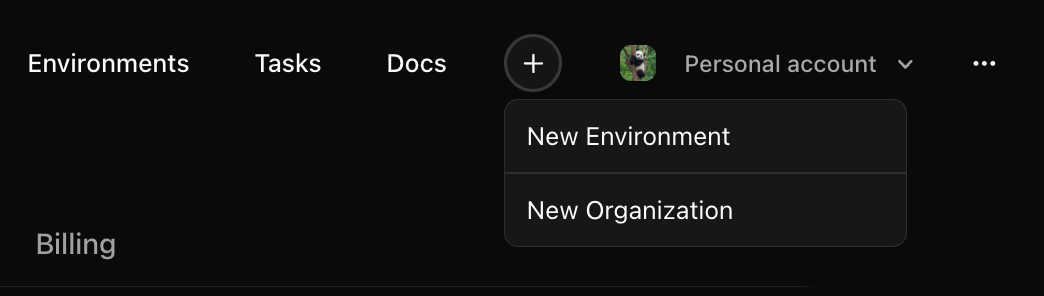
Log into [OpenReward](https://openreward.ai), press the plus icon in the navbar and press **New Environment**:
## Goals
* Make a mathematics code execution environment using OpenReward and E2B.
* Deploy the environment to OpenReward.
* Sample from the environment using a model of your choice.
## Prerequisites
* You have completed the [Your First Environment](../environments/your-first-environment) tutorial
* An OpenReward [account](https://openreward.ai/)
* An OpenReward [API key](https://openreward.ai/keys)
* An E2B [API key](https://e2b.dev/dashboard/)
* An API key and SDK for your model provider of choice (e.g. OpenAI, Anthropic, Google, OpenRouter)
## Setup
Environments in OpenReward are written using [ORS](https://openrewardstandard.io).
ORS is implemented in the [OpenReward Python library](https://www.github.com/OpenReward/openreward-python), and we will use it for this tutorial.
You can install the library using pip or uv:
```bash theme={null}
pip install openreward
```
You should also install the `e2b` Python SDK:
```bash theme={null}
pip install e2b
```
\## Introduction
[ORS](https://openrewardstandard.io) environments can be configured to work with any sandbox provider. In this tutorial we will show how to initialise an E2B sandbox within an ORS environment. We'll setup a simple mathematics environment and give an agent access to a sandbox for executing code. By the end of this tutorial, you will understand how to use E2B as an integration for making environments with ORS and OpenReward.
## Getting Started
In the [Your First Environment](../environments/your-first-environment) tutorial, we built a mathematics environment using the [GSM8K](https://arxiv.org/abs/2110.14168) dataset.
We will use a similar dataset here, but this time we will give an agent an access to an E2B sandbox for code execution.
First, let's initialise our environment `gsm8ksandbox`:
```bash theme={null}
orwd init gsm8ksandbox --template basic
cd gsm8k && ls
```
Next we'll download the two `parquet` files from the GSM8K [HuggingFace repository](https://huggingface.co/datasets/openai/gsm8k/tree/main/main) and put them in the root of our project:
```
test-00000-of-00001.parquet
train-00000-of-00001.parquet
```
A single row of data from the train set looks as follows:
```
{'question': 'Natalia sold clips to 48 of her friends in April, and then she sold half as many clips in May. How many clips did Natalia sell altogether in April and May?', 'answer': 'Natalia sold 48/2 = <<48/2=24>>24 clips in May.\nNatalia sold 48+24 = <<48+24=72>>72 clips altogether in April and May.\n#### 72', 'id': '0'}
```
Next we'll write a new server file. This will involve:
* Loading the tasks from the `parquet` files
* Verifying the answer is correct - we'll use the [MathVerify](https://github.com/huggingface/Math-Verify) library for this.
```python theme={null}
from math_verify import parse, verify
import pandas as pd
from pydantic import BaseModel
from typing import Optional
from e2b import AsyncSandbox
from openreward.environments import Environment, JSONObject, Server, Split, TextBlock, ToolOutput, tool
class GSM8KTaskSpec(BaseModel):
id: str
question: str
answer: str
class AnswerParams(BaseModel):
answer: str
train_tasks = pd.read_parquet("train-00000-of-00001.parquet").to_dict(orient="records")
test_tasks = pd.read_parquet("test-00000-of-00001.parquet").to_dict(orient="records")
for i, task in enumerate(train_tasks):
task['id'] = str(i)
for i, task in enumerate(test_tasks):
task['id'] = str(i)
class GSM8KSandbox(Environment):
"""
A GSM8K sandbox environment
"""
def __init__(self, task_spec: JSONObject = {}, secrets: dict[str, str] = {}):
super().__init__(task_spec)
self.config = GSM8KTaskSpec.model_validate(task_spec)
@classmethod
def list_tasks(cls, split: str) -> list[JSONObject]:
if split == "train":
return train_tasks
elif split == "test":
return test_tasks
raise ValueError(f"Unknown split: {split}")
@classmethod
def list_splits(cls):
return [Split(name="train", type="train"), Split(name="test", type="test")]
def get_prompt(self) -> str:
return [TextBlock(type="text", text=self.config.question)]
@tool
def answer(self, params: AnswerParams) -> ToolOutput:
"""
The answer tool can be used to submit your final answer. Note that this finishes the episode.
"""
gold = parse(self.config.answer)
answer = parse(params.answer)
is_correct = verify(gold, answer)
if is_correct:
agent_message = "Correct!"
reward = 1.0
else:
agent_message = "Wrong!"
reward = 0.0
return ToolOutput(
blocks=[TextBlock(type="text", text=agent_message)],
reward=reward,
finished=True
)
if __name__ == "__main__":
Server([GSM8KSandbox]).run()
```
Install the `math-verify` requirement:
```bash theme={null}
pip install math-verify
```
Now we are going to modify our environment by including an E2B sandbox. First, we'll adjust our `__init__`:
```python theme={null}
def __init__(self, task_spec: JSONObject = {}, secrets: dict[str, str] = {}):
super().__init__(task_spec)
self.config = GSM8KTaskSpec.model_validate(task_spec)
self.api_key = secrets.get("e2b_api_key")
if not self.api_key:
raise ValueError("E2B API key must be provided via secrets parameter")
self.sandbox = None
```
Next, we'll add a `setup` and `teardown` method:
```python theme={null}
async def setup(self) -> None:
self.sandbox = await AsyncSandbox.create(
api_key=self.api_key,
timeout=60 * 60, # 1 hour
)
async def teardown(self) -> None:
if self.sandbox is not None:
await self.sandbox.kill()
```
These methods ensure that when a session begins, we create a sandbox, and when a session ends, we kill it.
Lastly, we can add a tool that relies on code execution. We'll add a `bash` tool. First we'll add the Pydantic model:
```python theme={null}
class BashParams(BaseModel, extra="forbid"):
command: str
timeout: Optional[float] = 30.0
```
and then we'll add the `bash` tool to the class:
```python theme={null}
@tool
async def bash(self, params: BashParams) -> ToolOutput:
"""Execute bash commands using the computer instance."""
try:
result = await self.sandbox.commands.run(params.command.strip(), timeout=params.timeout)
result_dict = {
"stdout": getattr(result, "stdout", ""),
"stderr": getattr(result, "stderr", ""),
"exit_code": getattr(result, "exit_code", None),
"error": getattr(result, "error", None),
}
# What the model sees as tool text output
text_out = result_dict["stdout"] or result_dict["stderr"] or str(result_dict)
return ToolOutput(
blocks=[TextBlock(type="text", text=text_out)],
metadata={"output": result_dict}, # JSON-safe now
reward=0.0,
finished=False,
)
except Exception as e:
return ToolOutput(
metadata={"error": str(e)},
blocks=[TextBlock(text=f"Error executing command: {str(e)}")],
finished=False
)
```
Now we can test this environment. First run the server as before:
```bash theme={null}
python server.py
```
Now choose a model provider of your choice and sample from the environment:
Make sure you have an API key for [OpenAI](https://platform.openai.com/api-keys), and set the environment variable:
```bash theme={null}
export OPENAI_API_KEY='your-openai-api-key-here'
export E2B_API_KEY='your-e2b-api-key-here'
```
Save this as `sample_agent.py`:
```python theme={null}
from openai import OpenAI
from openreward import OpenReward
import os
import json
or_client = OpenReward()
oai_client = OpenAI()
MODEL_NAME = "gpt-5.4"
environment = or_client.environments.get(name="gsm8ksandbox", base_url="http://localhost:8080")
tasks = environment.list_tasks(split="train")
tools = environment.list_tools(format="openai")
example_task = tasks[0]
with environment.session(task=example_task, secrets={"e2b_api_key": os.getenv("E2B_API_KEY")}) as session:
prompt = session.get_prompt()
input_list = [{"role": "user", "content": prompt[0].text}]
finished = False
print(input_list)
while not finished:
response = oai_client.responses.create(
model=MODEL_NAME,
tools=tools,
input=input_list
)
print(response.output)
input_list += response.output
for item in response.output:
if item.type == "function_call":
tool_result = session.call_tool(item.name, json.loads(str(item.arguments)))
reward = tool_result.reward
finished = tool_result.finished
input_list.append({
"type": "function_call_output",
"call_id": item.call_id,
"output": json.dumps({
"result": tool_result.blocks[0].text
})
})
print(input_list[-1])
if tool_result.finished:
finished = True
break
```
```bash theme={null}
python sample_agent.py
```
Example output:
```bash theme={null}
[{'role': 'user', 'content': 'Natalia sold clips to 48 of her friends in April, and then she sold half as many clips in May. How many clips did Natalia sell altogether in April and May?\n\nUse the bash tool to execute commands.'}]
[ResponseFunctionToolCall(arguments='{"command":"python3 - << \'PY\'\\napril=48\\nmay=april/2\\nprint(april+may)\\nPY","timeout":100000}', call_id='call_TTS3bI1XFo0Gl88If18JZZ6l', name='bash', type='function_call', id='fc_04efdcdc3efb56c300699ada2d1fac81908551b7ab626fffd2', status='completed')]
{'type': 'function_call_output', 'call_id': 'call_TTS3bI1XFo0Gl88If18JZZ6l', 'output': '{"result": "72.0\\n"}'}
[ResponseOutputMessage(id='msg_04efdcdc3efb56c300699ada2f46d48190a6234d05fdc92310', content=[ResponseOutputText(annotations=[], text='Natalia sold 48 clips in April. In May she sold half of that: \\(48 \\div 2 = 24\\).\n\nAltogether, she sold \\(48 + 24 = 72\\) clips in April and May.', type='output_text', logprobs=[])], role='assistant', status='completed', type='message')]
[ResponseFunctionToolCall(arguments='{"answer":"Natalia sold 48 clips in April. In May she sold half of that: 48 ÷ 2 = 24. Altogether, she sold 48 + 24 = 72 clips."}', call_id='call_QPFUtfAviwYsozYSKadq78gZ', name='answer', type='function_call', id='fc_04efdcdc3efb56c300699ada30ddfc81909c7bd18e1398f223', status='completed')]
{'type': 'function_call_output', 'call_id': 'call_QPFUtfAviwYsozYSKadq78gZ', 'output': '{"result": "Correct!"}'}
```
Make sure you have API key for [Anthropic](https://platform.claude.com/settings/keys), and set the environment variable:
```bash theme={null}
export ANTHROPIC_API_KEY='your-anthropic-api-key-here'
export E2B_API_KEY='your-e2b-api-key-here'
```
Save this as `sample_agent.py`:
```python theme={null}
import anthropic
from openreward import OpenReward
import json
import os
or_client = OpenReward()
ant_client = anthropic.Anthropic()
MODEL_NAME = "claude-sonnet-4-6"
environment = or_client.environments.get(name="gsm8ksandbox", base_url="http://localhost:8080")
tasks = environment.list_tasks(split="train")
tools = environment.list_tools(format="anthropic")
example_task = tasks[0]
with environment.session(task=example_task, secrets={"e2b_api_key": os.getenv("E2B_API_KEY")}) as session:
prompt = session.get_prompt()
messages = [{"role": "user", "content": prompt[0].text}]
finished = False
print(messages)
while not finished:
message = ant_client.messages.create(
model=MODEL_NAME,
max_tokens=4096,
tools=tools,
messages=messages
)
messages.append({
"role": "assistant",
"content": message.content,
})
print(messages[-1])
if message.stop_reason == "tool_use":
tool_uses = [b for b in message.content if getattr(b, "type", None) == "tool_use"]
if not tool_uses:
raise RuntimeError("stop_reason was tool_use but no tool_use blocks found")
tool_result_blocks = []
finished = False
for tu in tool_uses:
tool_name = tu.name
tool_input = tu.input
try:
tr = session.call_tool(tool_name, tool_input)
# Convert OpenReward blocks -> string safely
text_parts = []
for b in getattr(tr, "blocks", []) or []:
t = getattr(b, "text", None)
if t is not None:
text_parts.append(t)
else:
text_parts.append(str(b))
tool_text = "".join(text_parts)
tool_result_blocks.append({
"type": "tool_result",
"tool_use_id": tu.id,
"content": tool_text,
})
# Track termination if the env says we're done
if getattr(tr, "finished", False):
finished = True
except Exception as e:
tool_result_blocks.append({
"type": "tool_result",
"tool_use_id": tu.id,
"content": f"Tool execution failed: {type(e).__name__}: {e}",
"is_error": True,
})
messages.append({
"role": "user",
"content": tool_result_blocks
})
print(messages[-1])
continue
```
```bash theme={null}
python sample_agent.py
```
Example output:
```bash theme={null}
[{'role': 'user', 'content': 'Natalia sold clips to 48 of her friends in April, and then she sold half as many clips in May. How many clips did Natalia sell altogether in April and May?\n\nUse the bash tool to execute commands.'}]
{'role': 'assistant', 'content': [TextBlock(text="I'll help you solve this math problem using the bash tool to calculate the answer.", type='text'), ToolUseBlock(id='toolu_01XbashToolExample123', input={'command': 'python3 - << \'PY\'\napril=48\nmay=april/2\nprint(april+may)\nPY', 'timeout': 100000}, name='bash', type='tool_use')]}
{'role': 'user', 'content': [{'type': 'tool_result', 'tool_use_id': 'toolu_01XbashToolExample123', 'content': '72.0\n'}]}
{'role': 'assistant', 'content': [TextBlock(text='Natalia sold 48 clips in April. In May she sold half of that: 48 ÷ 2 = 24.\n\nAltogether, she sold 48 + 24 = 72 clips in April and May.', type='text'), ToolUseBlock(id='toolu_01HEJromRn1bMcU8HM5jQZDF', input={'answer': 'Natalia sold 48 clips in April. In May she sold half of that: 48 ÷ 2 = 24. Altogether, she sold 48 + 24 = 72 clips.'}, name='answer', type='tool_use')]}
{'role': 'user', 'content': [{'type': 'tool_result', 'tool_use_id': 'toolu_01HEJromRn1bMcU8HM5jQZDF', 'content': 'Correct!'}]}
```
Make sure you have an API key for [Gemini](https://aistudio.google.com/app/apikey) and set it as an environment variable:
```bash theme={null}
export GEMINI_API_KEY='your-gemini-api-key-here'
export E2B_API_KEY='your-e2b-api-key-here'
```
Save this as `sample_agent.py`:
```python theme={null}
from google import genai
from google.genai import types
from openreward import OpenReward
import json
import os
or_client = OpenReward()
gem_client = genai.Client()
MODEL_NAME = "gemini-2.5-flash"
environment = or_client.environments.get(name="gsm8ksandbox", base_url="http://localhost:8080")
tasks = environment.list_tasks(split="train")
tools = environment.list_tools(format="google")
genai_tools = [types.Tool(function_declarations=tools)]
genai_config = types.GenerateContentConfig(tools=genai_tools)
example_task = tasks[0]
with environment.session(task=example_task, secrets={"e2b_api_key": os.getenv("E2B_API_KEY")}) as session:
prompt = session.get_prompt()
contents = [
types.Content(
role="user", parts=[types.Part(text=prompt[0].text)]
)
]
finished = False
print(contents)
while not finished:
response = gem_client.models.generate_content(
model=MODEL_NAME,
config=genai_config,
contents=contents
)
print(response.candidates[0].content)
contents.append(response.candidates[0].content) # Append the content from the model's response.
for part in response.candidates[0].content.parts:
if part.function_call:
tool_call = part.function_call
tool_result = session.call_tool(tool_call.name, tool_call.args)
reward = tool_result.reward
finished = tool_result.finished
function_response_part = types.Part.from_function_response(
name=tool_call.name,
response={"result": json.dumps({
"result": tool_result.blocks[0].text
})},
)
contents.append(types.Content(role="user", parts=[function_response_part])) # Append the function response
print(contents[-1])
if tool_result.finished:
finished = True
break
```
```bash theme={null}
python sample_agent.py
```
Example output:
```bash theme={null}
[Content(
parts=[
Part(
text='Natalia sold clips to 48 of her friends in April, and then she sold half as many clips in May. How many clips did Natalia sell altogether in April and May?\n\nUse the bash tool to execute commands.'
),
],
role='user'
)]
parts=[Part(
function_call=FunctionCall(
args={
'command': "python3 - << 'PY'\napril=48\nmay=april/2\nprint(april+may)\nPY",
'timeout': 100000
},
name='bash'
)
)] role='model'
parts=[Part(
function_response=FunctionResponse(
name='bash',
response={
'result': '{"result": "72.0\\n"}'
}
)
)] role='user'
parts=[Part(
text='Natalia sold 48 clips in April. In May she sold half of that: 48 ÷ 2 = 24.\n\nAltogether, she sold 48 + 24 = 72 clips in April and May.'
)] role='model'
parts=[Part(
function_call=FunctionCall(
args={
'answer': 'Natalia sold 48 clips in April. In May she sold half of that: 48 ÷ 2 = 24. Altogether, she sold 48 + 24 = 72 clips.'
},
name='answer'
)
)] role='model'
parts=[Part(
function_response=FunctionResponse(
name='answer',
response={
'result': '{"result": "Correct!"}'
}
)
)] role='user'
```
Make sure you have an API key for [OpenRouter](https://openrouter.ai/keys) and set it as an environment variables:
```bash theme={null}
export OPENREWARD_API_KEY='your-openreward-api-key-here'
export E2B_API_KEY='your-e2b-api-key-here'
```
Save this as `sample_agent.py`:
```python theme={null}
from openai import OpenAI
from openreward import OpenReward
import json
import os
or_client = OpenReward()
oai_client = OpenAI(
base_url="https://openrouter.ai/api/v1",
api_key=os.environ.get("OPENROUTER_API_KEY")
)
MODEL_NAME = "deepseek/deepseek-v3.2"
environment = or_client.environments.get(name="gsm8ksandbox", base_url="http://localhost:8080")
tasks = environment.list_tasks(split="train")
tools = environment.list_tools(format="openrouter")
example_task = tasks[0]
with environment.session(task=example_task, secrets={"e2b_api_key": os.getenv("E2B_API_KEY")}) as session:
prompt = session.get_prompt()
input_list = [{"role": "user", "content": prompt[0].text}]
finished = False
print(input_list)
while not finished:
response = oai_client.chat.completions.create(
model=MODEL_NAME,
tools=tools,
messages=input_list
)
input_list.append({
"role": "assistant",
"content": response.choices[0].message.content,
"tool_calls": response.choices[0].message.tool_calls
})
print(input_list[-1])
tool_calls = response.choices[0].message.tool_calls
if not tool_calls:
break
for tool_call in response.choices[0].message.tool_calls:
tool_name = tool_call.function.name
tool_args = json.loads(tool_call.function.arguments)
tool_result = session.call_tool(tool_name, tool_args)
reward = tool_result.reward
finished = tool_result.finished
input_list.append({
"role": "tool",
"tool_call_id": tool_call.id,
"content": json.dumps({
"result": tool_result.blocks[0].text
})
})
print(input_list[-1])
if tool_result.finished:
finished = True
break
```
```bash theme={null}
python sample_agent.py
```
Example output:
```bash theme={null}
[{'role': 'user', 'content': 'Natalia sold clips to 48 of her friends in April, and then she sold half as many clips in May. How many clips did Natalia sell altogether in April and May?\n\nUse the bash tool to execute commands.'}]
{'role': 'assistant', 'content': None, 'tool_calls': [ChatCompletionMessageFunctionToolCall(id='call_bash_example_001', function=Function(arguments='{"command":"python3 - << \'PY\'\\napril=48\\nmay=april/2\\nprint(april+may)\\nPY","timeout":100000}', name='bash'), type='function')]}
{'role': 'tool', 'tool_call_id': 'call_bash_example_001', 'content': '{"result": "72.0\\n"}'}
{'role': 'assistant', 'content': 'Natalia sold 48 clips in April. In May she sold half of that: 48 ÷ 2 = 24.\n\nAltogether, she sold 48 + 24 = 72 clips in April and May.', 'tool_calls': [ChatCompletionMessageFunctionToolCall(id='019af3af119248e0f1cd239559746033', function=Function(arguments='{"answer": "Natalia sold 48 clips in April. In May she sold half of that: 48 ÷ 2 = 24. Altogether, she sold 48 + 24 = 72 clips."}', name='answer'), type='function')]}
{'role': 'tool', 'tool_call_id': '019af3af119248e0f1cd239559746033', 'content': '{"result": "Correct!"}'}
```
Nice one! We have a working ORS environment.
Now we'll see how we can host the environment on OpenReward. The benefits of using OpenReward are:
* **Infrastructure**: you do not have to set up infrastructure and compute to host the environment yourself. We take care of this and you are only charged based on your actual usage of the environment.
* **Discovery**: your environment can be discovered and used by other users of the platform, helping drive adoption and attention to your work.
## Host on OpenReward
Log into [OpenReward](https://openreward.ai), press the plus icon in the navbar and press **New Environment**:
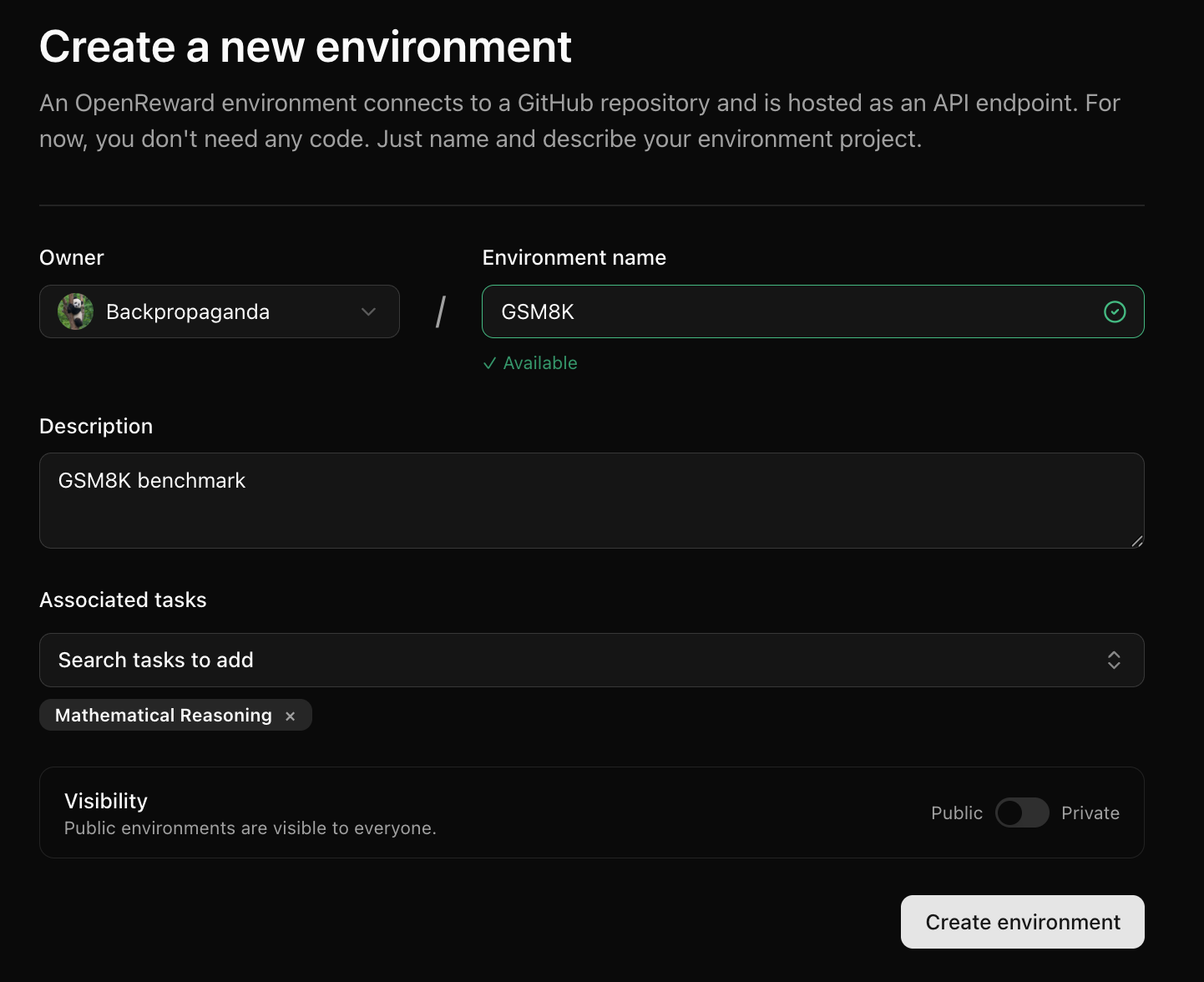
 Next, fill in information about the environment and press **Create Environment**:
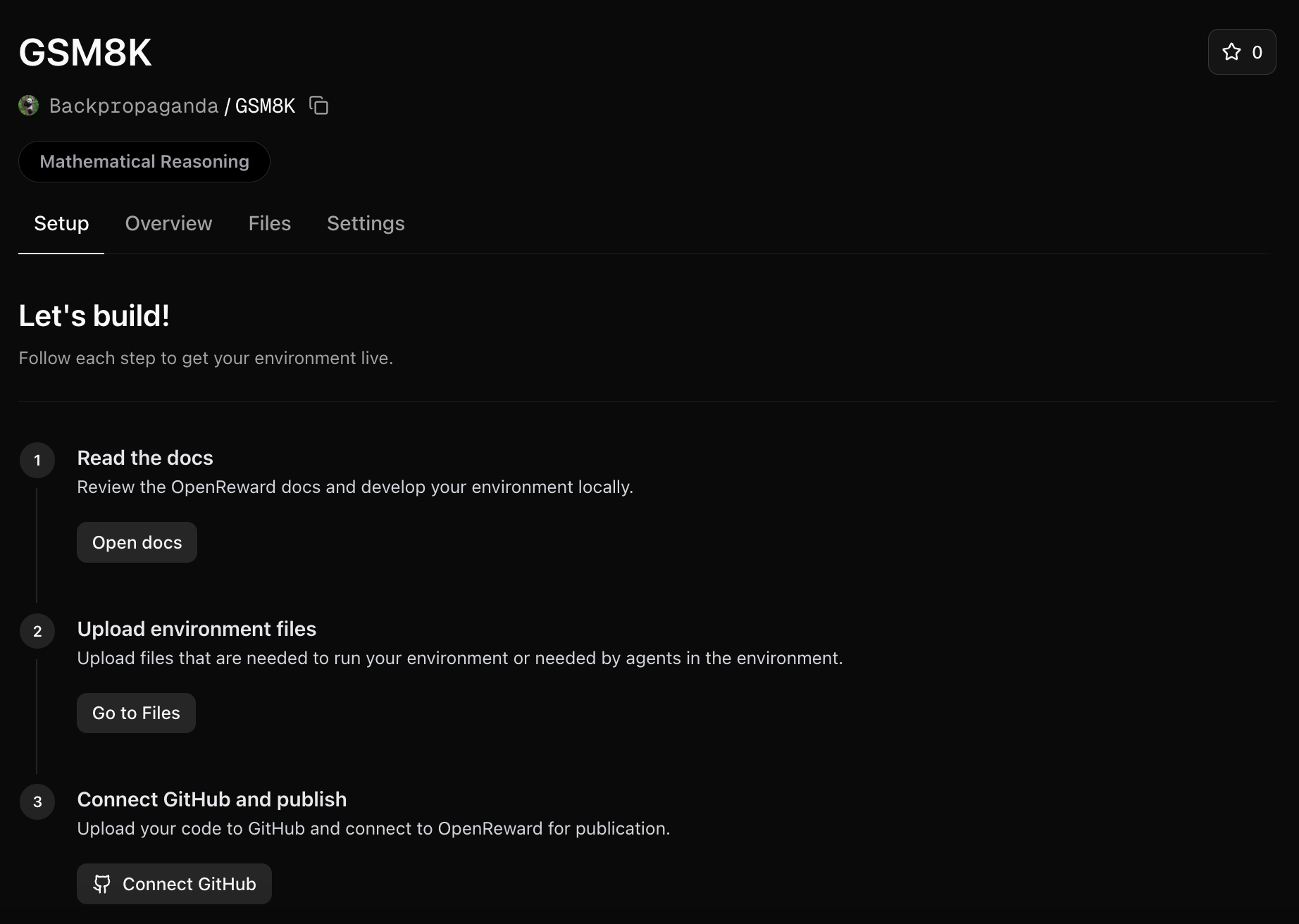
 You will be redirected to your new environment and will see setup instructions:
 ### Upload environment files
We will need a way to use the train and test parquet files in our environment. We'll upload these to the environment files:
Click on the **Files** tab and upload each file:
### Upload environment files
We will need a way to use the train and test parquet files in our environment. We'll upload these to the environment files:
Click on the **Files** tab and upload each file:
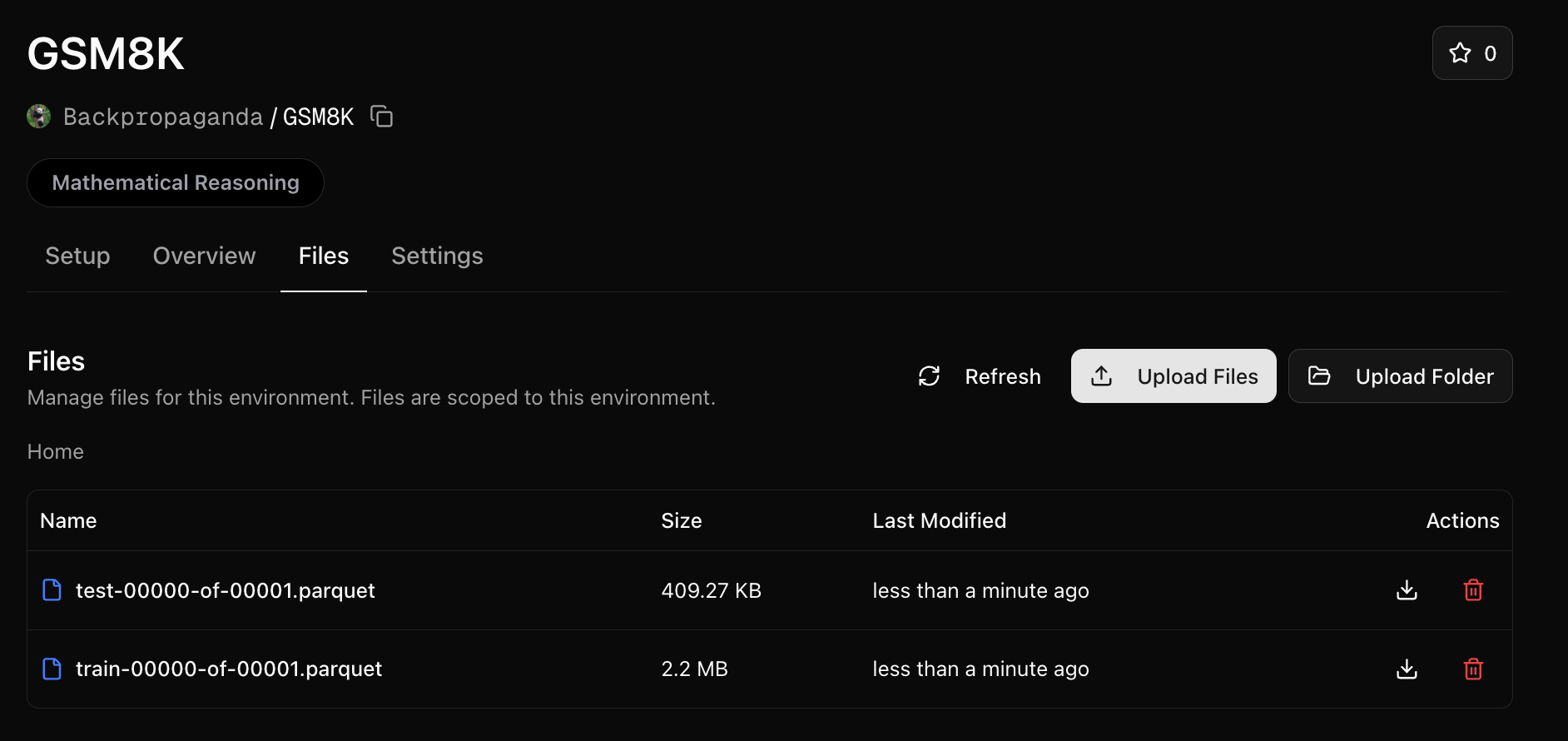 Files are mounted to the environment server at the `/orwd_data` directory.
We'll need to reference this folder in our `server.py`. Make the following change:
```python theme={null}
train_tasks = pd.read_parquet("/orwd_data/train-00000-of-00001.parquet").to_dict(orient="records")
test_tasks = pd.read_parquet("/orwd_data/test-00000-of-00001.parquet").to_dict(orient="records")
```
Note: you may want to set an environment variable instead of hardcoding like above so you can continue to test
locally (without the `/orwd_data` prefix).
### Write the Dockerfile and requirements
We'll need a `Dockerfile` in our repository:
```txt theme={null}
FROM python:3.11-slim
RUN apt update && apt upgrade -y && apt install -y \
curl
WORKDIR /app
# Copy requirements and install dependencies
COPY requirements.txt .
RUN pip install --no-cache-dir -r requirements.txt
# Copy application code
COPY server.py .
# Expose port
EXPOSE 8000
# Start the server
CMD ["python", "server.py"]
```
We'll need to update `requirements.txt`:
```txt theme={null}
fastapi>=0.115.12
openreward
pandas
pyarrow
uvicorn>=0.34.3
math-verify[antlr4_13_2]
```
### Push to GitHub and connect
Next, [push your environment code to a GitHub repository](https://github.com/new).
Once your GitHub repository is ready, go to your OpenReward environment and connect the repository:
Files are mounted to the environment server at the `/orwd_data` directory.
We'll need to reference this folder in our `server.py`. Make the following change:
```python theme={null}
train_tasks = pd.read_parquet("/orwd_data/train-00000-of-00001.parquet").to_dict(orient="records")
test_tasks = pd.read_parquet("/orwd_data/test-00000-of-00001.parquet").to_dict(orient="records")
```
Note: you may want to set an environment variable instead of hardcoding like above so you can continue to test
locally (without the `/orwd_data` prefix).
### Write the Dockerfile and requirements
We'll need a `Dockerfile` in our repository:
```txt theme={null}
FROM python:3.11-slim
RUN apt update && apt upgrade -y && apt install -y \
curl
WORKDIR /app
# Copy requirements and install dependencies
COPY requirements.txt .
RUN pip install --no-cache-dir -r requirements.txt
# Copy application code
COPY server.py .
# Expose port
EXPOSE 8000
# Start the server
CMD ["python", "server.py"]
```
We'll need to update `requirements.txt`:
```txt theme={null}
fastapi>=0.115.12
openreward
pandas
pyarrow
uvicorn>=0.34.3
math-verify[antlr4_13_2]
```
### Push to GitHub and connect
Next, [push your environment code to a GitHub repository](https://github.com/new).
Once your GitHub repository is ready, go to your OpenReward environment and connect the repository:
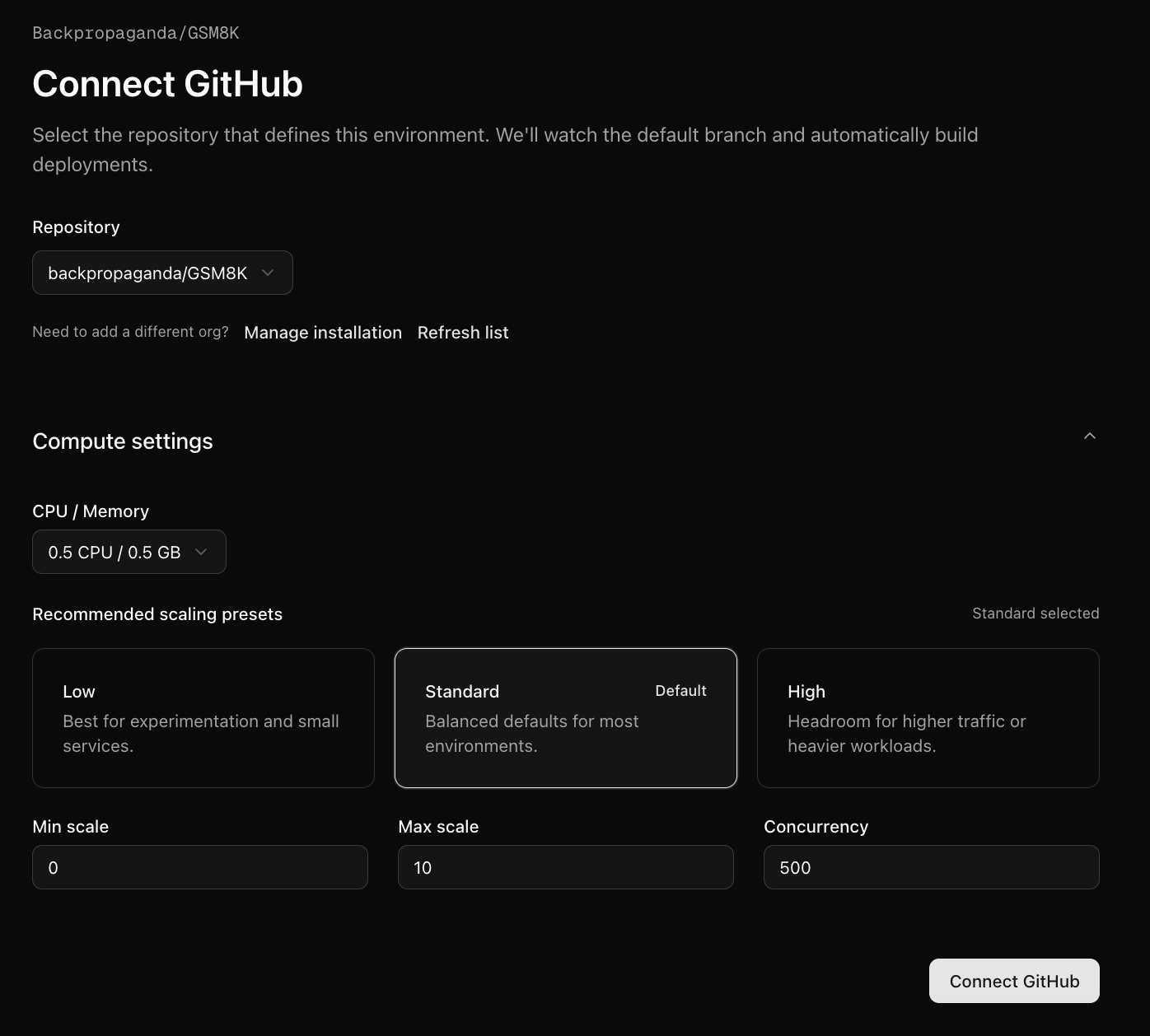 You will be given a choice for how much compute you would like to allocate for it. We'll use a low compute configuration since this is a simple environment.
Press Connect GitHub and your first build will begin.
To check the progress of the build, click the Deployments tab:
You will be given a choice for how much compute you would like to allocate for it. We'll use a low compute configuration since this is a simple environment.
Press Connect GitHub and your first build will begin.
To check the progress of the build, click the Deployments tab:
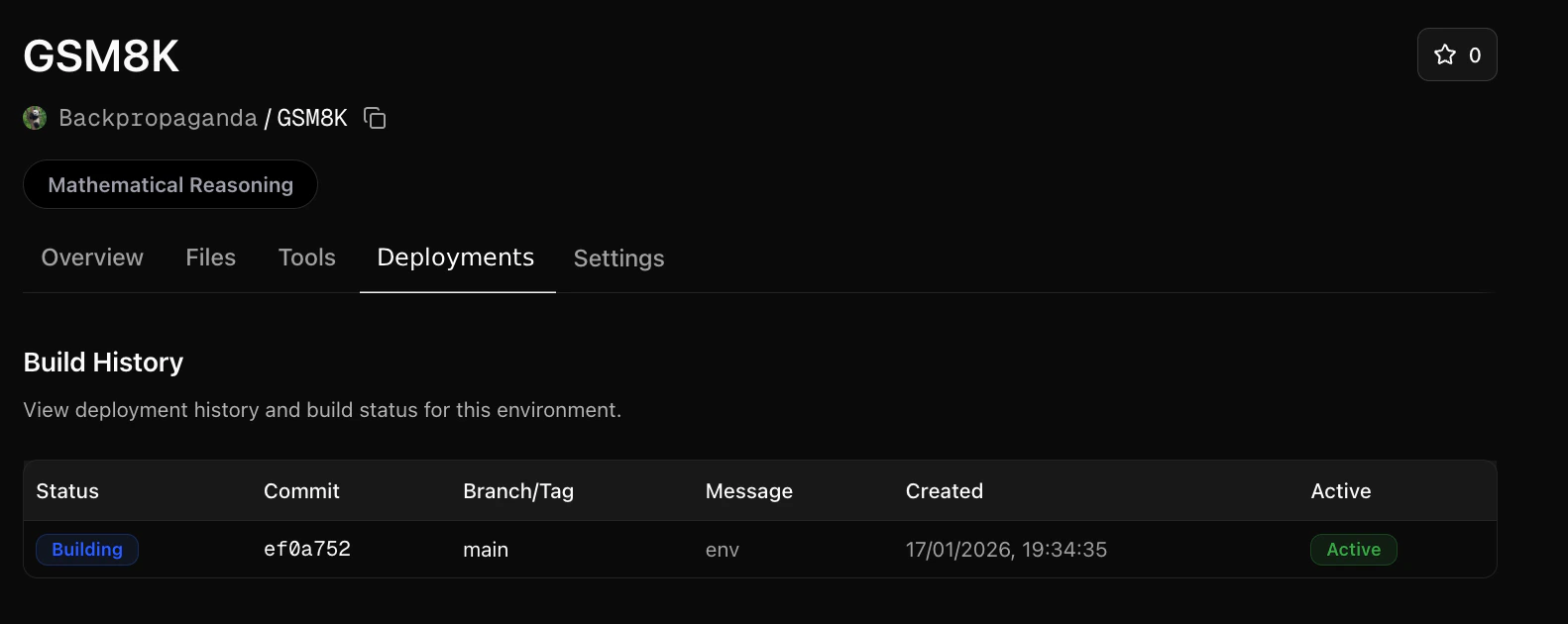 You can click on the latest build row to see logs:
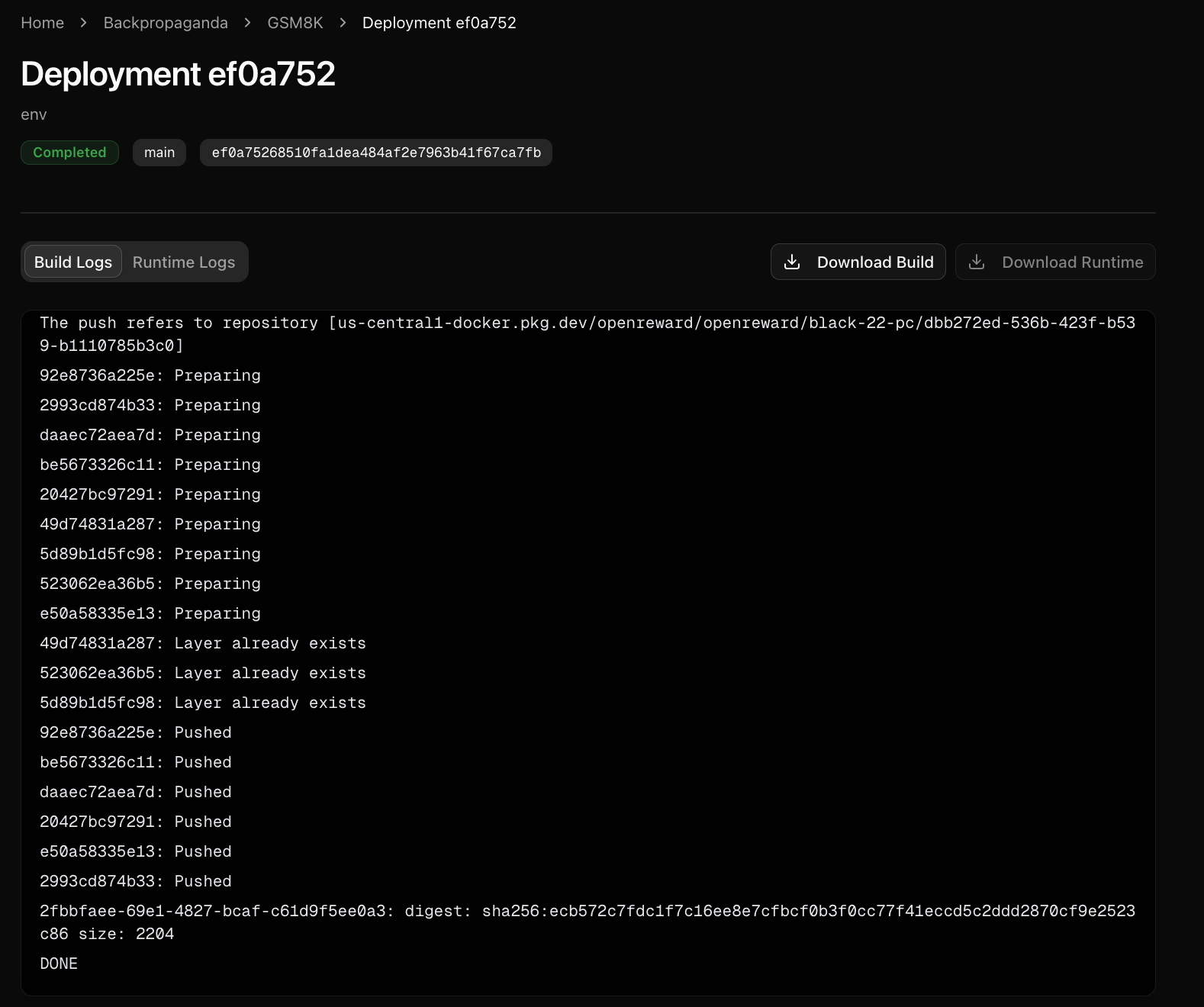 The build logs show the progress of building the environment. The runtime logs show any calls to the environment server, and can be useful for diagnosing errors.
### Sample from your environment
Now your environment is hosted on OpenReward, we can sample from it:
Make sure you have API keys for [OpenReward](https://openreward.ai/keys) and [OpenAI](https://platform.openai.com/api-keys), and set these as environment variables:
```bash theme={null}
export OPENAI_API_KEY='your-openai-api-key-here'
export OPENREWARD_API_KEY='your-openreward-api-key-here'
export E2B_API_KEY='your-e2b-api-key-here'
```
Save this as `quickstart.py`:
```python theme={null}
from openai import OpenAI
from openreward import OpenReward
import json
import os
or_client = OpenReward()
oai_client = OpenAI()
MODEL_NAME = "gpt-5.4"
environment = or_client.environments.get(name="yourusername/gsm8k")
tasks = environment.list_tasks(split="train")
tools = environment.list_tools(format="openai")
example_task = tasks[0]
with environment.session(task=example_task, secrets={"e2b_api_key": os.getenv("E2B_API_KEY")}) as session:
prompt = session.get_prompt()
input_list = [{"role": "user", "content": prompt[0].text}]
finished = False
print(input_list)
while not finished:
response = oai_client.responses.create(
model=MODEL_NAME,
tools=tools,
input=input_list
)
print(response.output)
input_list += response.output
for item in response.output:
if item.type == "function_call":
tool_result = session.call_tool(item.name, json.loads(str(item.arguments)))
reward = tool_result.reward
finished = tool_result.finished
input_list.append({
"type": "function_call_output",
"call_id": item.call_id,
"output": json.dumps({
"result": tool_result.blocks[0].text
})
})
print(input_list[-1])
if tool_result.finished:
finished = True
break
```
```bash theme={null}
python quickstart.py
```
Example output:
```bash theme={null}
[{'role': 'user', 'content': 'Natalia sold clips to 48 of her friends in April, and then she sold half as many clips in May. How many clips did Natalia sell altogether in April and May?\n\nUse the bash tool to execute commands.'}]
[ResponseFunctionToolCall(arguments='{"command":"python3 - << \'PY\'\\napril=48\\nmay=april/2\\nprint(april+may)\\nPY","timeout":100000}', call_id='call_TTS3bI1XFo0Gl88If18JZZ6l', name='bash', type='function_call', id='fc_04efdcdc3efb56c300699ada2d1fac81908551b7ab626fffd2', status='completed')]
{'type': 'function_call_output', 'call_id': 'call_TTS3bI1XFo0Gl88If18JZZ6l', 'output': '{"result": "72.0\\n"}'}
[ResponseOutputMessage(id='msg_04efdcdc3efb56c300699ada2f46d48190a6234d05fdc92310', content=[ResponseOutputText(annotations=[], text='Natalia sold 48 clips in April. In May she sold half of that: \\(48 \\div 2 = 24\\).\n\nAltogether, she sold \\(48 + 24 = 72\\) clips in April and May.', type='output_text', logprobs=[])], role='assistant', status='completed', type='message')]
[ResponseFunctionToolCall(arguments='{"answer":"Natalia sold 48 clips in April. In May she sold half of that: 48 ÷ 2 = 24. Altogether, she sold 48 + 24 = 72 clips."}', call_id='call_QPFUtfAviwYsozYSKadq78gZ', name='answer', type='function_call', id='fc_04efdcdc3efb56c300699ada30ddfc81909c7bd18e1398f223', status='completed')]
{'type': 'function_call_output', 'call_id': 'call_QPFUtfAviwYsozYSKadq78gZ', 'output': '{"result": "Correct!"}'}
```
Make sure you have API keys for [OpenReward](https://openreward.ai/keys) and [Anthropic](https://platform.claude.com/settings/keys), and set these as environment variables:
```bash theme={null}
export ANTHROPIC_API_KEY='your-anthropic-api-key-here'
export OPENREWARD_API_KEY='your-openreward-api-key-here'
export E2B_API_KEY='your-e2b-api-key-here'
```
Save this as `quickstart.py`:
```python theme={null}
import anthropic
from openreward import OpenReward
import json
import os
or_client = OpenReward()
ant_client = anthropic.Anthropic()
MODEL_NAME = "claude-sonnet-4-6"
environment = or_client.environments.get(name="yourusername/gsm8k")
tasks = environment.list_tasks(split="train")
tools = environment.list_tools(format="anthropic")
example_task = tasks[0]
with environment.session(task=example_task, secrets={"e2b_api_key": os.getenv("E2B_API_KEY")}) as session:
prompt = session.get_prompt()
messages = [{"role": "user", "content": prompt[0].text}]
finished = False
print(messages)
while not finished:
response = ant_client.messages.create(
model=MODEL_NAME,
max_tokens=4096,
tools=tools,
messages=messages
)
print(message)
messages.append(message)
if message.stop_reason == "tool_use":
tool_use = next(block for block in message.content if block.type == "tool_use")
tool_name = tool_use.name
tool_input = tool_use.input
tool_result = session.call_tool(tool_name, tool_input)
reward = tool_result.reward
finished = tool_result.finished
messages.append({
"role": "user",
"content": [
{
"type": "tool_result",
"tool_use_id": tool_use.id,
"content": tool_result.blocks[0].text
}
]
})
print(messages[-1])
if tool_result.finished:
finished = True
break
```
```bash theme={null}
python quickstart.py
```
Example output:
```bash theme={null}
[{'role': 'user', 'content': 'Natalia sold clips to 48 of her friends in April, and then she sold half as many clips in May. How many clips did Natalia sell altogether in April and May?\n\nUse the bash tool to execute commands.'}]
{'role': 'assistant', 'content': [TextBlock(text="I'll help you solve this math problem using the bash tool to calculate the answer.", type='text'), ToolUseBlock(id='toolu_01XbashToolExample123', input={'command': 'python3 - << \'PY\'\napril=48\nmay=april/2\nprint(april+may)\nPY', 'timeout': 100000}, name='bash', type='tool_use')]}
{'role': 'user', 'content': [{'type': 'tool_result', 'tool_use_id': 'toolu_01XbashToolExample123', 'content': '72.0\n'}]}
{'role': 'assistant', 'content': [TextBlock(text='Natalia sold 48 clips in April. In May she sold half of that: 48 ÷ 2 = 24.\n\nAltogether, she sold 48 + 24 = 72 clips in April and May.', type='text'), ToolUseBlock(id='toolu_01HEJromRn1bMcU8HM5jQZDF', input={'answer': 'Natalia sold 48 clips in April. In May she sold half of that: 48 ÷ 2 = 24. Altogether, she sold 48 + 24 = 72 clips.'}, name='answer', type='tool_use')]}
{'role': 'user', 'content': [{'type': 'tool_result', 'tool_use_id': 'toolu_01HEJromRn1bMcU8HM5jQZDF', 'content': 'Correct!'}]}
```
Make sure you have API keys for [OpenReward](https://openreward.ai/keys) and [Gemini](https://aistudio.google.com/app/apikey), and set these as environment variables:
```bash theme={null}
export GEMINI_API_KEY='your-gemini-api-key-here'
export OPENREWARD_API_KEY='your-openreward-api-key-here'
export E2B_API_KEY='your-e2b-api-key-here'
```
Save this as `quickstart.py`:
```python theme={null}
from google import genai
from google.genai import types
from openreward import OpenReward
import json
import os
or_client = OpenReward()
gem_client = genai.Client()
MODEL_NAME = "gemini-2.5-flash"
environment = or_client.environments.get(name="yourusername/gsm8k")
tasks = environment.list_tasks(split="train")
tools = environment.list_tools(format="google")
genai_tools = [types.Tool(function_declarations=[f]) for f in tools]
genai_config = types.GenerateContentConfig(tools=genai_tools)
example_task = tasks[0]
with environment.session(task=example_task, secrets={"e2b_api_key": os.getenv("E2B_API_KEY")}) as session:
prompt = session.get_prompt()
contents = [
types.Content(
role="user", parts=[types.Part(text=prompt[0].text)]
)
]
finished = False
print(contents)
while not finished:
response = gem_client.models.generate_content(
model=MODEL_NAME,
config=genai_config,
contents=contents
)
print(response.candidates[0].content)
contents.append(response.candidates[0].content) # Append the content from the model's response.
for part in response.candidates[0].content.parts:
if part.function_call:
tool_call = part.function_call
tool_result = session.call_tool(tool_call.name, tool_call.args)
reward = tool_result.reward
finished = tool_result.finished
function_response_part = types.Part.from_function_response(
name=tool_call.name,
response={"result": json.dumps({
"result": tool_result.blocks[0].text
})},
)
contents.append(types.Content(role="user", parts=[function_response_part])) # Append the function response
print(contents[-1])
if tool_result.finished:
finished = True
break
```
```bash theme={null}
python quickstart.py
```
Example output:
```bash theme={null}
[Content(
parts=[
Part(
text='Natalia sold clips to 48 of her friends in April, and then she sold half as many clips in May. How many clips did Natalia sell altogether in April and May?\n\nUse the bash tool to execute commands.'
),
],
role='user'
)]
parts=[Part(
function_call=FunctionCall(
args={
'command': "python3 - << 'PY'\napril=48\nmay=april/2\nprint(april+may)\nPY",
'timeout': 100000
},
name='bash'
)
)] role='model'
parts=[Part(
function_response=FunctionResponse(
name='bash',
response={
'result': '{"result": "72.0\\n"}'
}
)
)] role='user'
parts=[Part(
text='Natalia sold 48 clips in April. In May she sold half of that: 48 ÷ 2 = 24.\n\nAltogether, she sold 48 + 24 = 72 clips in April and May.'
)] role='model'
parts=[Part(
function_call=FunctionCall(
args={
'answer': 'Natalia sold 48 clips in April. In May she sold half of that: 48 ÷ 2 = 24. Altogether, she sold 48 + 24 = 72 clips.'
},
name='answer'
)
)] role='model'
parts=[Part(
function_response=FunctionResponse(
name='answer',
response={
'result': '{"result": "Correct!"}'
}
)
)] role='user'
```
Make sure you have API keys for [OpenReward](https://openreward.ai/keys) and [OpenRouter](https://openrouter.ai/keys), and set these as environment variables:
```bash theme={null}
export OPENROUTER_API_KEY='your-openrouter-api-key-here'
export OPENREWARD_API_KEY='your-openreward-api-key-here'
export E2B_API_KEY='your-e2b-api-key-here'
```
Save this as `quickstart.py`:
```python theme={null}
from openai import OpenAI
from openreward import OpenReward
import json
import os
or_client = OpenReward()
oai_client = OpenAI(
base_url="https://openrouter.ai/api/v1",
api_key=os.environ.get("OPENROUTER_API_KEY")
)
MODEL_NAME = "deepseek/deepseek-v3.2"
environment = or_client.environments.get(name="yourusername/gsm8k")
tasks = environment.list_tasks(split="train")
tools = environment.list_tools(format="openrouter")
example_task = tasks[0]
with environment.session(task=example_task, secrets={"e2b_api_key": os.getenv("E2B_API_KEY")}) as session:
prompt = await session.get_prompt()
input_list = [{"role": "user", "content": prompt[0].text}]
finished = False
print(input_list)
while not finished:
response = oai_client.chat.completions.create(
model=MODEL_NAME,
tools=tools,
messages=input_list
)
print(response)
input_list.append(response)
tool_calls = response.choices[0].message.tool_calls
if not tool_calls:
return
for tool_call in response.choices[0].message.tool_calls:
tool_name = tool_call.function.name
tool_args = json.loads(tool_call.function.arguments)
tool_result = await session.call_tool(tool_name, tool_args)
reward = tool_result.reward
finished = tool_result.finished
input_list.append({
"role": "tool",
"tool_call_id": tool_call.id,
"content": json.dumps({
"result": tool_result.blocks[0].text
})
})
print(input_list[-1])
if tool_result.finished:
finished = True
break
```
```bash theme={null}
python quickstart.py
```
Example output:
```bash theme={null}
[{'role': 'user', 'content': 'Natalia sold clips to 48 of her friends in April, and then she sold half as many clips in May. How many clips did Natalia sell altogether in April and May?\n\nUse the bash tool to execute commands.'}]
{'role': 'assistant', 'content': None, 'tool_calls': [ChatCompletionMessageFunctionToolCall(id='call_bash_example_001', function=Function(arguments='{"command":"python3 - << \'PY\'\\napril=48\\nmay=april/2\\nprint(april+may)\\nPY","timeout":100000}', name='bash'), type='function')]}
{'role': 'tool', 'tool_call_id': 'call_bash_example_001', 'content': '{"result": "72.0\\n"}'}
{'role': 'assistant', 'content': 'Natalia sold 48 clips in April. In May she sold half of that: 48 ÷ 2 = 24.\n\nAltogether, she sold 48 + 24 = 72 clips in April and May.', 'tool_calls': [ChatCompletionMessageFunctionToolCall(id='019af3af119248e0f1cd239559746033', function=Function(arguments='{"answer": "Natalia sold 48 clips in April. In May she sold half of that: 48 ÷ 2 = 24. Altogether, she sold 48 + 24 = 72 clips."}', name='answer'), type='function')]}
{'role': 'tool', 'tool_call_id': '019af3af119248e0f1cd239559746033', 'content': '{"result": "Correct!"}'}
```
If you are running with another provider, or using custom models, then here are the main principles to keep in mind.
Make sure you have API keys for [OpenReward](https://openreward.ai/keys) and [OpenRouter](https://openrouter.ai/keys), and set these as environment variables:
```bash theme={null}
export OPENROUTER_API_KEY='your-openrouter-api-key-here'
export OPENREWARD_API_KEY='your-openreward-api-key-here'
```
You'll need to use the OpenReward client to access the environment and its main information
```python theme={null}
from openreward import OpenReward
or_client = OpenReward()
environment = or_client.environments.get(name="yourusername/gsm8k")
tasks = environment.list_tasks(split="train")
tools = environment.list_tools(format="openai")
example_task = tasks[0]
```
```python theme={null}
async with environment.session(task=example_task) as session:
```
Using a context manager, we can start a session with the environment. This defines a scope in which
you can use the agent to call tools and get tool results.
Above we have selected the first task to sample from, which is a particular problem in the CTF environment.
You can get the prompt for the task as follows:
```python theme={null}
prompt = await session.get_prompt()
```
You will also need to pass in the `tools` into the context window of your model, usually somewhere in the system prompt.
An agent will usually keep interacting with an environment until it hits a termination state associated with the environment, or
some other imposed limit (e.g. maximum number of terms).
In a simple sequential agent model, this could be a while loop like:
```python theme={null}
while not finished:
```
where `finished` is a boolean.
In agentic environments, actions are treated as tool calls. That means you need to have a way to parse tool calls from your model's generations.
The key thing to note is that for OpenReward environment, a tool call requires specifying a name (`str`) and some arguments (`dict`).
To call a tool you will call:
```python theme={null}
tool_result = await session.call_tool(tool_name, tool_arguments)
```
This means that you will need to parse out the `tool_name` and `tool_arguments` from your model's generation and then parse this information into the
`call_tool` method.
If you have executed an available tool correctly, you will receive a `ToolOutput` output. This contains attributes for:
* `reward` : an (optional) `float` denoting reward. For example, submitting a correct math solution through a `submit_solution` tool might give a reward of `1.0`.
* `finished` : a `bool` specifying whether the episode is finished or not. For example, some tools may end the episode (if for example an agent submits a final answer through `submit_solution` in a math task).
* `data` : a `dict` with output of the executing of the tool. For example, the stdout of executing a `bash` tool. This information should be passed to the agent as feedback.
For our agent loop, some example control flow we might want after receiving a `ToolOutput` is:
* Recording `reward` for use in a policy gradient algorithm such as GRPO or PPO
* Breaking out of the core agent loop if `finished=True`
* Adding `data` to the context window as feedback and continuing with the next model generation
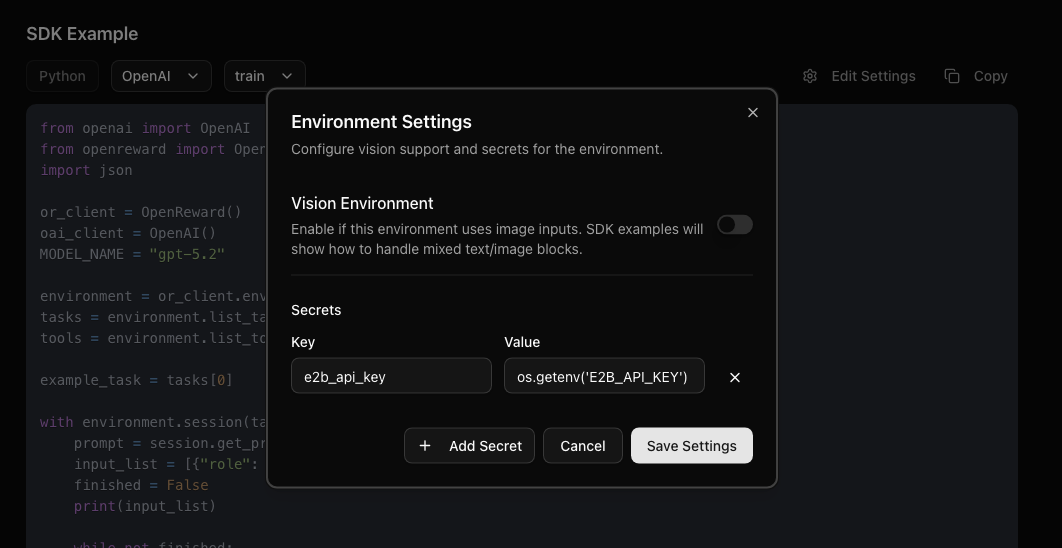
Importantly, if you are publishing your environment, you should update your SDK example and let users know that your environment needs an `E2B_API_KEY`. Press Edit Settings near the SDK example then insert the code for environment variables:
The build logs show the progress of building the environment. The runtime logs show any calls to the environment server, and can be useful for diagnosing errors.
### Sample from your environment
Now your environment is hosted on OpenReward, we can sample from it:
Make sure you have API keys for [OpenReward](https://openreward.ai/keys) and [OpenAI](https://platform.openai.com/api-keys), and set these as environment variables:
```bash theme={null}
export OPENAI_API_KEY='your-openai-api-key-here'
export OPENREWARD_API_KEY='your-openreward-api-key-here'
export E2B_API_KEY='your-e2b-api-key-here'
```
Save this as `quickstart.py`:
```python theme={null}
from openai import OpenAI
from openreward import OpenReward
import json
import os
or_client = OpenReward()
oai_client = OpenAI()
MODEL_NAME = "gpt-5.4"
environment = or_client.environments.get(name="yourusername/gsm8k")
tasks = environment.list_tasks(split="train")
tools = environment.list_tools(format="openai")
example_task = tasks[0]
with environment.session(task=example_task, secrets={"e2b_api_key": os.getenv("E2B_API_KEY")}) as session:
prompt = session.get_prompt()
input_list = [{"role": "user", "content": prompt[0].text}]
finished = False
print(input_list)
while not finished:
response = oai_client.responses.create(
model=MODEL_NAME,
tools=tools,
input=input_list
)
print(response.output)
input_list += response.output
for item in response.output:
if item.type == "function_call":
tool_result = session.call_tool(item.name, json.loads(str(item.arguments)))
reward = tool_result.reward
finished = tool_result.finished
input_list.append({
"type": "function_call_output",
"call_id": item.call_id,
"output": json.dumps({
"result": tool_result.blocks[0].text
})
})
print(input_list[-1])
if tool_result.finished:
finished = True
break
```
```bash theme={null}
python quickstart.py
```
Example output:
```bash theme={null}
[{'role': 'user', 'content': 'Natalia sold clips to 48 of her friends in April, and then she sold half as many clips in May. How many clips did Natalia sell altogether in April and May?\n\nUse the bash tool to execute commands.'}]
[ResponseFunctionToolCall(arguments='{"command":"python3 - << \'PY\'\\napril=48\\nmay=april/2\\nprint(april+may)\\nPY","timeout":100000}', call_id='call_TTS3bI1XFo0Gl88If18JZZ6l', name='bash', type='function_call', id='fc_04efdcdc3efb56c300699ada2d1fac81908551b7ab626fffd2', status='completed')]
{'type': 'function_call_output', 'call_id': 'call_TTS3bI1XFo0Gl88If18JZZ6l', 'output': '{"result": "72.0\\n"}'}
[ResponseOutputMessage(id='msg_04efdcdc3efb56c300699ada2f46d48190a6234d05fdc92310', content=[ResponseOutputText(annotations=[], text='Natalia sold 48 clips in April. In May she sold half of that: \\(48 \\div 2 = 24\\).\n\nAltogether, she sold \\(48 + 24 = 72\\) clips in April and May.', type='output_text', logprobs=[])], role='assistant', status='completed', type='message')]
[ResponseFunctionToolCall(arguments='{"answer":"Natalia sold 48 clips in April. In May she sold half of that: 48 ÷ 2 = 24. Altogether, she sold 48 + 24 = 72 clips."}', call_id='call_QPFUtfAviwYsozYSKadq78gZ', name='answer', type='function_call', id='fc_04efdcdc3efb56c300699ada30ddfc81909c7bd18e1398f223', status='completed')]
{'type': 'function_call_output', 'call_id': 'call_QPFUtfAviwYsozYSKadq78gZ', 'output': '{"result": "Correct!"}'}
```
Make sure you have API keys for [OpenReward](https://openreward.ai/keys) and [Anthropic](https://platform.claude.com/settings/keys), and set these as environment variables:
```bash theme={null}
export ANTHROPIC_API_KEY='your-anthropic-api-key-here'
export OPENREWARD_API_KEY='your-openreward-api-key-here'
export E2B_API_KEY='your-e2b-api-key-here'
```
Save this as `quickstart.py`:
```python theme={null}
import anthropic
from openreward import OpenReward
import json
import os
or_client = OpenReward()
ant_client = anthropic.Anthropic()
MODEL_NAME = "claude-sonnet-4-6"
environment = or_client.environments.get(name="yourusername/gsm8k")
tasks = environment.list_tasks(split="train")
tools = environment.list_tools(format="anthropic")
example_task = tasks[0]
with environment.session(task=example_task, secrets={"e2b_api_key": os.getenv("E2B_API_KEY")}) as session:
prompt = session.get_prompt()
messages = [{"role": "user", "content": prompt[0].text}]
finished = False
print(messages)
while not finished:
response = ant_client.messages.create(
model=MODEL_NAME,
max_tokens=4096,
tools=tools,
messages=messages
)
print(message)
messages.append(message)
if message.stop_reason == "tool_use":
tool_use = next(block for block in message.content if block.type == "tool_use")
tool_name = tool_use.name
tool_input = tool_use.input
tool_result = session.call_tool(tool_name, tool_input)
reward = tool_result.reward
finished = tool_result.finished
messages.append({
"role": "user",
"content": [
{
"type": "tool_result",
"tool_use_id": tool_use.id,
"content": tool_result.blocks[0].text
}
]
})
print(messages[-1])
if tool_result.finished:
finished = True
break
```
```bash theme={null}
python quickstart.py
```
Example output:
```bash theme={null}
[{'role': 'user', 'content': 'Natalia sold clips to 48 of her friends in April, and then she sold half as many clips in May. How many clips did Natalia sell altogether in April and May?\n\nUse the bash tool to execute commands.'}]
{'role': 'assistant', 'content': [TextBlock(text="I'll help you solve this math problem using the bash tool to calculate the answer.", type='text'), ToolUseBlock(id='toolu_01XbashToolExample123', input={'command': 'python3 - << \'PY\'\napril=48\nmay=april/2\nprint(april+may)\nPY', 'timeout': 100000}, name='bash', type='tool_use')]}
{'role': 'user', 'content': [{'type': 'tool_result', 'tool_use_id': 'toolu_01XbashToolExample123', 'content': '72.0\n'}]}
{'role': 'assistant', 'content': [TextBlock(text='Natalia sold 48 clips in April. In May she sold half of that: 48 ÷ 2 = 24.\n\nAltogether, she sold 48 + 24 = 72 clips in April and May.', type='text'), ToolUseBlock(id='toolu_01HEJromRn1bMcU8HM5jQZDF', input={'answer': 'Natalia sold 48 clips in April. In May she sold half of that: 48 ÷ 2 = 24. Altogether, she sold 48 + 24 = 72 clips.'}, name='answer', type='tool_use')]}
{'role': 'user', 'content': [{'type': 'tool_result', 'tool_use_id': 'toolu_01HEJromRn1bMcU8HM5jQZDF', 'content': 'Correct!'}]}
```
Make sure you have API keys for [OpenReward](https://openreward.ai/keys) and [Gemini](https://aistudio.google.com/app/apikey), and set these as environment variables:
```bash theme={null}
export GEMINI_API_KEY='your-gemini-api-key-here'
export OPENREWARD_API_KEY='your-openreward-api-key-here'
export E2B_API_KEY='your-e2b-api-key-here'
```
Save this as `quickstart.py`:
```python theme={null}
from google import genai
from google.genai import types
from openreward import OpenReward
import json
import os
or_client = OpenReward()
gem_client = genai.Client()
MODEL_NAME = "gemini-2.5-flash"
environment = or_client.environments.get(name="yourusername/gsm8k")
tasks = environment.list_tasks(split="train")
tools = environment.list_tools(format="google")
genai_tools = [types.Tool(function_declarations=[f]) for f in tools]
genai_config = types.GenerateContentConfig(tools=genai_tools)
example_task = tasks[0]
with environment.session(task=example_task, secrets={"e2b_api_key": os.getenv("E2B_API_KEY")}) as session:
prompt = session.get_prompt()
contents = [
types.Content(
role="user", parts=[types.Part(text=prompt[0].text)]
)
]
finished = False
print(contents)
while not finished:
response = gem_client.models.generate_content(
model=MODEL_NAME,
config=genai_config,
contents=contents
)
print(response.candidates[0].content)
contents.append(response.candidates[0].content) # Append the content from the model's response.
for part in response.candidates[0].content.parts:
if part.function_call:
tool_call = part.function_call
tool_result = session.call_tool(tool_call.name, tool_call.args)
reward = tool_result.reward
finished = tool_result.finished
function_response_part = types.Part.from_function_response(
name=tool_call.name,
response={"result": json.dumps({
"result": tool_result.blocks[0].text
})},
)
contents.append(types.Content(role="user", parts=[function_response_part])) # Append the function response
print(contents[-1])
if tool_result.finished:
finished = True
break
```
```bash theme={null}
python quickstart.py
```
Example output:
```bash theme={null}
[Content(
parts=[
Part(
text='Natalia sold clips to 48 of her friends in April, and then she sold half as many clips in May. How many clips did Natalia sell altogether in April and May?\n\nUse the bash tool to execute commands.'
),
],
role='user'
)]
parts=[Part(
function_call=FunctionCall(
args={
'command': "python3 - << 'PY'\napril=48\nmay=april/2\nprint(april+may)\nPY",
'timeout': 100000
},
name='bash'
)
)] role='model'
parts=[Part(
function_response=FunctionResponse(
name='bash',
response={
'result': '{"result": "72.0\\n"}'
}
)
)] role='user'
parts=[Part(
text='Natalia sold 48 clips in April. In May she sold half of that: 48 ÷ 2 = 24.\n\nAltogether, she sold 48 + 24 = 72 clips in April and May.'
)] role='model'
parts=[Part(
function_call=FunctionCall(
args={
'answer': 'Natalia sold 48 clips in April. In May she sold half of that: 48 ÷ 2 = 24. Altogether, she sold 48 + 24 = 72 clips.'
},
name='answer'
)
)] role='model'
parts=[Part(
function_response=FunctionResponse(
name='answer',
response={
'result': '{"result": "Correct!"}'
}
)
)] role='user'
```
Make sure you have API keys for [OpenReward](https://openreward.ai/keys) and [OpenRouter](https://openrouter.ai/keys), and set these as environment variables:
```bash theme={null}
export OPENROUTER_API_KEY='your-openrouter-api-key-here'
export OPENREWARD_API_KEY='your-openreward-api-key-here'
export E2B_API_KEY='your-e2b-api-key-here'
```
Save this as `quickstart.py`:
```python theme={null}
from openai import OpenAI
from openreward import OpenReward
import json
import os
or_client = OpenReward()
oai_client = OpenAI(
base_url="https://openrouter.ai/api/v1",
api_key=os.environ.get("OPENROUTER_API_KEY")
)
MODEL_NAME = "deepseek/deepseek-v3.2"
environment = or_client.environments.get(name="yourusername/gsm8k")
tasks = environment.list_tasks(split="train")
tools = environment.list_tools(format="openrouter")
example_task = tasks[0]
with environment.session(task=example_task, secrets={"e2b_api_key": os.getenv("E2B_API_KEY")}) as session:
prompt = await session.get_prompt()
input_list = [{"role": "user", "content": prompt[0].text}]
finished = False
print(input_list)
while not finished:
response = oai_client.chat.completions.create(
model=MODEL_NAME,
tools=tools,
messages=input_list
)
print(response)
input_list.append(response)
tool_calls = response.choices[0].message.tool_calls
if not tool_calls:
return
for tool_call in response.choices[0].message.tool_calls:
tool_name = tool_call.function.name
tool_args = json.loads(tool_call.function.arguments)
tool_result = await session.call_tool(tool_name, tool_args)
reward = tool_result.reward
finished = tool_result.finished
input_list.append({
"role": "tool",
"tool_call_id": tool_call.id,
"content": json.dumps({
"result": tool_result.blocks[0].text
})
})
print(input_list[-1])
if tool_result.finished:
finished = True
break
```
```bash theme={null}
python quickstart.py
```
Example output:
```bash theme={null}
[{'role': 'user', 'content': 'Natalia sold clips to 48 of her friends in April, and then she sold half as many clips in May. How many clips did Natalia sell altogether in April and May?\n\nUse the bash tool to execute commands.'}]
{'role': 'assistant', 'content': None, 'tool_calls': [ChatCompletionMessageFunctionToolCall(id='call_bash_example_001', function=Function(arguments='{"command":"python3 - << \'PY\'\\napril=48\\nmay=april/2\\nprint(april+may)\\nPY","timeout":100000}', name='bash'), type='function')]}
{'role': 'tool', 'tool_call_id': 'call_bash_example_001', 'content': '{"result": "72.0\\n"}'}
{'role': 'assistant', 'content': 'Natalia sold 48 clips in April. In May she sold half of that: 48 ÷ 2 = 24.\n\nAltogether, she sold 48 + 24 = 72 clips in April and May.', 'tool_calls': [ChatCompletionMessageFunctionToolCall(id='019af3af119248e0f1cd239559746033', function=Function(arguments='{"answer": "Natalia sold 48 clips in April. In May she sold half of that: 48 ÷ 2 = 24. Altogether, she sold 48 + 24 = 72 clips."}', name='answer'), type='function')]}
{'role': 'tool', 'tool_call_id': '019af3af119248e0f1cd239559746033', 'content': '{"result": "Correct!"}'}
```
If you are running with another provider, or using custom models, then here are the main principles to keep in mind.
Make sure you have API keys for [OpenReward](https://openreward.ai/keys) and [OpenRouter](https://openrouter.ai/keys), and set these as environment variables:
```bash theme={null}
export OPENROUTER_API_KEY='your-openrouter-api-key-here'
export OPENREWARD_API_KEY='your-openreward-api-key-here'
```
You'll need to use the OpenReward client to access the environment and its main information
```python theme={null}
from openreward import OpenReward
or_client = OpenReward()
environment = or_client.environments.get(name="yourusername/gsm8k")
tasks = environment.list_tasks(split="train")
tools = environment.list_tools(format="openai")
example_task = tasks[0]
```
```python theme={null}
async with environment.session(task=example_task) as session:
```
Using a context manager, we can start a session with the environment. This defines a scope in which
you can use the agent to call tools and get tool results.
Above we have selected the first task to sample from, which is a particular problem in the CTF environment.
You can get the prompt for the task as follows:
```python theme={null}
prompt = await session.get_prompt()
```
You will also need to pass in the `tools` into the context window of your model, usually somewhere in the system prompt.
An agent will usually keep interacting with an environment until it hits a termination state associated with the environment, or
some other imposed limit (e.g. maximum number of terms).
In a simple sequential agent model, this could be a while loop like:
```python theme={null}
while not finished:
```
where `finished` is a boolean.
In agentic environments, actions are treated as tool calls. That means you need to have a way to parse tool calls from your model's generations.
The key thing to note is that for OpenReward environment, a tool call requires specifying a name (`str`) and some arguments (`dict`).
To call a tool you will call:
```python theme={null}
tool_result = await session.call_tool(tool_name, tool_arguments)
```
This means that you will need to parse out the `tool_name` and `tool_arguments` from your model's generation and then parse this information into the
`call_tool` method.
If you have executed an available tool correctly, you will receive a `ToolOutput` output. This contains attributes for:
* `reward` : an (optional) `float` denoting reward. For example, submitting a correct math solution through a `submit_solution` tool might give a reward of `1.0`.
* `finished` : a `bool` specifying whether the episode is finished or not. For example, some tools may end the episode (if for example an agent submits a final answer through `submit_solution` in a math task).
* `data` : a `dict` with output of the executing of the tool. For example, the stdout of executing a `bash` tool. This information should be passed to the agent as feedback.
For our agent loop, some example control flow we might want after receiving a `ToolOutput` is:
* Recording `reward` for use in a policy gradient algorithm such as GRPO or PPO
* Breaking out of the core agent loop if `finished=True`
* Adding `data` to the context window as feedback and continuing with the next model generation
Importantly, if you are publishing your environment, you should update your SDK example and let users know that your environment needs an `E2B_API_KEY`. Press Edit Settings near the SDK example then insert the code for environment variables: