> ## Documentation Index
> Fetch the complete documentation index at: https://docs.openreward.ai/llms.txt
> Use this file to discover all available pages before exploring further.
# Training with SkyRL
> Train language models with reinforcement learning using SkyRL and OpenReward environments
Thanks to [@tyfeng1997](https://x.com/tyfeng1997) for contributing the SkyRL × OpenReward integration upstream in [SkyRL PR #1458](https://github.com/NovaSky-AI/SkyRL/pull/1458).
## Goals
* Set up distributed RL training with SkyRL
* Configure an OpenReward environment for training
* Monitor training progress with WandB and OpenReward rollouts
* Train a model on the WhoDunit environment using GRPO
## Prerequisites
* The [SkyRL](https://github.com/NovaSky-AI/SkyRL) repository cloned locally
* A [Modal](https://modal.com/) account and the Modal CLI (`pip install modal && modal setup`)
* An OpenReward [account](https://openreward.ai/) and [API key](https://openreward.ai/keys)
* *(Optional)* A [WandB](https://wandb.ai/) account and API key — pass `LOGGER=console` to skip
* Python 3.11+
* NVIDIA GPUs (the example targets 4× A100 via Modal)
## Setup
[SkyRL](https://github.com/NovaSky-AI/SkyRL) is NovaSky-AI's modular full-stack RL training framework for LLMs. It uses Ray for distributed orchestration, vLLM for fast rollout generation, and FSDP2 for distributed training. SkyRL ships with a ready-to-run OpenReward integration under `examples/train_integrations/openreward`, which trains agents on OpenReward environments using GRPO and is set up to launch on Modal-provisioned A100s.
First, clone the SkyRL repository and install the Modal CLI:
```bash theme={null}
git clone https://github.com/NovaSky-AI/SkyRL.git
cd SkyRL
pip install modal && modal setup
```
The example uses [`uv`](https://github.com/astral-sh/uv) to install SkyRL and the OpenReward client inside the Modal container at run time, so there's nothing else to install on your machine.
Export the API keys you'll forward into Modal in the next steps:
```bash theme={null}
export OPENREWARD_API_KEY=your_openreward_key_here
export WANDB_API_KEY=your_wandb_key_here # optional
export OPENREWARD_UPLOAD_ROLLOUT=true # upload rollouts to the OpenReward dashboard
export OPENREWARD_RUN_NAME=skyrl-openreward-whodunit # groups uploads from one training run
```
Each Modal command below passes these variables through inside the `--command` string so the training container can read them.
## Understanding the Training Pipeline
The training pipeline combines three services:
* **SkyRL** provides the GRPO trainer, Ray-based orchestration, vLLM rollout engine, and FSDP2 training backend. The example is configured to run on Modal's GPU infrastructure (4× A100 by default).
* **OpenReward** provides the environments and tasks. A `BaseTextEnv` adapter (`OpenRewardEnv` in `env.py`) wraps OpenReward's session API into SkyRL-Gym, with exponential-backoff retries for transient API errors.
* **WandB** tracks metrics, logs, and training progress.
During training, SkyRL samples multi-turn tool-use rollouts from your OpenReward environment via vLLM, computes GRPO advantages with KL regularization against a reference policy, and updates the model. Trajectories are optionally uploaded to OpenReward so you can inspect each step's tool call, tool result, and reward on the OpenReward dashboard.
## Selecting an Environment
Browse available environments at [OpenReward](https://openreward.ai/environments):
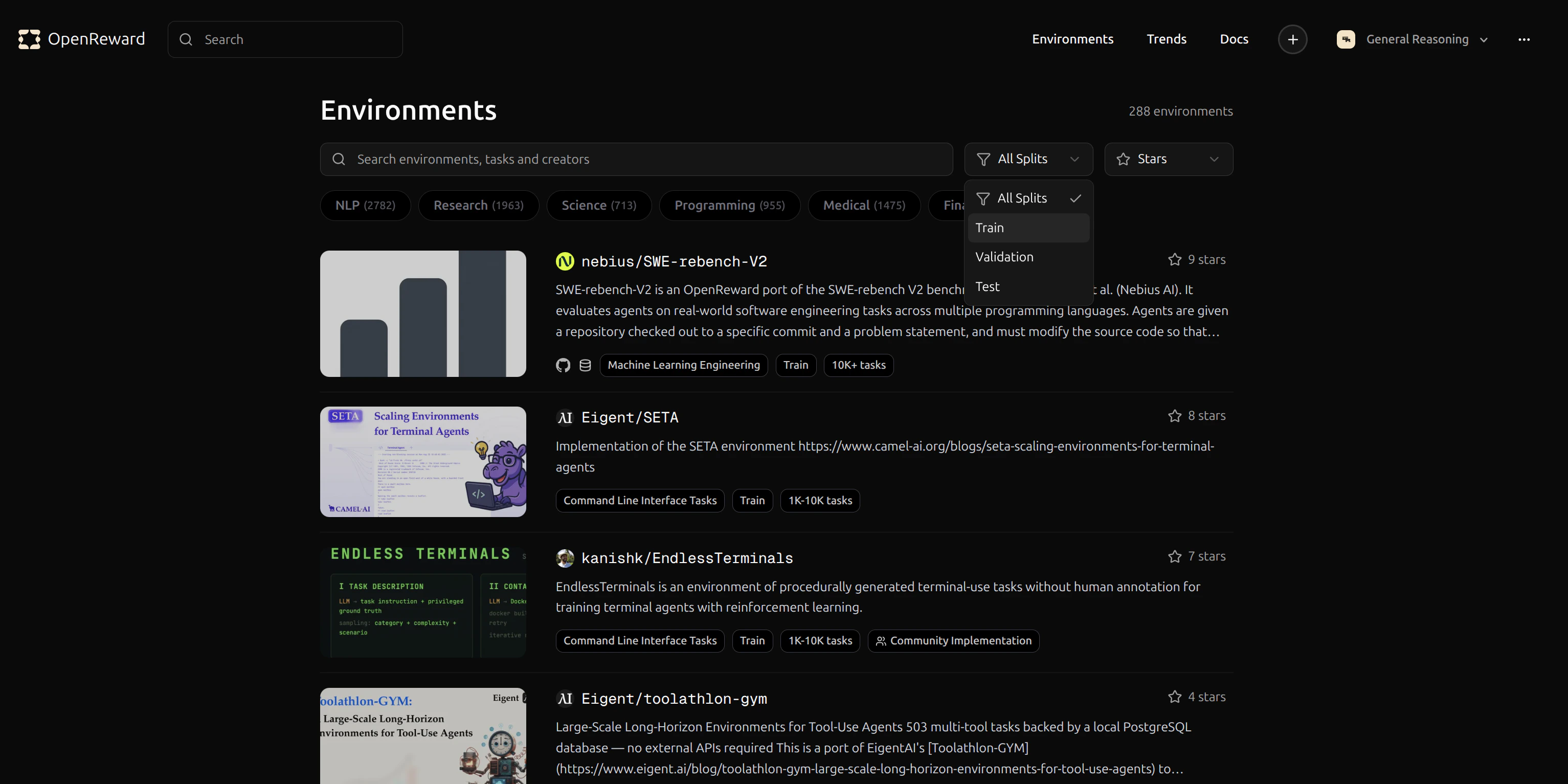 Let's use the `GeneralReasoning/WhoDunit` environment for this tutorial. This environment challenges agents to solve murder mystery puzzles by gathering information about suspects, weapons, and locations.
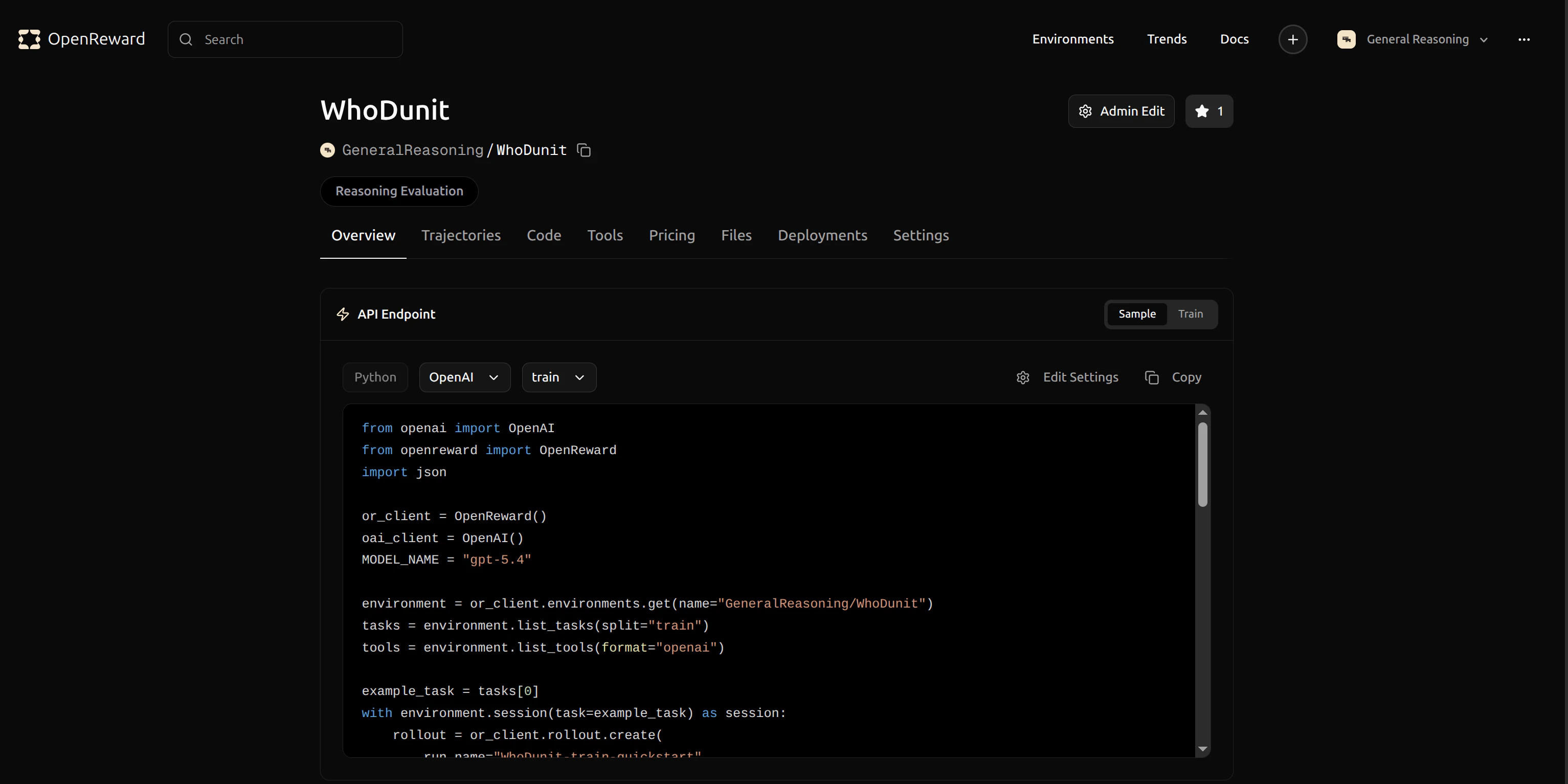 Click the copy button to copy the identifier `GeneralReasoning/WhoDunit` for use in your dataset preparation command.
## Configuration
Training is controlled by two things: the task dataset produced by `prepare_tasks.py`, and CLI overrides passed through `run_openreward.sh` to SkyRL's config system. The script also reads a few env vars (`MODEL`, `NUM_GPUS`, `LOGGER`, `RUN_NAME`) for the most common knobs.
### `prepare_tasks.py` — task dataset
This script queries OpenReward for tasks, opens a temporary session per task to fetch the initial prompt and tool specs, and writes a Parquet dataset that SkyRL loads at training time. It runs as a one-shot job on a small Modal GPU:
```bash theme={null}
MODAL_GPU=L4:1 modal run examples/train_integrations/modal/main.py \
--command "OPENREWARD_API_KEY=$OPENREWARD_API_KEY \
uv run --isolated --with openreward --with pyarrow \
python examples/train_integrations/openreward/prepare_tasks.py \
--env GeneralReasoning/WhoDunit \
--split train \
--max-tasks 50 \
--output /root/data/openreward/train.parquet"
```
You can train on multiple environments simultaneously by passing `--env` more than once — the dataset row's `env_name` column tells `OpenRewardEnv` which environment to open at rollout time:
```bash theme={null}
MODAL_GPU=L4:1 modal run examples/train_integrations/modal/main.py \
--command "OPENREWARD_API_KEY=$OPENREWARD_API_KEY \
uv run --isolated --with openreward --with pyarrow \
python examples/train_integrations/openreward/prepare_tasks.py \
--env GeneralReasoning/WhoDunit \
--env GeneralReasoning/CTF \
--split train \
--output /root/data/openreward/train.parquet"
```
### `run_openreward.sh` — trainer flags
All training, optimizer, generator, and placement settings are overridable. The script forwards any positional args (`$@`) to SkyRL's config system, so you can append `key=value` overrides to the `bash run_openreward.sh ...` line. The most common ones:
| Flag | Default | Description |
| ------------------------------------------------- | -------------------------- | ------------------------------------------- |
| `MODEL` (env var) | `Qwen/Qwen2.5-3B-Instruct` | HuggingFace checkpoint (set via env var) |
| `NUM_GPUS` (env var) | `4` | GPUs for colocated policy + ref + inference |
| `trainer.epochs` | `3` | Training epochs over the dataset |
| `trainer.train_batch_size` | `16` | Unique prompts per training step |
| `trainer.policy.optimizer_config.lr` | `1.0e-6` | Learning rate |
| `trainer.algorithm.advantage_estimator` | `grpo` | RL advantage estimator |
| `trainer.algorithm.kl_loss_coef` | `0.001` | KL regularization coefficient |
| `trainer.strategy` | `fsdp2` | Distributed training strategy |
| `trainer.max_prompt_length` | `2048` | Max prompt tokens |
| `generator.inference_engine.num_engines` | `4` | Number of vLLM engines |
| `generator.inference_engine.tensor_parallel_size` | `1` | TP size per engine |
| `generator.n_samples_per_prompt` | `4` | Rollouts per prompt (GRPO group size) |
| `generator.max_turns` | `10` | Max agent-environment turns per episode |
| `generator.sampling_params.temperature` | `1.0` | Sampling temperature |
| `generator.sampling_params.max_generate_length` | `1024` | Max generation tokens per turn |
| `environment.env_class` | `openreward` | Always `openreward` for this example |
Total rollouts per step = `train_batch_size × n_samples_per_prompt = 16 × 4 = 64`.
## Running Training
Training is a two-step process. First, fetch tasks from OpenReward into a Parquet dataset (see [Configuration](#configuration) above for the full command). Then launch training on a 4× A100 Modal job:
```bash theme={null}
MODAL_GPU=A100:4 modal run examples/train_integrations/modal/main.py \
--command "OPENREWARD_API_KEY=$OPENREWARD_API_KEY \
WANDB_API_KEY=$WANDB_API_KEY \
OPENREWARD_UPLOAD_ROLLOUT=true \
OPENREWARD_RUN_NAME=$OPENREWARD_RUN_NAME \
bash examples/train_integrations/openreward/run_openreward.sh"
```
Common overrides — append `key=value` arguments to the `bash` line and they'll be forwarded to SkyRL's config system:
```bash theme={null}
# Shorter run, fewer turns per episode
MODAL_GPU=A100:4 modal run examples/train_integrations/modal/main.py \
--command "OPENREWARD_API_KEY=$OPENREWARD_API_KEY \
bash examples/train_integrations/openreward/run_openreward.sh \
trainer.epochs=2 generator.max_turns=8"
# Larger model (use the MODEL env var the script reads)
MODAL_GPU=A100:4 modal run examples/train_integrations/modal/main.py \
--command "OPENREWARD_API_KEY=$OPENREWARD_API_KEY MODEL=Qwen/Qwen2.5-7B-Instruct \
bash examples/train_integrations/openreward/run_openreward.sh"
# Tune GRPO group size and batch
MODAL_GPU=A100:4 modal run examples/train_integrations/modal/main.py \
--command "OPENREWARD_API_KEY=$OPENREWARD_API_KEY \
bash examples/train_integrations/openreward/run_openreward.sh \
generator.n_samples_per_prompt=8 trainer.train_batch_size=32"
```
The training process will:
1. Spin up the Modal container, install SkyRL + OpenReward via `uv`, and initialize Ray
2. Register `OpenRewardEnv` with SkyRL-Gym inside each Ray worker
3. Load the policy with FSDP2 and start the colocated vLLM inference engines
4. Sample multi-turn tool-use rollouts from the WhoDunit environment
5. Compute GRPO advantages and update the policy with KL regularization against the reference model
6. Log metrics to WandB and upload rollouts to OpenReward
7. Save FSDP2 checkpoints periodically
## Monitoring Training
Your training metrics will appear in your WandB dashboard. You can track rewards, episode length, and pass-rate metrics in real time.
Click the copy button to copy the identifier `GeneralReasoning/WhoDunit` for use in your dataset preparation command.
## Configuration
Training is controlled by two things: the task dataset produced by `prepare_tasks.py`, and CLI overrides passed through `run_openreward.sh` to SkyRL's config system. The script also reads a few env vars (`MODEL`, `NUM_GPUS`, `LOGGER`, `RUN_NAME`) for the most common knobs.
### `prepare_tasks.py` — task dataset
This script queries OpenReward for tasks, opens a temporary session per task to fetch the initial prompt and tool specs, and writes a Parquet dataset that SkyRL loads at training time. It runs as a one-shot job on a small Modal GPU:
```bash theme={null}
MODAL_GPU=L4:1 modal run examples/train_integrations/modal/main.py \
--command "OPENREWARD_API_KEY=$OPENREWARD_API_KEY \
uv run --isolated --with openreward --with pyarrow \
python examples/train_integrations/openreward/prepare_tasks.py \
--env GeneralReasoning/WhoDunit \
--split train \
--max-tasks 50 \
--output /root/data/openreward/train.parquet"
```
You can train on multiple environments simultaneously by passing `--env` more than once — the dataset row's `env_name` column tells `OpenRewardEnv` which environment to open at rollout time:
```bash theme={null}
MODAL_GPU=L4:1 modal run examples/train_integrations/modal/main.py \
--command "OPENREWARD_API_KEY=$OPENREWARD_API_KEY \
uv run --isolated --with openreward --with pyarrow \
python examples/train_integrations/openreward/prepare_tasks.py \
--env GeneralReasoning/WhoDunit \
--env GeneralReasoning/CTF \
--split train \
--output /root/data/openreward/train.parquet"
```
### `run_openreward.sh` — trainer flags
All training, optimizer, generator, and placement settings are overridable. The script forwards any positional args (`$@`) to SkyRL's config system, so you can append `key=value` overrides to the `bash run_openreward.sh ...` line. The most common ones:
| Flag | Default | Description |
| ------------------------------------------------- | -------------------------- | ------------------------------------------- |
| `MODEL` (env var) | `Qwen/Qwen2.5-3B-Instruct` | HuggingFace checkpoint (set via env var) |
| `NUM_GPUS` (env var) | `4` | GPUs for colocated policy + ref + inference |
| `trainer.epochs` | `3` | Training epochs over the dataset |
| `trainer.train_batch_size` | `16` | Unique prompts per training step |
| `trainer.policy.optimizer_config.lr` | `1.0e-6` | Learning rate |
| `trainer.algorithm.advantage_estimator` | `grpo` | RL advantage estimator |
| `trainer.algorithm.kl_loss_coef` | `0.001` | KL regularization coefficient |
| `trainer.strategy` | `fsdp2` | Distributed training strategy |
| `trainer.max_prompt_length` | `2048` | Max prompt tokens |
| `generator.inference_engine.num_engines` | `4` | Number of vLLM engines |
| `generator.inference_engine.tensor_parallel_size` | `1` | TP size per engine |
| `generator.n_samples_per_prompt` | `4` | Rollouts per prompt (GRPO group size) |
| `generator.max_turns` | `10` | Max agent-environment turns per episode |
| `generator.sampling_params.temperature` | `1.0` | Sampling temperature |
| `generator.sampling_params.max_generate_length` | `1024` | Max generation tokens per turn |
| `environment.env_class` | `openreward` | Always `openreward` for this example |
Total rollouts per step = `train_batch_size × n_samples_per_prompt = 16 × 4 = 64`.
## Running Training
Training is a two-step process. First, fetch tasks from OpenReward into a Parquet dataset (see [Configuration](#configuration) above for the full command). Then launch training on a 4× A100 Modal job:
```bash theme={null}
MODAL_GPU=A100:4 modal run examples/train_integrations/modal/main.py \
--command "OPENREWARD_API_KEY=$OPENREWARD_API_KEY \
WANDB_API_KEY=$WANDB_API_KEY \
OPENREWARD_UPLOAD_ROLLOUT=true \
OPENREWARD_RUN_NAME=$OPENREWARD_RUN_NAME \
bash examples/train_integrations/openreward/run_openreward.sh"
```
Common overrides — append `key=value` arguments to the `bash` line and they'll be forwarded to SkyRL's config system:
```bash theme={null}
# Shorter run, fewer turns per episode
MODAL_GPU=A100:4 modal run examples/train_integrations/modal/main.py \
--command "OPENREWARD_API_KEY=$OPENREWARD_API_KEY \
bash examples/train_integrations/openreward/run_openreward.sh \
trainer.epochs=2 generator.max_turns=8"
# Larger model (use the MODEL env var the script reads)
MODAL_GPU=A100:4 modal run examples/train_integrations/modal/main.py \
--command "OPENREWARD_API_KEY=$OPENREWARD_API_KEY MODEL=Qwen/Qwen2.5-7B-Instruct \
bash examples/train_integrations/openreward/run_openreward.sh"
# Tune GRPO group size and batch
MODAL_GPU=A100:4 modal run examples/train_integrations/modal/main.py \
--command "OPENREWARD_API_KEY=$OPENREWARD_API_KEY \
bash examples/train_integrations/openreward/run_openreward.sh \
generator.n_samples_per_prompt=8 trainer.train_batch_size=32"
```
The training process will:
1. Spin up the Modal container, install SkyRL + OpenReward via `uv`, and initialize Ray
2. Register `OpenRewardEnv` with SkyRL-Gym inside each Ray worker
3. Load the policy with FSDP2 and start the colocated vLLM inference engines
4. Sample multi-turn tool-use rollouts from the WhoDunit environment
5. Compute GRPO advantages and update the policy with KL regularization against the reference model
6. Log metrics to WandB and upload rollouts to OpenReward
7. Save FSDP2 checkpoints periodically
## Monitoring Training
Your training metrics will appear in your WandB dashboard. You can track rewards, episode length, and pass-rate metrics in real time.
 Key SkyRL + OpenReward metrics:
* `reward/avg_pass_at_4` — success rate across the 4 GRPO rollouts per prompt
* `reward/avg_raw_reward` — mean raw reward across all episodes
* `reward/mean_positive_reward` — mean reward on successful episodes
* `environment/turns` — average number of turns per episode
* `environment/total_reward` / `environment/num_rewards` — cumulative environment signal
In the reference PR run (Qwen2.5-3B-Instruct, 100 WhoDunit tasks, 3 epochs = 18 steps), `avg_pass_at_4` climbed from \~0.70 to \~0.90 and `mean_positive_reward` improved from \~0.09 to \~0.16 — clear learning signal even from a small 3B model with limited data.
Detailed rollout data is uploaded to your OpenReward runs page so you can inspect each trajectory:
Key SkyRL + OpenReward metrics:
* `reward/avg_pass_at_4` — success rate across the 4 GRPO rollouts per prompt
* `reward/avg_raw_reward` — mean raw reward across all episodes
* `reward/mean_positive_reward` — mean reward on successful episodes
* `environment/turns` — average number of turns per episode
* `environment/total_reward` / `environment/num_rewards` — cumulative environment signal
In the reference PR run (Qwen2.5-3B-Instruct, 100 WhoDunit tasks, 3 epochs = 18 steps), `avg_pass_at_4` climbed from \~0.70 to \~0.90 and `mean_positive_reward` improved from \~0.09 to \~0.16 — clear learning signal even from a small 3B model with limited data.
Detailed rollout data is uploaded to your OpenReward runs page so you can inspect each trajectory:
 Click a rollout to see every tool call, tool result, and per-step reward:
 ## Additional tips
### Rollout visualization
Rollout upload is controlled by the `OPENREWARD_UPLOAD_ROLLOUT` environment variable and `OPENREWARD_RUN_NAME` groups rollouts from a single training run together. Set `OPENREWARD_UPLOAD_ROLLOUT=false` to skip uploads.
### Retry & resilience
`OpenRewardEnv` wraps OpenReward API calls in an exponential-backoff retry (handling 502/503/429 and connection errors), so transient service hiccups won't crash a long training run.
### Memory considerations
Multi-turn tool-use rollouts produce long sequences (system prompt + tool specs + N turns of generation + tool responses). If you hit OOM during training:
* Reduce `trainer.micro_forward_batch_size_per_gpu` and `trainer.micro_train_batch_size_per_gpu` (default `4` each in `run_openreward.sh`)
* Reduce `trainer.max_prompt_length` or `generator.sampling_params.max_generate_length`
* The reference model already runs with `trainer.ref.fsdp_config.cpu_offload=true` by default; you can also offload the policy with `trainer.policy.fsdp_config.cpu_offload=true`
* For larger models, increase tensor parallelism: `generator.inference_engine.tensor_parallel_size=2`
### Disabling WandB
If you don't want to use WandB, pass `LOGGER=console` and the script will print metrics to stdout instead:
```bash theme={null}
MODAL_GPU=A100:4 modal run examples/train_integrations/modal/main.py \
--command "OPENREWARD_API_KEY=$OPENREWARD_API_KEY LOGGER=console \
bash examples/train_integrations/openreward/run_openreward.sh"
```
### Secrets for environments with external services
Some environments require additional secrets (e.g. `OPENAI_API_KEY` for LLM graders, search API keys). Forward them through the Modal `--command` string the same way as `OPENREWARD_API_KEY` so the training container picks them up.
## Next Steps
Learn how to run evaluations on your trained model
Create custom environments for training
Learn more about SkyRL's capabilities
## Additional tips
### Rollout visualization
Rollout upload is controlled by the `OPENREWARD_UPLOAD_ROLLOUT` environment variable and `OPENREWARD_RUN_NAME` groups rollouts from a single training run together. Set `OPENREWARD_UPLOAD_ROLLOUT=false` to skip uploads.
### Retry & resilience
`OpenRewardEnv` wraps OpenReward API calls in an exponential-backoff retry (handling 502/503/429 and connection errors), so transient service hiccups won't crash a long training run.
### Memory considerations
Multi-turn tool-use rollouts produce long sequences (system prompt + tool specs + N turns of generation + tool responses). If you hit OOM during training:
* Reduce `trainer.micro_forward_batch_size_per_gpu` and `trainer.micro_train_batch_size_per_gpu` (default `4` each in `run_openreward.sh`)
* Reduce `trainer.max_prompt_length` or `generator.sampling_params.max_generate_length`
* The reference model already runs with `trainer.ref.fsdp_config.cpu_offload=true` by default; you can also offload the policy with `trainer.policy.fsdp_config.cpu_offload=true`
* For larger models, increase tensor parallelism: `generator.inference_engine.tensor_parallel_size=2`
### Disabling WandB
If you don't want to use WandB, pass `LOGGER=console` and the script will print metrics to stdout instead:
```bash theme={null}
MODAL_GPU=A100:4 modal run examples/train_integrations/modal/main.py \
--command "OPENREWARD_API_KEY=$OPENREWARD_API_KEY LOGGER=console \
bash examples/train_integrations/openreward/run_openreward.sh"
```
### Secrets for environments with external services
Some environments require additional secrets (e.g. `OPENAI_API_KEY` for LLM graders, search API keys). Forward them through the Modal `--command` string the same way as `OPENREWARD_API_KEY` so the training container picks them up.
## Next Steps
Learn how to run evaluations on your trained model
Create custom environments for training
Learn more about SkyRL's capabilities