

Goals
- Make an accounting environment using the OpenReward library.
- Deploy the environment to OpenReward.
- Sample from the environment using a model of your choice.
Prerequisites
- An OpenReward account
- An OpenReward API key
- An API key and SDK for your model provider of choice (e.g. OpenAI, Anthropic, Google, OpenRouter)
- You have completed the Your First Environment tutorial and understand the main components of ORS.
Setup
First, make sure you’ve installed the openreward library:pip install openreward
sandbox template:
orwd init accountantenv --template sandbox
cd accountantenv && ls
server.py, sandbox_env.py, Dockerfile and requirements.txt.
If you look inside sandbox_env.py, you can see a SandboxEnv is defined.
It looks very similar to any other ORS environment, but the key addition is a sandbox:
self.sandbox_settings = SandboxSettings(
    environment="YourUsername/SandboxEnv",
    image="generalreasoning/python-ds:3.12-tools",
    machine_size="0.5:1",
    block_network=False,
    bucket_config=SandboxBucketConfig(
        mount_path="/tmp/sandbox/",
        read_only=True
    )
)

or_client = AsyncOpenReward(api_key=secrets.get("api_key"))
self.sandbox = or_client.sandbox(self.sandbox_settings)
AsyncOpenReward client for sandbox environments.
The key thing to note is that a sandbox is tied to an environment on OpenReward, so unlike the ordinary ORS servers, we’ll need to connect our server to an OpenReward environment space to utilise this compute.
To do this, let’s create our environment on OpenReward. We’ll create an environment called AccountantEnv.
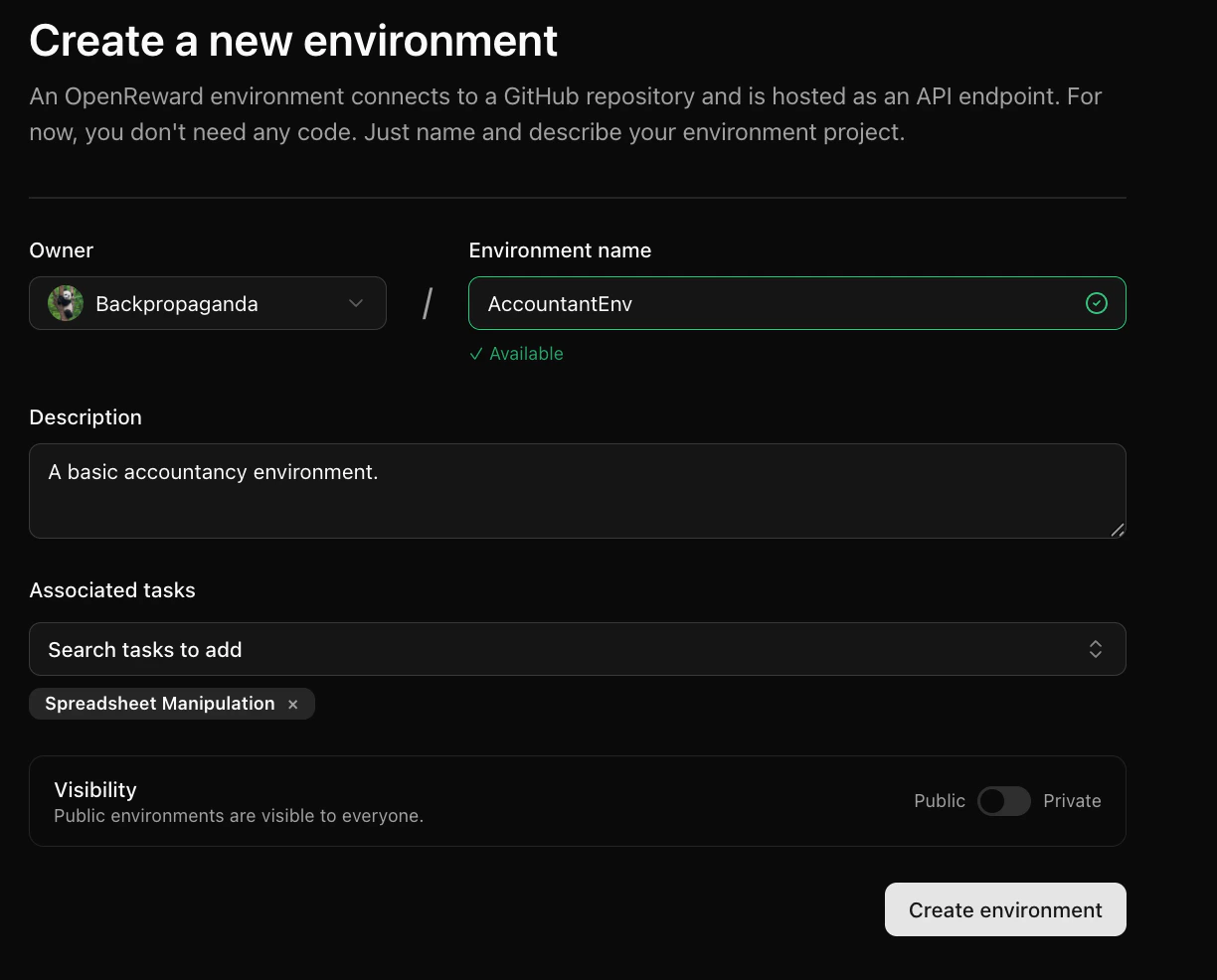
sandbox_env.py (make sure to replace with your username):
self.sandbox_settings = SandboxSettings(
    environment="YourUsername/AccountantEnv",
    image="generalreasoning/python-ds:3.12-tools",
    machine_size="0.5:1",
    block_network=False,
    bucket_config=SandboxBucketConfig(
        mount_path="/tmp/sandbox/",
        read_only=True,
        only_dir="agent"
    )
)

or_client = AsyncOpenReward(api_key=secrets.get("api_key"))
self.sandbox = or_client.sandbox(self.sandbox_settings)
server.py:
pip install -r requirements.txt
python server.py
INFO:     Started server process [92466]
INFO:     Waiting for application startup.
INFO:     Application startup complete.
INFO:     Uvicorn running on http://0.0.0.0:8080 (Press CTRL+C to quit)
8080. We will leave this running.
Now let’s see how we can interact with the SandboxEnv. Choose your model provider of choice and write the following file to test_agent.py:
- OpenAI
- Anthropic
- Google
- OpenRouter
1
Set your API keys
Make sure you have API keys for OpenAI and OpenReward, and set these as environment variables:
export OPENAI_API_KEY='your-openai-api-key-here'
export OPENREWARD_API_KEY='your-openreward-api-key-here'
2
Create your code
Save this as
test_agent.py:import json
import asyncio
import os
from openai import AsyncOpenAI
from openreward import AsyncOpenReward
async def main():
or_client = AsyncOpenReward()
oai_client = AsyncOpenAI()
MODEL_NAME = "gpt-5.4"
ENV_NAME = "SandboxEnvironment"
SPLIT = "test"
OR_API_KEY = os.getenv("OPENREWARD_API_KEY")
environment = or_client.environments.get(name=ENV_NAME, base_url="http://localhost:8080")
tasks = await environment.list_tasks(split=SPLIT)
tools = await environment.list_tools(format="openai")
print(f"Found {len(tasks)} tasks")
# Test first scenario
for task in tasks[:1]:
async with environment.session(
task=task,
secrets={"api_key": OR_API_KEY}
) as session:
prompt = await session.get_prompt()
input_list = [{"role": "user", "content": prompt[0].text}]
finished = False
print(f"\n=== Initial Prompt ===")
print(f"Role: {input_list[0]['role']}")
print(f"Content: {input_list[0]['content'][:100]}..." if len(input_list[0]['content']) > 100 else f"Content: {input_list[0]['content']}")
print(f"Finished: {finished}\n")
while not finished:
response = await oai_client.responses.create(
model=MODEL_NAME,
tools=tools,
input=input_list
)
last_output = response.output[-1]
print(f"=== Model Response ===")
print(f"Type: {last_output.type}")
if hasattr(last_output, 'name'):
print(f"Function: {last_output.name}")
if hasattr(last_output, 'content'):
print(f"Content: {last_output.content[:100]}..." if len(str(last_output.content)) > 100 else f"Content: {last_output.content}")
print()
input_list += response.output
for item in response.output:
if item.type == "function_call":
print(f"Tool: {item.name}")
print(f"Arguments: {item.arguments}")
tool_result = await session.call_tool(
item.name,
json.loads(str(item.arguments))
)
reward = tool_result.reward
finished = tool_result.finished
input_list.append({
"type": "function_call_output",
"call_id": item.call_id,
"output": tool_result.blocks[0].text
})
print(f"=== Tool Result Logged ===")
print(f"Call ID: {input_list[-1]['call_id']}")
print(f"Output: {input_list[-1]['output'][:100]}..." if len(input_list[-1]['output']) > 100 else f"Output: {input_list[-1]['output']}")
print(f"Reward: {reward:.4f} | Finished: {finished}\n")
if finished:
print(f"FINISHED!")
break
if __name__ == "__main__":
asyncio.run(main())
3
Run your code
python test_agent.py
1
Set your API keys
Make sure you have API keys for Anthropic and OpenReward, and set these as environment variables:
export ANTHROPIC_API_KEY='your-anthropic-api-key-here'
export OPENREWARD_API_KEY='your-openreward-api-key-here'
2
Create your code
Save this as
test_agent.py:import json
import asyncio
import os
import anthropic
from openreward import AsyncOpenReward
async def main():
or_client = AsyncOpenReward()
ant_client = anthropic.AsyncAnthropic()
MODEL_NAME = "claude-sonnet-4-6"
ENV_NAME = "SandboxEnvironment"
SPLIT = "test"
OR_API_KEY = os.getenv("OPENREWARD_API_KEY")
environment = or_client.environments.get(name=ENV_NAME, base_url="http://localhost:8080")
tasks = await environment.list_tasks(split=SPLIT)
tools = await environment.list_tools(format="anthropic")
print(f"Found {len(tasks)} tasks")
# Test first scenario
for task in tasks[:1]:
async with environment.session(
task=task,
secrets={"api_key": OR_API_KEY}
) as session:
prompt = await session.get_prompt()
messages = [{"role": "user", "content": prompt[0].text}]
finished = False
print(f"\n=== Initial Prompt ===")
print(f"Role: {messages[0]['role']}")
print(f"Content: {messages[0]['content'][:100]}..." if len(messages[0]['content']) > 100 else f"Content: {messages[0]['content']}")
print(f"Finished: {finished}\n")
while not finished:
response = await ant_client.messages.create(
model=MODEL_NAME,
max_tokens=4096,
tools=tools,
messages=messages
)
print(f"=== Model Response ===")
print(f"Stop reason: {response.stop_reason}")
print(f"Content: {response.content}\n")
messages.append({
"role": "assistant",
"content": response.content,
})
if response.stop_reason == "tool_use":
tool_uses = [b for b in response.content if getattr(b, "type", None) == "tool_use"]
if not tool_uses:
raise RuntimeError("stop_reason was tool_use but no tool_use blocks found")
tool_result_blocks = []
for tu in tool_uses:
tool_name = tu.name
tool_input = tu.input
print(f"Tool: {tool_name}")
print(f"Arguments: {tool_input}")
try:
tr = await session.call_tool(tool_name, tool_input)
text_parts = []
for b in getattr(tr, "blocks", []) or []:
t = getattr(b, "text", None)
if t is not None:
text_parts.append(t)
else:
text_parts.append(str(b))
tool_text = "".join(text_parts)
tool_result_blocks.append({
"type": "tool_result",
"tool_use_id": tu.id,
"content": tool_text,
})
reward = tr.reward
finished = getattr(tr, "finished", False)
print(f"=== Tool Result Logged ===")
print(f"Tool use ID: {tu.id}")
print(f"Output: {tool_text[:100]}..." if len(tool_text) > 100 else f"Output: {tool_text}")
print(f"Reward: {reward:.4f} | Finished: {finished}\n")
if finished:
print(f"FINISHED!")
break
except Exception as e:
tool_result_blocks.append({
"type": "tool_result",
"tool_use_id": tu.id,
"content": f"Tool execution failed: {type(e).__name__}: {e}",
"is_error": True,
})
messages.append({
"role": "user",
"content": tool_result_blocks
})
if finished:
break
else:
break
if __name__ == "__main__":
asyncio.run(main())
3
Run your code
python test_agent.py
1
Set your API keys
Make sure you have API keys for Gemini and OpenReward, and set these as environment variables:
export GEMINI_API_KEY='your-gemini-api-key-here'
export OPENREWARD_API_KEY='your-openreward-api-key-here'
2
Create your code
Save this as
test_agent.py:import json
import asyncio
import os
from google import genai
from google.genai import types
from openreward import AsyncOpenReward
async def main():
or_client = AsyncOpenReward()
gem_client = genai.Client()
MODEL_NAME = "gemini-2.5-flash"
ENV_NAME = "SandboxEnvironment"
SPLIT = "test"
OR_API_KEY = os.getenv("OPENREWARD_API_KEY")
environment = or_client.environments.get(name=ENV_NAME, base_url="http://localhost:8080")
tasks = await environment.list_tasks(split=SPLIT)
tools = await environment.list_tools(format="google")
genai_tools = [types.Tool(function_declarations=tools)]
genai_config = types.GenerateContentConfig(tools=genai_tools)
print(f"Found {len(tasks)} tasks")
# Test first scenario
for task in tasks[:1]:
async with environment.session(
task=task,
secrets={"api_key": OR_API_KEY}
) as session:
prompt = await session.get_prompt()
contents = [
types.Content(
role="user", parts=[types.Part(text=prompt[0].text)]
)
]
finished = False
print(f"\n=== Initial Prompt ===")
print(f"Role: user")
print(f"Content: {prompt[0].text[:100]}..." if len(prompt[0].text) > 100 else f"Content: {prompt[0].text}")
print(f"Finished: {finished}\n")
while not finished:
response = gem_client.models.generate_content(
model=MODEL_NAME,
config=genai_config,
contents=contents
)
print(f"=== Model Response ===")
print(f"Content: {response.candidates[0].content}\n")
contents.append(response.candidates[0].content)
for part in response.candidates[0].content.parts:
if part.function_call:
tool_call = part.function_call
print(f"Tool: {tool_call.name}")
print(f"Arguments: {tool_call.args}")
tool_result = await session.call_tool(tool_call.name, tool_call.args)
reward = tool_result.reward
finished = tool_result.finished
function_response_part = types.Part.from_function_response(
name=tool_call.name,
response={"result": tool_result.blocks[0].text},
)
contents.append(types.Content(role="user", parts=[function_response_part]))
print(f"=== Tool Result Logged ===")
print(f"Tool: {tool_call.name}")
print(f"Output: {tool_result.blocks[0].text[:100]}..." if len(tool_result.blocks[0].text) > 100 else f"Output: {tool_result.blocks[0].text}")
print(f"Reward: {reward:.4f} | Finished: {finished}\n")
if finished:
print(f"FINISHED!")
break
if finished:
break
if __name__ == "__main__":
asyncio.run(main())
3
Run your code
python test_agent.py
1
Set your API keys
Make sure you have API keys for OpenRouter and OpenReward, and set these as environment variables:
export OPENROUTER_API_KEY='your-openrouter-api-key-here'
export OPENREWARD_API_KEY='your-openreward-api-key-here'
2
Create your code
Save this as
test_agent.py:import json
import asyncio
import os
from openai import AsyncOpenAI
from openreward import AsyncOpenReward
async def main():
or_client = AsyncOpenReward()
oai_client = AsyncOpenAI(
base_url="https://openrouter.ai/api/v1",
api_key=os.environ.get("OPENROUTER_API_KEY")
)
MODEL_NAME = "deepseek/deepseek-v3.2"
ENV_NAME = "SandboxEnvironment"
SPLIT = "test"
OR_API_KEY = os.getenv("OPENREWARD_API_KEY")
environment = or_client.environments.get(name=ENV_NAME, base_url="http://localhost:8080")
tasks = await environment.list_tasks(split=SPLIT)
tools = await environment.list_tools(format="openrouter")
print(f"Found {len(tasks)} tasks")
# Test first scenario
for task in tasks[:1]:
async with environment.session(
task=task,
secrets={"api_key": OR_API_KEY}
) as session:
prompt = await session.get_prompt()
messages = [{"role": "user", "content": prompt[0].text}]
finished = False
print(f"\n=== Initial Prompt ===")
print(f"Role: {messages[0]['role']}")
print(f"Content: {messages[0]['content'][:100]}..." if len(messages[0]['content']) > 100 else f"Content: {messages[0]['content']}")
print(f"Finished: {finished}\n")
while not finished:
response = await oai_client.chat.completions.create(
model=MODEL_NAME,
tools=tools,
messages=messages
)
print(f"=== Model Response ===")
print(f"Message: {response.choices[0].message}\n")
messages.append({
"role": "assistant",
"content": response.choices[0].message.content,
"tool_calls": response.choices[0].message.tool_calls
})
tool_calls = response.choices[0].message.tool_calls
if not tool_calls:
break
for tool_call in tool_calls:
tool_name = tool_call.function.name
tool_args = json.loads(tool_call.function.arguments)
print(f"Tool: {tool_name}")
print(f"Arguments: {tool_args}")
tool_result = await session.call_tool(tool_name, tool_args)
reward = tool_result.reward
finished = tool_result.finished
messages.append({
"role": "tool",
"tool_call_id": tool_call.id,
"content": json.dumps({
"result": tool_result.blocks[0].text
})
})
print(f"=== Tool Result Logged ===")
print(f"Tool call ID: {tool_call.id}")
print(f"Output: {tool_result.blocks[0].text[:100]}..." if len(tool_result.blocks[0].text) > 100 else f"Output: {tool_result.blocks[0].text}")
print(f"Reward: {reward:.4f} | Finished: {finished}\n")
if finished:
print(f"FINISHED!")
break
if finished:
break
if __name__ == "__main__":
asyncio.run(main())
3
Run your code
python test_agent.py
Found 1 tasks

=== Initial Prompt ===
Role: user
Content: You are participating in task 0. Please explore the file system.
Finished: False

=== Model Response ===
Type: function_call
Function: bash

Tool: bash
=== Tool Result Logged ===
Call ID: call_X9la8q01zbfCBcaXyhhUpl1D
Output: total 60
drwxr-xr-x   1 root root 4096 Jan 18 10:28 .
drwxr-xr-x   1 root root 4096 Jan 18 10:28 ..
...
Reward: 0.0000 | Finished: False
...
bash tool and is able to explore a file system with the environment.
But as we can see, there is nothing in the file system right now.
Let’s now give the agent access to a file in the file system. We’ll use this transactions.csv.
Let’s upload it to a folder called agent in the Files tab of our environment:
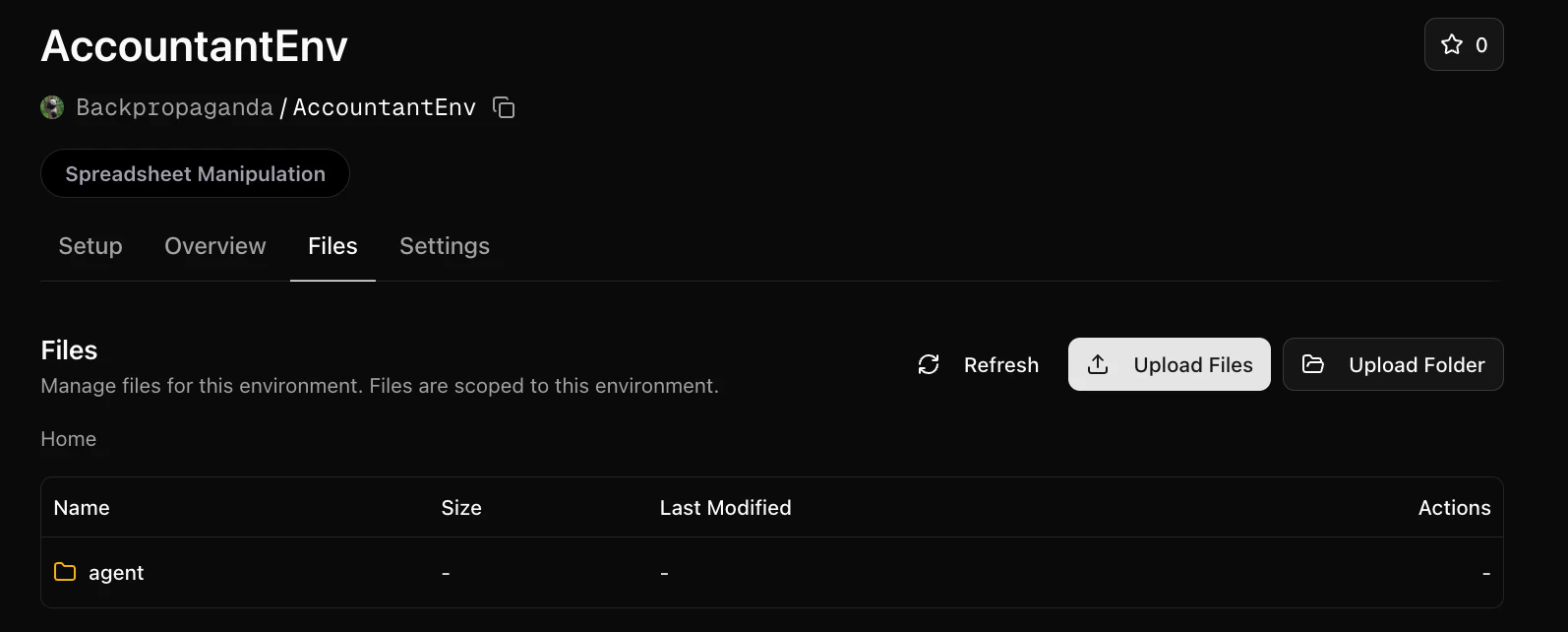
self.sandbox_settings = SandboxSettings(
    environment="YourUsername/AccountantEnv",
    image="generalreasoning/python-ds:3.12-tools",
    machine_size="0.5:1",
    block_network=False,
    bucket_config=SandboxBucketConfig(
        mount_path="/tmp/sandbox/",
        read_only=True,
        only_dir="agent"
    )
)
async def get_prompt(self) -> List[TextBlock]:
    """Return the challenge prompt."""
    full_prompt = f"""You are participating in task {self.task_id}. Please explore the file system. Check /tmp/sandbox/."""

    return [TextBlock(text=full_prompt)]
test_agent.py file:
python test_agent.py
Found 1 tasks

=== Initial Prompt ===
Role: user
Content: You are participating in task 0. Please explore the file system. Check /tmp/sandbox/.
Finished: False

=== Model Response ===
Type: function_call
Function: bash

Tool: bash
=== Tool Result Logged ===
Call ID: call_D3sLk8NNb5mikqDMkpucD2UY
Output: total 2
-rw-r--r-- 1 root root 1039 Jan 18 11:47 transactions.csv
/tmp/sandbox/transactions.csv

(ex...
Reward: 0.0000 | Finished: False

=== Model Response ===
Type: function_call
Function: bash

Tool: bash
=== Tool Result Logged ===
Call ID: call_2qnpGUf5cUNRSkliExhEfaxl
Output: ID,Date,Transaction Type,Category,Amount
1,30-Nov-22,Paycheck,Salary," $ 5,500.00 "
2,30-Nov-22,Pr...
Reward: 0.0000 | Finished: False

=== Model Response ===
Type: message
Content: [ResponseOutputText(annotations=[], text='In `/tmp/sandbox/` there is a single file:\n\n- `/tmp/sandbox/transactions.csv` (1039 bytes)\n\nContents preview (CSV with 21 rows + header):\n\nHeader:\n- `ID, Date, Transaction Type, Category, Amount`\n\nSample rows:\n- `1, 30-Nov-22, Paycheck, Salary, "$ 5,500.00 "`\n- `2, 30-Nov-22, Profit from Food Business, Profit/Loss, "$ 1,600.00 "`\n- Expenses are negative formatted like `$(...)`, e.g.\n  - `7, 04-Dec-22, Rent, Rent, "$ (1,700.00)"`\n\nCategories include: Salary, Profit/Loss, Insurances, Taxes, Rent, Loans, Food, Entertainment, Utilities, Memberships, Personal, Dining Out.', type='output_text', logprobs=[])]...
transactions.csv file and managed to open to see its contents.
Now the agent has access to this file, we can construct a task for the agent that has a reward.
In the transactions spreadsheet, we have a list of transactions. We’ll task the agent with calculating the total balance.
The reward in this case is easy to verify: the agent either gets the right balance, or it doesn’t.
Here is an implementation for this type of environment. Copy it (replacing with your username) to sandbox_env.py:
from typing import List

from openreward import AsyncOpenReward, SandboxBucketConfig, SandboxSettings
from openreward.environments import (Environment, JSONObject, Split, TextBlock,
                                     ToolOutput, tool)
from pydantic import BaseModel


class BashParams(BaseModel, extra="forbid"):
    command: str

class SubmitAnswerParams(BaseModel, extra="forbid"):
    answer: int

class EnvironmentSpec(BaseModel):
    task_id: str


class AccountantEnv(Environment):
    def __init__(self, task_spec: JSONObject, secrets: dict[str, str] = {}) -> None:
        super().__init__(task_spec)

        self.validated = EnvironmentSpec.model_validate(task_spec)
        self.task_id = self.validated.task_id

        if not secrets.get("api_key"):
            raise ValueError("OpenReward API key is required")

        self.sandbox_settings = SandboxSettings(
            environment="YourUsername/AccountantEnv",
            image="generalreasoning/python-ds:3.12-tools",
            machine_size="0.5:1",
            block_network=False,
            bucket_config=SandboxBucketConfig(
                mount_path="/tmp/sandbox/",
                read_only=True
            )
        )

        or_client = AsyncOpenReward(api_key=secrets.get("api_key"))
        self.sandbox = or_client.sandbox(self.sandbox_settings)

    async def setup(self) -> None:
        await self.sandbox.start()

    async def teardown(self) -> None:
        await self.sandbox.stop()

    @tool
    async def bash(self, params: BashParams) -> ToolOutput:
        """Executes a bash command in the environment."""

        output, code = await self.sandbox.run(params.command.strip())

        return ToolOutput(
            blocks=[TextBlock(text=f"{output}\n\n(exit {code})")],
            metadata={"output": output, "exit_code": code},
            reward=0.0,
            finished=False,
        )

    @tool
    async def submit_answer(self, params: SubmitAnswerParams) -> ToolOutput:
        """Submit an integer answer for the current task."""

        # Define correct answers for each task
        correct_answers = {
            "0": 1625  # Balance for transactions.csv
        }

        correct = correct_answers.get(self.task_id)
        is_correct = params.answer == correct

        result_text = f"Submitted answer: {params.answer}"
        if is_correct:
            result_text += "\nCorrect! Task completed."
            reward = 1.0
        else:
            result_text += f"\nIncorrect. Expected: {correct}"
            reward = 0.0

        return ToolOutput(
            blocks=[TextBlock(text=result_text)],
            metadata={"answer": params.answer, "correct": is_correct},
            reward=reward,
            finished=True,
        )

    async def get_prompt(self) -> List[TextBlock]:
        """Return the challenge prompt."""

        if self.task_id == "0":
            full_prompt = """You are an accountant assistant. Your task is to calculate the final balance from a transactions spreadsheet.

The file is located at: /tmp/sandbox/transactions.csv

Calculate the total balance and submit your answer using the submit_answer tool with an integer (dollars).
"""
        else:
            full_prompt = f"""You are participating in task {self.task_id}. Please explore the file system. Check /tmp/sandbox/."""

        return [TextBlock(text=full_prompt)]

    @classmethod
    def list_tasks(cls, split: str) -> List[JSONObject]:
        """Get all available tasks."""

        if split == "test":
            return [{"task_id": "0"}]
        elif split == "train":
            return []  # No training tasks
        else:
            raise ValueError(f"Unknown split: {split}")

    @classmethod
    def list_splits(cls):
        return [Split(name="train", type="train"), Split(name="test", type="test")]
server.py with the new name:
from openreward.environments import Server

from sandbox_env import AccountantEnv

if __name__ == "__main__":
    server = Server([AccountantEnv])
    server.run()
test_agent.py:
Found 1 tasks

=== Initial Prompt ===
Role: user
Content: You are an accountant assistant. Your task is to calculate the final balance from a transactions spr...
Finished: False

=== Model Response ===
Type: function_call
Function: bash

Tool: bash
Arguments: {"command":"python3 - <<'PY'\nimport pandas as pd\npath='/tmp/sandbox/transactions.csv'\ndf=pd.read_csv(path)\nprint(df.head())\nprint(df.columns)\n# try find amount column\nfor c in df.columns:\n    if 'amount' in c.lower() or 'amt' in c.lower() or 'value' in c.lower():\n        print('amount col candidate',c)\nprint('rows',len(df))\nprint(df.dtypes)\nPY"}
=== Tool Result Logged ===
Call ID: call_gItEykpyH3Gqa6xrZN6VeNhw
Output:    ID       Date           Transaction Type     Category        Amount
0   1  30-Nov-22             ...
Reward: 0.0000 | Finished: False

=== Model Response ===
Type: function_call
Function: bash

Tool: bash
Arguments: {"command":"python3 - <<'PY'\nimport pandas as pd, re\npath='/tmp/sandbox/transactions.csv'\ndf=pd.read_csv(path)\n\ndef parse_amt(s):\n    if pd.isna(s):\n        return 0.0\n    s=str(s).strip()\n    neg=False\n    # parentheses indicate negative\n    if '(' in s and ')' in s:\n        neg=True\n    # remove currency symbols and commas and parentheses\n    s=re.sub(r'[^0-9.\\-]', '', s)\n    if s=='':\n        val=0.0\n    else:\n        val=float(s)\n    if neg:\n        val=-abs(val)\n    return val\n\ndf['amt']=df['Amount'].apply(parse_amt)\nprint(df[['Amount','amt']].head(10))\nprint('sum',df['amt'].sum())\nPY"}
=== Tool Result Logged ===
Call ID: call_DkhOWr5mooHXIUmN8vy60FDs
Output:           Amount     amt
0    $ 5,500.00   5500.0
1    $ 1,600.00   1600.0
2     $ (250.00)  -250.0
...
Reward: 0.0000 | Finished: False

=== Model Response ===
Type: function_call
Function: bash

Tool: bash
Arguments: {"command":"python3 - <<'PY'\nimport pandas as pd, re\npath='/tmp/sandbox/transactions.csv'\ndf=pd.read_csv(path)\n\ndef parse_amt(s):\n    s=str(s).strip()\n    neg=('(' in s and ')' in s)\n    s=re.sub(r'[^0-9.\\-]', '', s)\n    val=float(s) if s else 0.0\n    if neg:\n        val=-abs(val)\n    return val\n\ndf['amt']=df['Amount'].apply(parse_amt)\nprint(df[['ID','Date','Transaction Type','Category','Amount','amt']])\nprint('total',df['amt'].sum())\nPY"}
=== Tool Result Logged ===
Call ID: call_JgjX0YkVT2GZhpGYwHy2fpe3
Output:     ID       Date  ...         Amount     amt
0    1  30-Nov-22  ...    $ 5,500.00   5500.0
1    2  ...
Reward: 0.0000 | Finished: False

=== Model Response ===
Type: function_call
Function: submit_answer

Tool: submit_answer
Arguments: {"answer":1625}
=== Tool Result Logged ===
Call ID: call_c4wen4IYNovyw88gIQCbd0se
Output: Submitted answer: 1625
Correct! Task completed.
Reward: 1.0000 | Finished: True

FINISHED!